Home / Security
Operation & Installation Guide for First Alert 2074F Series Security Safe
Quick guide for the First Alert 2074F, 2074EF, 2079F, and 2079EF security safes. Includes instructions for battery installation, programming your personal code, mounting, and maintenance.
Quick answers from the manual
Quick answer
- To set up the safe, install 4 AA batteries, press the reset button inside the door, and enter a 3-8 digit code followed by the A or B key. p. 3, 4
Key actions
- Install batteries p. 3
- Program code p. 4
- Mounting p. 6
First start
- Install 4 AA batteries and test the code before closing the door. p. 3, 5
Show 4 more answers Show less
Problems and fixes
Safe fails to open
Check batteries, wait 15 minutes if lock-out occurred, or use override key.
p. 5Maintenance and reset
- Replace batteries at least once a year. p. 7
Technical specifications
| Parameter | Value | Meaning | Pages |
|---|---|---|---|
| Passcode | 3-8 digits | Length of personal code | p. 2, 4 |
| Lock-out | 15 minutes | Security lock-out period after 3 invalid attempts | p. 5 |
Where to find it in the PDF
- Initial set-up p. 3
- Programming p. 4
- Mounting p. 6
Table of contents
Manual images
Click an image to enlargeQuick guide from the manual
This guide covers the operation and installation of the First Alert 2074F series security safes. Before using the safe, record your model, serial, and key numbers in a secure location. Do not store the override key inside the safe. If you encounter issues, do not return the safe to the store; contact Consumer Affairs at 1-800-223-8566.
Initial set-up
The safe requires 4 AA batteries for operation. To install:
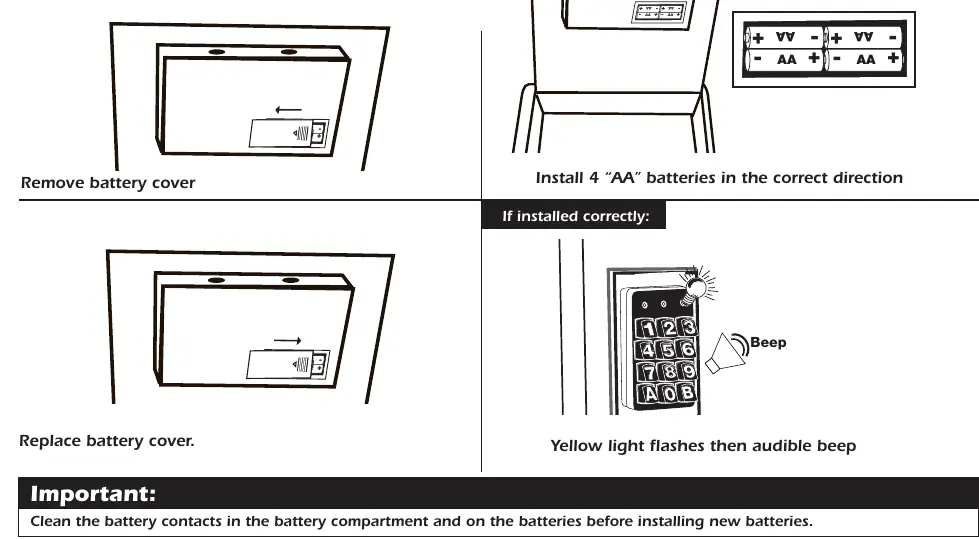
- Remove the battery cover inside the safe door.
- Insert 4 AA batteries in the correct direction.
- Replace the battery cover.
- If installed correctly, a yellow light will flash and an audible beep will sound.
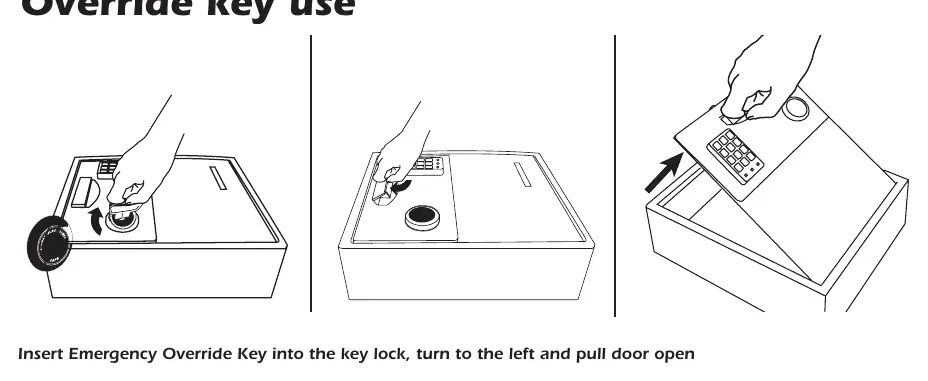
If the digital lock fails, use the Emergency Override Key to gain access. Insert the key into the lock, turn to the left, and pull the door open.
Programming your Personal Code
To set your personal access code:
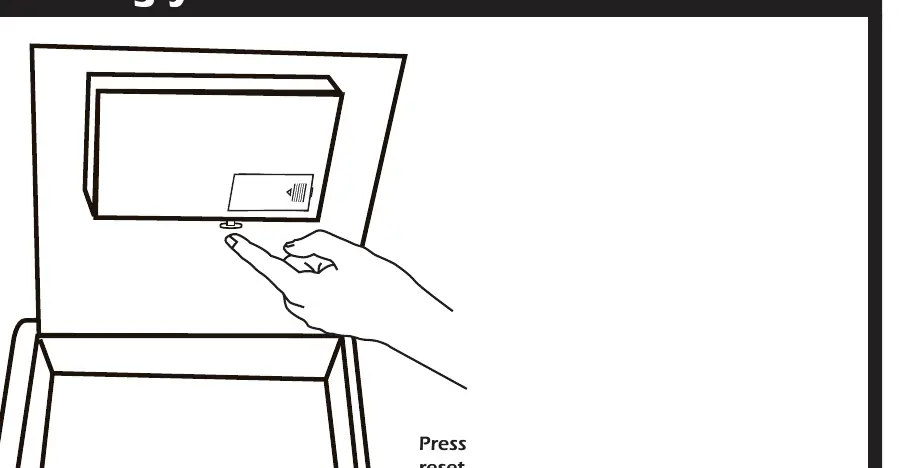
- Open the safe door.
- Press the reset button located inside the door.
- Wait for the ready light to flash and a beep to sound.
- Enter your new code (3-8 digits) followed by the 'A' or 'B' key.
- The ready light will flash and beep again to confirm.
Testing and Closing
Test the code before closing the door. Enter your code; a green light should appear. Lift the handle within 5 seconds to open. The safe automatically relocks if no action is taken within 5 seconds. To lock, press the handle down.
Mounting
The safe can be mounted on a shelf or wall:
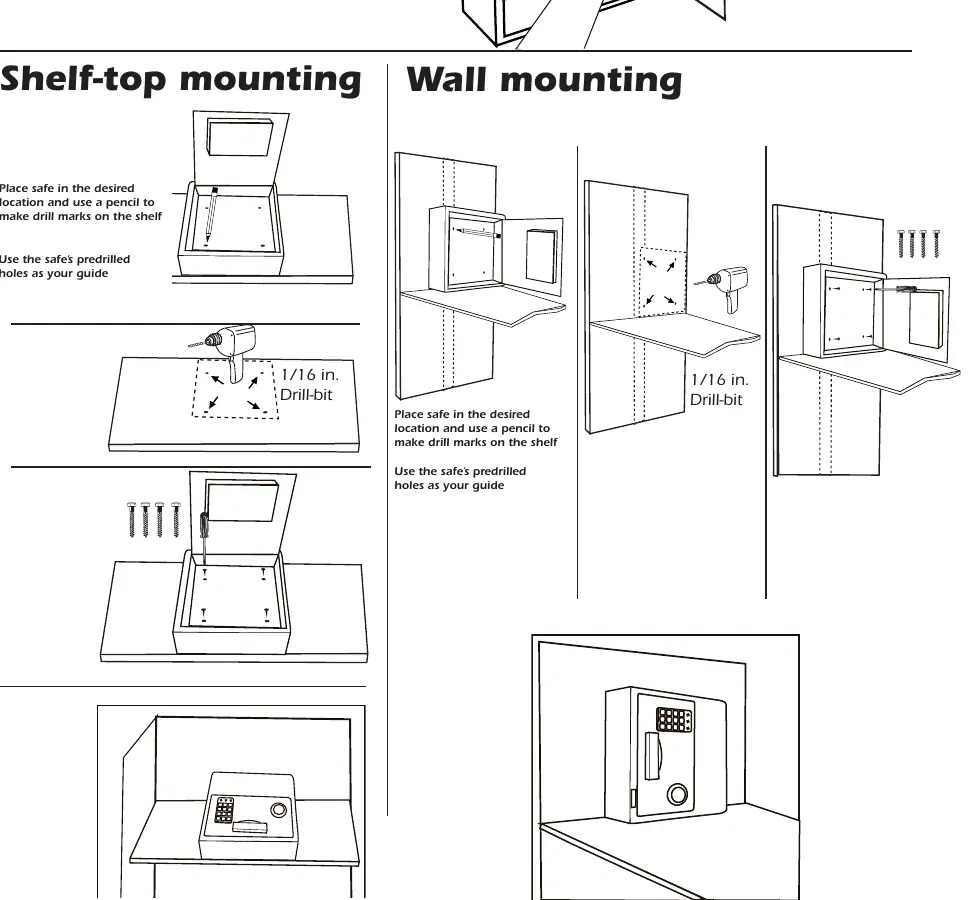
- Shelf-top mounting: Place the safe in the desired location, mark drill holes using the predrilled holes as a guide, and drill using a 1/16 in. drill bit.
- Wall mounting: Similar to shelf mounting, place the safe against the wall, mark the holes, and drill.
Care and Maintenance
- Batteries: Replace at least once a year. Clean battery contacts before installing new ones.
- Cleaning: Use a mild cleaner (e.g., window cleaner). Do not use abrasive cleansers.
- Moisture: Store delicate items in an air-tight container. Open and air out the safe for 20 minutes every two weeks if in a humid area.
Manufacturer information
First Alert
Practical help
Common problems
Safe fails to open with personal code
Check if batteries are installed properly and replace if necessary. If a lock-out occurred, wait 15 minutes before trying again.
Handle will not close
Ensure the handle is pressed fully down; if not fully closed, the safe will remain unlocked.
Before use
- Record model, serial, and key numbers in a safe place
- Install 4 AA batteries
- Test the personal code before locking the door
- Store the override key in a secure location outside the safe
Show more Show less
Specs in practice
- Passcode length
- 3 to 8 digits followed by A or B
- Lock-out period
- 15 minutes after three invalid attempts
- Drill bit size
- 1/16 inch for mounting holes
Images and diagrams
- Override key is used to turn the lock to the left to open the door manually
- Reset button is located inside the safe door for programming
- Handle must be lifted within 5 seconds of entering the code
Model compatibility
- Compatible with 2074F, 2074EF, 2079F, and 2079EF models

Manual page author
David Miller
Documentation analyst