Documents / Warranty Safety
User Manual for First Alert 2036EF Firesafe
Quick guide for the First Alert 2036EF Firesafe. Learn how to open and close your safe, ensure proper storage, perform maintenance, and order replacement keys.
Quick answers from the manual
Quick answer
- This manual provides operation and installation instructions for the First Alert Firesafe series, including opening/closing procedures, maintenance, and warranty information. p. 1, 2
Key actions
- Opening the safe p. 1
- Closing the safe p. 1
- Ordering replacement keys p. 2
Problems and fixes
Lost keys
Contact Consumer Affairs with the Key Number.
p. 2Show 3 more answers Show less
Maintenance and reset
- Clean the safe with a damp cloth and dry. Do not use solvents. p. 2
Technical specifications
| Parameter | Value | Meaning | Pages |
|---|---|---|---|
| Fire Protection | 350°F (177°C) for 30 minutes | Internal temperature rating during a fire up to 1550°F (843°C). | p. 2 |
Where to find it in the PDF
- Opening, Closing, and Warranty p. 1
- Proper Use, Identification, and Contact p. 2
Table of contents
Quick Guide: Opening and Closing
Follow these steps to operate your First Alert Firesafe.
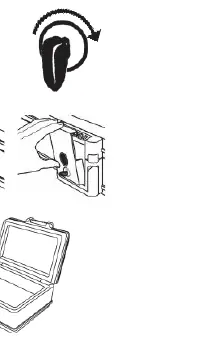
Opening Your Safe
- Insert the key into the lock and turn it clockwise to the right.
- Push the large button; the locking latch will open and spring forward.
- Once the latch has cleared the lip, you can open the lid.
Closing Your Safe
- Close the lid, ensuring that the contents do not obstruct the seal.
- Push the latch back and down onto the lid clasp and snap it into the closed position.
- Turn the key counter-clockwise to the left and remove it. The safe is now locked.
Proper Use and Safety
Important: Always store your safe in a flat, horizontal position. Storing the unit on its sides or ends will not protect the contents during a fire.
Moisture Warning: We recommend placing delicate items such as pictures or intricate jewelry into an air-tight container before storing them in your safe. Avoid placing the safe in areas of high humidity. For optimum performance, the safe should be opened and aired out for at least 20 minutes every two weeks.
Maintenance
To clean your safe, wash off with a damp cloth and dry. Never use paint thinners or chemical solvents, as they can permanently damage the finish.
Identification and Keys
The Model Number and Key Number are essential for support. The Key Number is engraved on the keys and around the lock cylinder. If a key is misplaced, the Key Number is required to provide a replacement. Always store keys and this manual outside of the safe.
Warranty and Support
The product includes a Lifetime After Fire Replacement Guarantee and a 5-year limited warranty against defects in material and workmanship. For claims, submit your name, address, a photo of the damaged safe, the Model Number, and a copy of the Fire Department report to BRK Consumer Affairs.
Manufacturer information
First Alert
Practical help
Common problems
Lost or damaged keys
Contact Consumer Affairs with your Key Number to order replacements.
Safe damaged by fire
Submit a claim to BRK with a photo of the safe, Model Number, and Fire Department report for a replacement unit.
Before use
- Record your Model Number and Key Number in a safe place.
- Store keys outside the safe.
- Keep this manual outside the safe.
- Ensure the safe is placed on a flat, horizontal surface.
- Air out the safe for 20 minutes every two weeks if stored in humid conditions.
Show more Show less
Specs in practice
- Weight Limit (Model 2037WF)
- The wheel cart supports a maximum of 85 lbs (38.6 kg).
Images and diagrams
- Opening: Insert key, turn clockwise, push button, pull lid.
- Closing: Close lid, push latch back and down, turn key counter-clockwise.
Model compatibility
- Model 2037WF includes Easy Roller Wheels.
- The manual applies to multiple models including 2011F, 2012F, 2013F, 2017F, 2036F, 2037F, 2014F, 2018F, and 2038F.

Manual page author
Emily Carter
User documentation editor