Home / Security
User Manual for First Alert 2054DF, 2084DF, and 2118DF Security Safes
Quick guide for First Alert 2054DF, 2084DF, and 2118DF security safes. Includes instructions for battery installation, passcode programming, shelf setup, and bolt-down installation.
Quick answers from the manual
Quick answer
- This manual covers the operation, installation, and maintenance of First Alert 2054DF, 2084DF, and 2118DF digital security safes. p. 1
Key actions
- Install batteries p. 4
- Program passcode p. 5
First start
- Use the square-top Emergency Override Key to open the safe for the first time. p. 4
Show 3 more answers Show less
Problems and fixes
Lockout period
Wait 5 minutes after 3 failed attempts, or 1 hour after 3 additional failed attempts.
p. 5Maintenance and reset
- Replace batteries at least once a year. p. 4
Where to find it in the PDF
- Programming Preparation p. 4
- Programming a Passcode p. 5
- Bolt-Down Installation p. 9
Table of contents
Manual images
Click an image to enlargeQuick Guide
This manual provides instructions for the First Alert Digital Fire Theft Safe. Before using your safe, you must install the batteries and open the door using the Emergency Override Key. Always store the override keys in a secure location outside of the safe.
Overview of Your Safe
The package includes the safe, an operation guide, and two companion entry keys. Models 2054DF include a bolt-down kit and a removable shelf. Models 2084DF and 2118DF include an adjustable shelf and support clips.
Programming Preparation
The digital keypad requires 4 AA batteries. To install them, locate the battery compartment to the right of the keypad, press the cover firmly, and slide it to the right. Ensure batteries are installed in the correct direction.


For the first time opening, use the square-top Emergency Override Key. Insert it into the lock, turn it to the left (counter-clockwise), and pull the door open. Important: Only turn the override key to the left to avoid damaging the lock.
Programming a Passcode
You can program a 3 to 8 digit passcode:
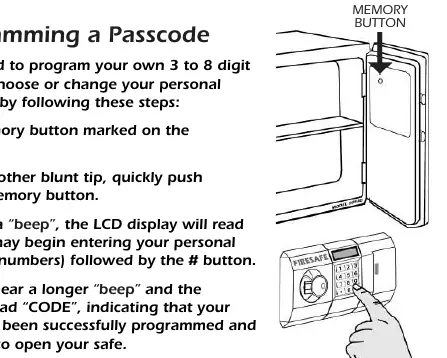
- Locate the memory button inside the door.
- Use a pen or blunt tip to push and release the memory button.
- Wait for the beep; the LCD will display "OPEN".
- Enter your personal code (3-8 digits) followed by the # button.
- A longer beep and the display reading "CODE" confirms the programming.
Security Lockout: The safe will lock out entry for 5 minutes after three failed attempts, and for one hour after three additional failed attempts.
Opening & Closing the Safe
To open with a passcode: Insert the round-top Companion Entry Key, press the * button, enter your passcode, and press #. When the display reads "GOOD", turn the key to the right to open. You must open the door within 3 seconds.
To close: Ensure the key is in the open position, close the door, turn the key to the locked position, and remove it.
Installing Shelves
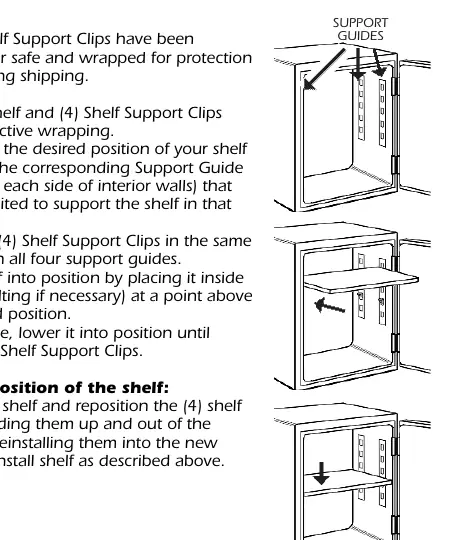
For models 2084DF and 2118DF, install the shelf support clips into the desired slots on the interior walls. Place the shelf inside the safe, tilting if necessary, and lower it onto the clips.
Bolt-Down Installation
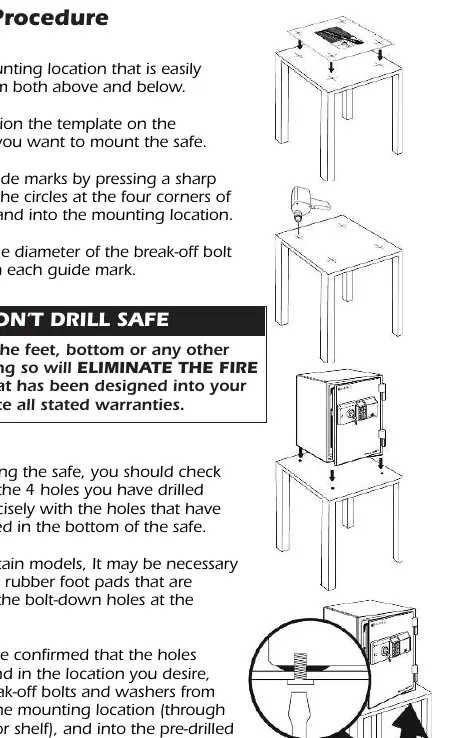
Model 2054DF includes a bolt-down kit. Choose a location accessible from above and below. Use the provided template to mark the floor, drill holes, and install the break-off bolts from underneath the mounting surface into the safe. Warning: Do not drill into the bottom of the safe itself, as this will void the fire protection warranty.
Care and Maintenance
Clean the exterior with a mild cleaner like window cleaner; do not use abrasive cleansers. Do not store medication, firearms, or combustible items in the safe. Avoid storing pearls, as they can sustain heat damage at temperatures below 350°F.
Consumer Affairs
If you have missing parts or need assistance, contact Consumer Affairs at 1-800-223-8566 (USA & Canada). Do not return the safe to the store.
Manufacturer information
First Alert
Practical help
Common problems
Safe won't open with passcode
Check if batteries are dead (Lo-bA on display) or if the safe is in a lockout period (wait 5 minutes or 1 hour).
Key stuck in cylinder
Ensure you are turning the key in the correct direction (Left for Override, Right for Entry). Do not force it.
Missing parts
Do not return to store. Contact Consumer Affairs at 1-800-223-8566.
Before use
- Install 4 AA batteries
- Open safe using the Emergency Override Key (square top)
- Program your personal 3-8 digit passcode
- Record your serial and model numbers
Show more Show less
Specs in practice
- Lockout Period
- Security feature that disables the keypad for 5 minutes after 3 failed attempts, or 1 hour after 3 more failed attempts.
- Override Key
- Square-top key used for emergency access if the passcode is forgotten or batteries fail.
Images and diagrams
- Battery compartment is located to the right of the digital keypad.
- Override key (square top) turns counter-clockwise to open.
- Entry key (round top) turns clockwise to open.
Model compatibility
- Not designed for medication, combustible items, guns, or weapons.
- Do not store pearls (heat damage).
- Not intended for audio/video cassettes, floppy discs, or film.

Manual page author
Michael Turner
Technical manual editor