Home / Smoke Detectors
User Manual for First Alert ZCOMBOA Smoke & Carbon Monoxide Alarm
Quick guide for the First Alert ZCOMBOA 2-in-1 Smoke and Carbon Monoxide Alarm. Learn about installation, Z-Wave connectivity, testing, and maintenance.
Quick answers from the manual
Quick answer
- The First Alert ZCOMBOA is a 2-in-1 smoke and carbon monoxide alarm with Z-Wave connectivity. It uses a photoelectric smoke sensor and an electrochemical CO sensor, powered by 2 AA batteries. p. 1
Key actions
- Install batteries p. 2
- Mount the alarm p. 2
- Test the alarm p. 2
Problems and fixes
Low battery chirp
Use Low Battery Silence feature to silence for up to 8 hours.
p. 2Show 3 more answers Show less
Maintenance and reset
- The alarm resets automatically when smoke and/or CO clears. p. 2
Technical specifications
| Parameter | Value | Meaning | Pages |
|---|---|---|---|
| Dimensions | 5.0" Dia. x 2.0" H | Physical size of the unit | p. 2 |
| Power | 3V (2 AA) | Battery requirements | p. 2 |
Where to find it in the PDF
- Features and Overview p. 1
- Installation and Specifications p. 2
Table of contents
Manual images
Click an image to enlargeQuick guide from the manual
The First Alert ZCOMBOA is a 2-in-1 combination smoke and carbon monoxide alarm designed for residential use. It features a photoelectric smoke sensor and an electrochemical CO sensor. The device is Z-Wave compatible, allowing it to integrate with smart home systems for remote notifications. It is powered by two AA batteries and includes tamper-resistant locking features.
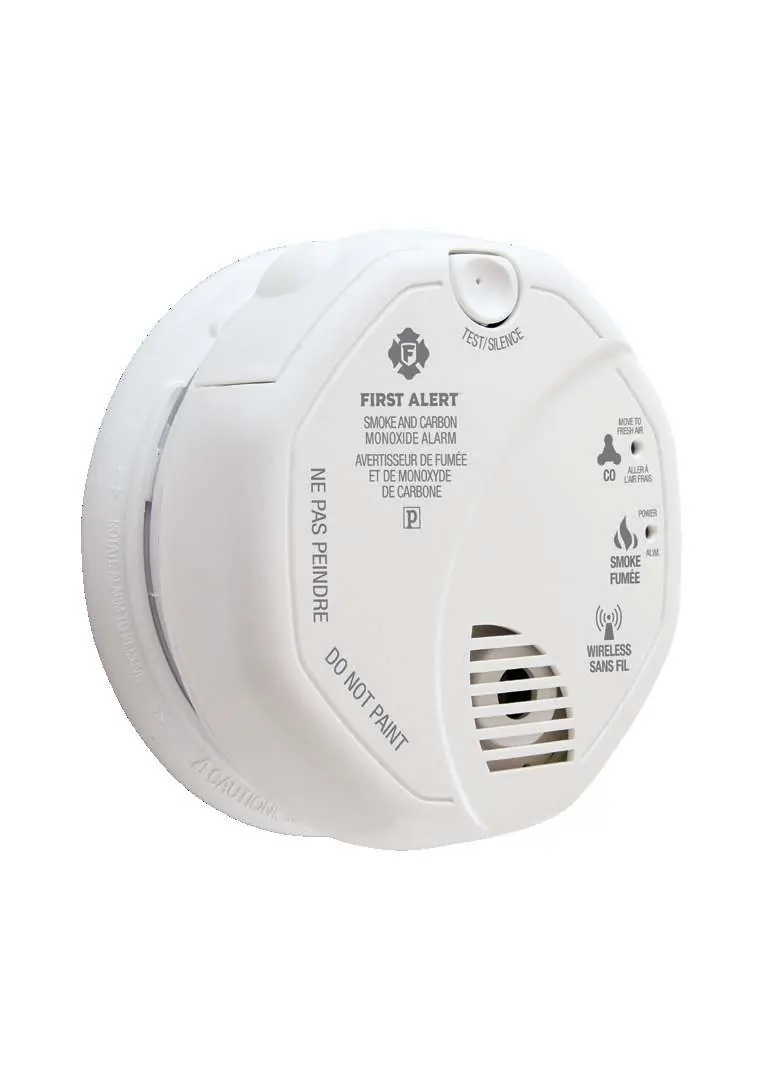
Product Overview
The alarm is equipped with several key components for operation and safety:
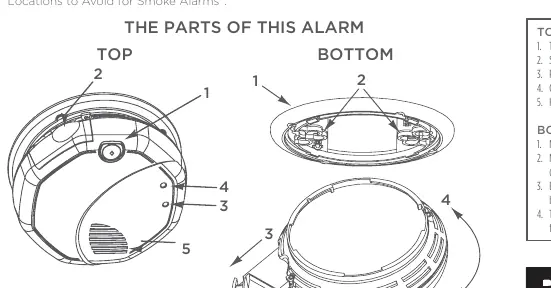
- Test/Silence Button: Used for testing the unit and silencing unwanted alarms.
- LED Indicators: Includes a Power/Alarm LED and a dedicated CO Alarm LED.
- Battery Drawer: Accessible for installing or replacing the two AA batteries.
- Horn: An 85dB horn to alert occupants.
Installation
Installation must conform to NFPA 72 and NFPA 720 standards. Always check local building codes before installation.
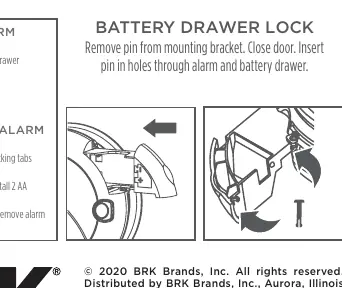
- Mounting: The unit is designed for wall or ceiling mounting. Use the provided mounting bracket.
- Locking Features: The alarm includes tamper-resistant locking pins that secure the alarm to the mounting bracket and lock the battery drawer to prevent unauthorized removal.
Operation and Testing
The device supports Z-Wave connectivity. It features the Smart Start system, which allows for intuitive connection to a hub via a QR code scan located on the device. The alarm supports one association group and sends "Heartbeat" signals to the hub to confirm operability.
Testing
Regular testing is essential. Press and hold the Test/Silence button to electronically simulate smoke and CO conditions and verify the unit is functioning correctly.
Silence Features
- Alarm Silence: Temporarily silences unwanted nuisance alarms.
- Low Battery Silence: Silences the low battery chirp for up to 8 hours.
Maintenance
The unit features a fully insect-screened sensing chamber to resist the entry of small insects. The "End of Life" signal will alert you when the unit needs replacement. The signal can be temporarily silenced for up to 2 days, but after 2-3 weeks, it cannot be silenced.
Technical Specifications
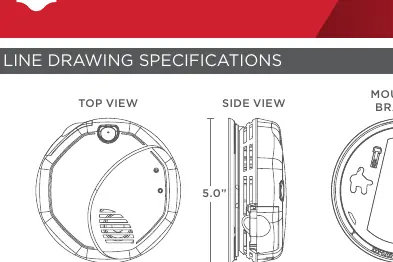
- Dimensions: 5.0" Diameter x 2.0" Height
- Power: 3V (Two 1.5V AA batteries)
- Operating Temperature: 40°F to 100°F (4°C to 38°C)
- Humidity Range: 10% to 95% relative humidity
- Wireless Frequency: Z-Wave 500 Series
Manufacturer information
First Alert
Practical help
Common problems
Unit chirping
Check battery status; use the Low Battery Silence feature to silence the chirp for up to 8 hours.
Unwanted nuisance alarms
Use the Alarm Silence feature to temporarily silence the unit.
Device not connecting to Z-Wave hub
Ensure the device is within range and use the Smart Start QR code on the device for on-boarding.
Before use
- Install 2 AA batteries into the battery drawer.
- Mount the bracket to the wall or ceiling.
- Test the unit using the Test/Silence button.
- Scan the QR code on the device for Z-Wave pairing.
- Verify the Green LED power-on indicator is active.
Show more Show less
Specs in practice
- Operating Temperature
- 40°F to 100°F (4°C to 38°C)
- Wireless Frequency
- Z-Wave 500 Series
Images and diagrams
- The top view shows the Test/Silence button and LED indicators.
- The bottom view shows the battery drawer and mounting slots.
- The side view shows the profile dimensions (5.0 inch diameter, 2.0 inch height).
Model compatibility
- Operates with 3rd party, certified Z-Wave devices enabled with the First Alert protocol.
- Meets ULC S531 and CSA 6.19-01 standards.

Manual page author
David Miller
Documentation analyst