Tools / Saws
User Manual for FLEX TS 92 18-EC Cordless Table Saw
Quick guide for the FLEX TS 92 18-EC cordless table saw. Includes assembly, adjustments, operation, maintenance, and safety instructions.
Table of contents
Manual images
Click an image to enlargeQuick guide from the manual
Before using the FLEX TS 92 18-EC cordless table saw, ensure you have read all safety warnings. Always remove the battery before performing any assembly, adjustments, or maintenance to prevent accidental starting. Ensure all safety guards, the riving knife, and the anti-kickback device are correctly installed and functioning before operation.
Safety instructions
WARNING: Always wear eye and hearing protection. Use cut-resistant gloves when handling saw blades. Never stand directly in line with the saw blade. Keep hands away from the blade area. Always use the saw blade guard, riving knife, and anti-kickback device for through-cutting operations.
Assembly
Unpack the table saw and verify all parts are present: miter gauge, push stick, smart guard system, riving knife, anti-kickback device, rip fence, dust tube, dust bag, vacuum adapter, table insert, blade wrench, and 5mm Allen key. Remove the styrofoam block and cable tie before first use. Insert the charged battery until it clicks into place.
Adjustments
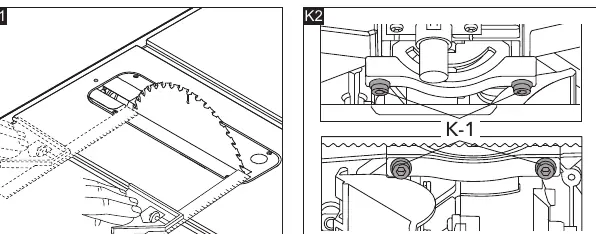
Adjust the 0° and 45° stops using the bevel lock lever and elevation wheel. Ensure the blade is parallel to the miter gauge slots by adjusting the alignment bolts under the table. Align the rip fence using the rail locking lever and adjustment knob, ensuring it is parallel to the blade.
Operation
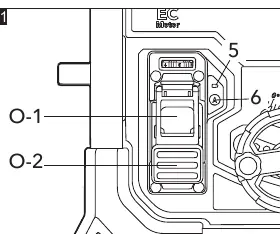
Use the green button to turn the saw on and the red paddle to turn it off. The saw features an auto-stop function; press the auto-stop button to activate it. Adjust the speed using the variable-speed dial. Connect the dust bag or vacuum adapter to the dust port for effective dust extraction.
Maintenance
Regularly clean the power tool and the grille in front of the vent slots. Blow out the housing interior and motor with dry compressed air. Periodically lubricate all moving parts. For spare parts and accessories, visit www.flex-tools.com.
Technical data
The saw operates at 18V with a no-load speed of 5000 /min. It features a 254 mm blade with a 30 mm hole diameter. The maximum cutting depth is 92 mm at 90° and 58 mm at 45°.
Official resources from the manual
Manufacturer information
FLEX
Practical help
Common problems
Blade binds or stalls during cutting.
Check if the blade is sharp and clean. Ensure the workpiece is fed at an even pace and that the rip fence is properly aligned.
Kickback occurs.
Ensure the riving knife and anti-kickback device are correctly installed and engaged in the workpiece.
Auto-stop feature fails to shut off the saw.
Examine the auto-stop sensor (O-3), wipe off any liquid, and remove accumulated sawdust.
Before use
- Check for missing or damaged parts.
- Remove the styrofoam block and cable tie.
- Ensure the battery is fully charged.
- Verify the blade guard, riving knife, and anti-kickback device are installed.
- Ensure the rip fence is locked securely.
Specs in practice
- No load speed
- 5000 /min
- Max cutting depth (90°)
- 92 mm
- Max cutting depth (45°)
- 58 mm
Images and diagrams
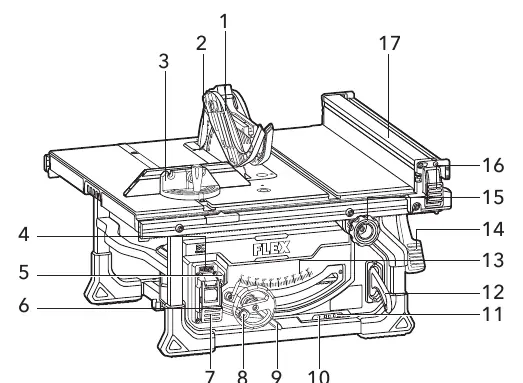
- Figure A: Overview of all components.
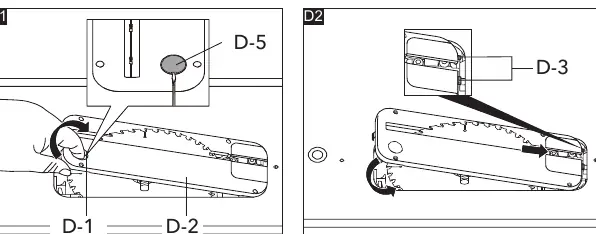
- Figure D1-D3: Table insert removal and installation.
- Figure E1-E2: Smart guard system and riving knife installation.
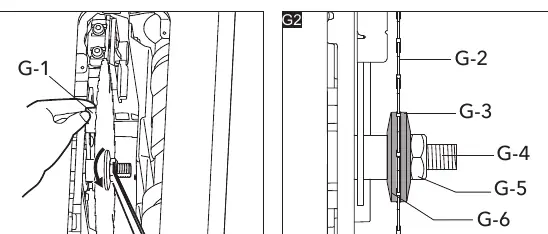
- Figure G1-G2: Blade changing procedure.
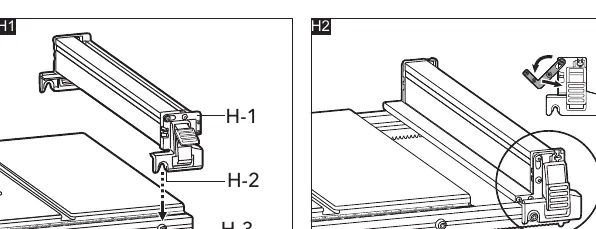
- Figure H1-H2: Rip fence attachment.
Model compatibility
- Compatible with FLEX batteries: AP 18.0/2.5, AP 18.0/5.0, AP 18.0/8.0.

Manual page author
David Miller
Documentation analyst
Organizes user manual content into clear summaries, with attention to model details, product context, and everyday usability.