Documents / Warranty Safety
FlinQ Garden Trimmer 18V User Manual
Quick guide for the FlinQ Garden Trimmer 18V, covering assembly, battery charging, operation, maintenance, and safety instructions.
Table of contents
Manual images
Jump to the sectionQuick guide from the manual
This document provides essential instructions for the safe and correct operation of the FlinQ Garden Trimmer 18V. It is intended for private domestic use only. Always read the full safety instructions before first use. Ensure the battery is removed before performing any maintenance, cleaning, or accessory changes.
Assembly
Protective cover: Place the cover [18] onto the motor head [7] and fasten with two cross-head screws [21].
Flower guard: Pull the guard [9] apart and insert both ends into the lateral slots on the lower motor head [7] until it snaps into position.
Edge guide: Press the wheel [10] into the support arm and secure the arm to the protective cover using two ST4 x 14 screws.
Additional handle: Attach the handle to the mount and secure it with the provided screw and adjustment lock.
Operation
Battery charging: Press the button [14] to check the charge level. Insert the battery [11] into the charger [15] and connect to a power socket. A red LED indicates charging, while a green LED indicates a full charge.
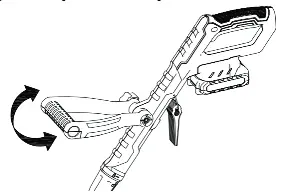
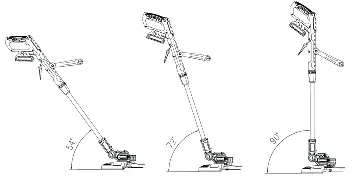
Adjustments: The trimmer features an adjustable additional handle angle, motor head angle (5 locking positions), and height adjustment via the union nut [6].
Switching on/off: To start, press the switch lock button [1] and then the on/off switch [2]. Release the switch lock button. To stop, release the on/off switch.
Lawn edge trimming: Rotate the motor head [7] by 90° until it latches to convert the tool into an edge trimmer.
Maintenance and care
Always switch off the product, remove the battery, and allow it to cool before cleaning. Keep the product clean, dry, and free from oil or grease. Clean air vents after every use with a soft brush. Store in a dark, dry, frost-free, and well-ventilated place, inaccessible to children. For long-term storage (over 3 months), keep the battery charged between 40% and 60%.
Safety
Always wear protective goggles, gloves, and ear protection. Keep bystanders at least 15 meters away. Do not use in rain or high humidity. Never fit metal cutting elements. If the trimmer is damaged, have it repaired by a qualified professional.
Manufacturer information
FlinQ
Practical help
Common problems
Battery not charging
Check if the battery is too cold or too warm (red LED flashing). Ensure the charger is connected properly.
Trimmer not cutting effectively
Check for wear on the line spool or plastic blades. Replace if damaged. Ensure the cutting circle is parallel to the ground.
Excessive line wear
Avoid contact with hard obstacles like stones, walls, or fences.
Before use
- Wear safety goggles, gloves, and ear protection.
- Ensure the work area is free of stones, wires, and debris.
- Check that the cutting device is securely attached and undamaged.
- Ensure the battery is charged to at least a medium level.
- Verify that the ventilation openings are clear.
Specs in practice
- Motor voltage
- 20V (nominal voltage for the cordless system).
- Cutting width
- 260 mm, the effective diameter of the cutting path.
- No Load Speed
- 8000 rpm, the rotational speed of the cutting head without resistance.
Images and diagrams
- The manual includes diagrams for adjusting the additional handle angle and the motor head angle (5 positions).
- Specific diagrams illustrate the conversion from a grass trimmer to an edge trimmer by rotating the motor head 90 degrees.
Model compatibility
- The charger is designed specifically for FQC8516 (2.0 Ah) and FQC8517 (4.0 Ah) battery packs.
- Do not use metal cutting elements.

Manual page author
Emily Carter
User documentation editor
Prepares concise manual descriptions and highlights the most useful setup, operation, and maintenance information for readers.