Baby / Baby Monitors
User Manual for Foscam 5 Inch 1080P Baby Monitor
Quick guide for the Foscam 5 Inch 1080P Baby Monitor. Learn how to set up, pair cameras, configure feeding reminders, sound alarms, and troubleshoot common issues.
Table of contents
Manual images
Click an image to enlargeQuick Start Guide
Before using your Foscam Baby Monitor, ensure you have charged the monitor for approximately 4 hours. The battery lasts about 8 hours. Remove the protective film from the screen before first use. Place the camera at least 3ft/1m away from your baby. If you intend to record videos, install a memory card into the monitor or camera before powering on.
Product Overview
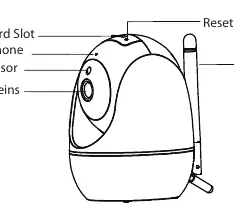
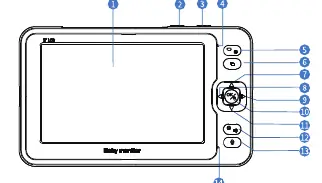
The system consists of a camera and a monitor. The camera features a microphone, night vision sensor, temperature sensor, and antenna. The monitor includes a 5-inch screen, power/sleep button, VOX (sound detection) button, camera switch, menu/back button, and navigation controls (Up, Down, Left, Right, OK) for adjusting volume, brightness, and settings.
Installation
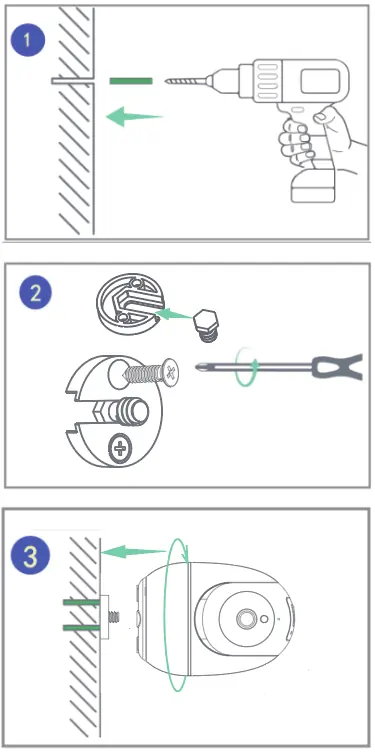
To mount the camera, drill holes in the wall, insert the provided bracket, and secure it with screws. Attach the camera to the bracket. Ensure the camera is positioned securely.
Camera Pairing
Generally, the camera is pre-paired. If not, press the Menu button on the monitor and select Cameras. Choose an unpaired channel (e.g., Channel 2) and press OK. Keep the camera powered on; it will automatically pair with the monitor. You can pair up to four cameras with one monitor.
Features and Settings
Feeding Reminder: Set a time interval and repeat mode in the Feeding menu to receive alerts.
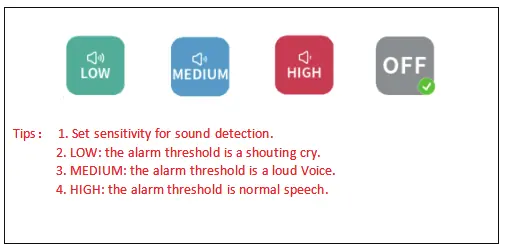
Sound Alarm (VOX): This voice-operated switch triggers an alarm when sound exceeds a threshold. You can adjust sensitivity: LOW (shouting cry), MEDIUM (loud voice), or HIGH (normal speech).
Temperature Alarm: The monitor alerts you if the ambient temperature is too low (< 18°C/64°F) or too high (> 30°C/86°F).
Music: Select from 8 lullabies and set the playing mode (single song or loop).
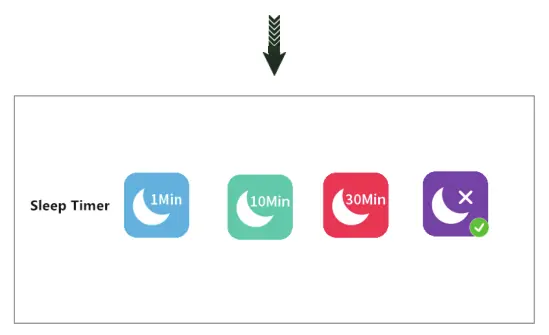
Display: Configure the sleep timer (1, 10, or 30 minutes) to shut down the screen and prolong battery life.
Recording and Playback
Enable recording in the Recording menu. Note that videos recorded in the monitor can only be viewed on the monitor. To view videos recorded in the camera, remove the memory card and use a card reader on a computer. Set the date and time before recording to ensure accurate playback search.
Troubleshooting
If you experience connection issues, ensure the power adapter is plugged in firmly and the devices are within range. If the video is blurry, check for obstacles on the lens. If the monitor makes noise, increase the distance between the camera and monitor or adjust the antenna. Night vision mode activates automatically in dark environments (brightness <= 5 Lux).
Specifications and Safety
The system operates on a frequency range of 2410.0~2469.5MHz. Use a 5V power supply. Do not submerge the product in water, keep it away from fire, and do not store the battery in high-temperature environments. If the battery leaks, wash eyes immediately with clean water and seek medical assistance.
Practical help
Common problems
Failed to connect camera to monitor
Ensure the power adapter is plugged in firmly and the camera and monitor are within effective distance.
Blurry live video
Check the camera lens and ensure there are no obstacles blocking the view.
Monitor making noise
The camera and monitor may be too close; move them further apart and adjust the antenna angle to minimize interference.
Picture is black and white
Night Vision Mode is active; this happens automatically in dark environments (brightness <= 5 Lux).
Before use
- Remove the protective film from the monitor screen.
- Charge the monitor for 4 hours before the first use.
- Install a memory card if you wish to record videos.
- Set the date and time in the System menu.
- Place the camera at least 3ft/1m away from the baby.
Specs in practice
- Frequency Range
- 2410.0~2469.5MHz
- Transmit Power (Monitor)
- < 16dBm
- Transmit Power (Camera)
- < 17dBm
- Recommended Power Supply
- 5V
Images and diagrams
- Installation: Drill holes, insert bracket, secure with screws, and mount the camera.
- Monitor Controls: Includes Power/Sleep, VOX, Camera Switch, Menu, and navigation buttons.
- Camera Overview: Includes Micro SD slot, Reset button, Microphone, Night Vision sensor, and Temperature sensor.
Model compatibility
- Supports up to 4 cameras paired with one monitor.
- Videos recorded in the monitor cannot be read via computer; use a card reader for camera-recorded videos.

Manual page author
Michael Turner
Technical manual editor
Reviews PDF manuals for structure, safety notes, and practical product details so readers can find the right information quickly.