Electronics / Cameras
User Manual for Arenti Alnanny B2 Kit Baby Monitor
Quick guide for the Arenti Alnanny B2 Kit baby monitor. Learn how to set up the camera, pair it with the monitor and app, use smart features like motion detection, and troubleshoot common issues.
Table of contents
Manual images
Click an image to enlargeQuick guide from the manual
The Arenti Alnanny B2 Kit is a baby monitor system consisting of a camera and a monitor. By default, the camera is connected to the monitor. You can also connect the camera to the Arenti mobile app for remote viewing and advanced settings. Ensure your Wi-Fi network is 2.4 GHz, as 5 GHz networks are not supported.
Device Overview
Camera: Features a status light, TF card slot, reset button, microphone, speaker, and a call button. The power port is located at the base.
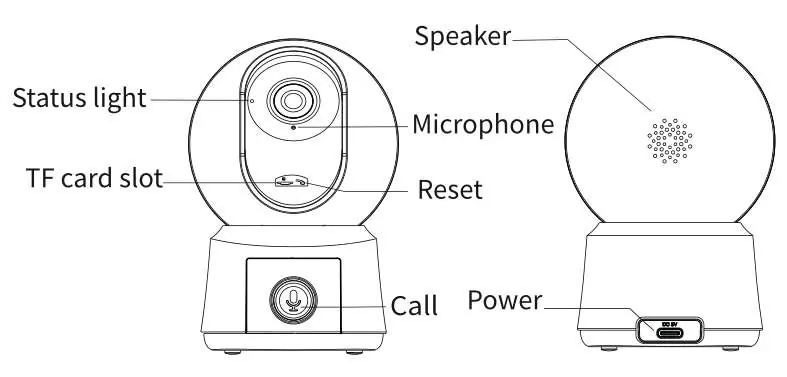
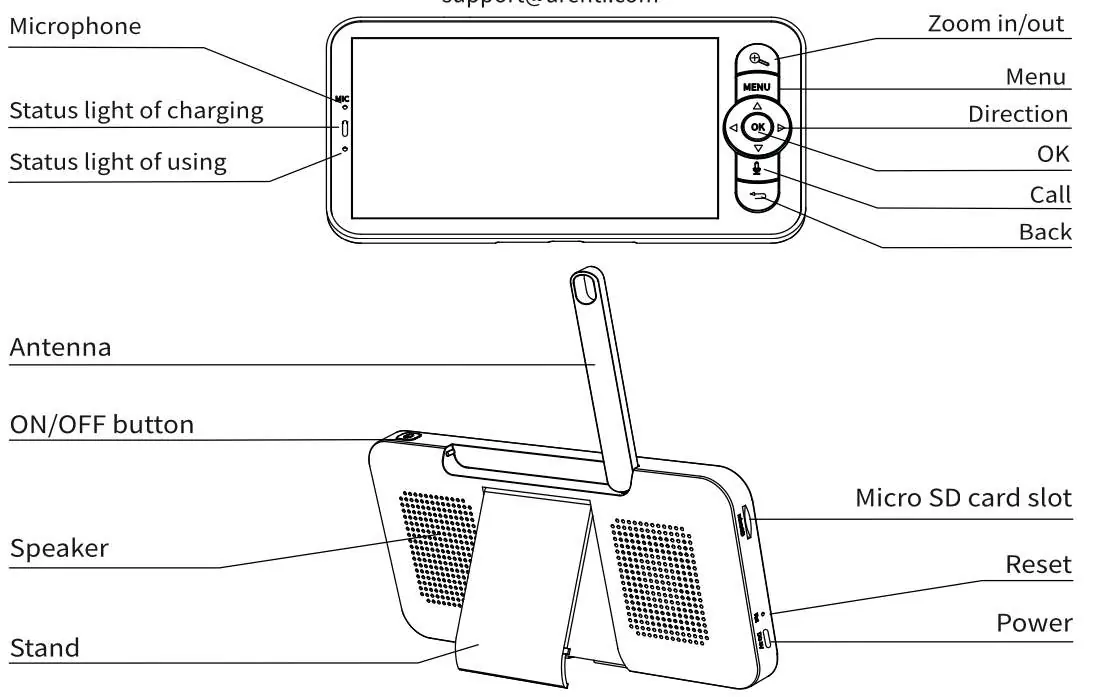
Monitor: Includes a speaker, charging and usage status lights, antenna, on/off button, microSD card slot, reset button, and power port. Navigation is handled via menu, direction, OK, call, and back buttons.
Installation
Method 1: Place the camera on a flat surface.
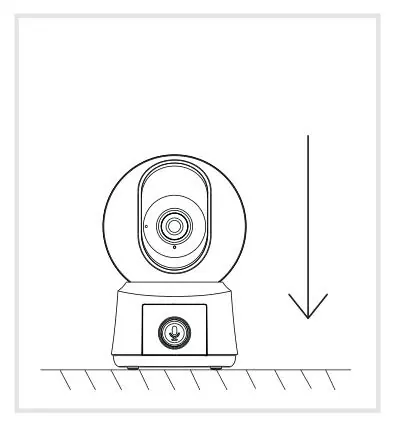
Method 2: Use the included mounting bracket to attach the camera to a clean surface.
Connecting to the App
To connect the camera to the mobile app:
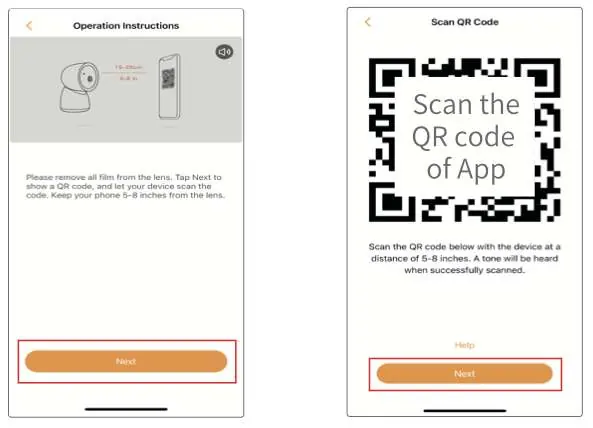
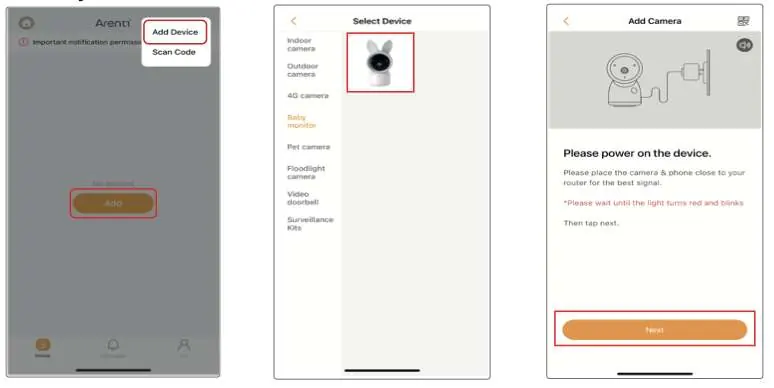
- Download the Arenti app and log in or create an account.
- Use the reset pin to reset the camera until the status light blinks red rapidly.
- Pair within 2 minutes of resetting.
- Follow in-app instructions to add the device and scan the QR code displayed on the monitor.
Monitor Pairing
The camera and monitor should connect automatically. If they do not:
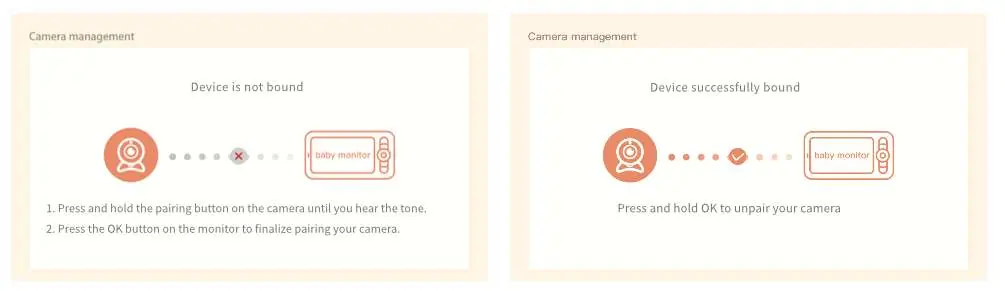
- On the monitor, press Menu and select Settings > Camera.
- Long press the Pairing button on the camera until you hear a prompt.
- Press OK on the monitor to complete pairing.
Camera Functions
- Camera Rotation: Use directional buttons on the monitor.
- Photo & Video: Access via the Menu on the monitor to take photos or record videos. View saved files in the playback menu.
- Play Music: Select the music icon in the Menu to soothe your baby.
- Feeding Reminder: Set up to 10 reminders per day via Settings > Feeding Reminder.
- Smart Care: Enable motion and noise detection via Settings > Smart Care.
- Temperature Detection: Monitor room temperature and set alerts via Settings > Temperature.
General Settings
Access the Menu to adjust brightness, time, language, sleep mode, and status indicator settings. Use the Micro SD Card Management section to view capacity or format the card.
Troubleshooting
- Device Offline: Ensure the camera is powered on, check Wi-Fi connection, restart the router, move the camera closer to the router, or re-add the device in the app.
- Pairing Issues: Ensure the network is 2.4 GHz, the password is correct, and the camera is in pairing mode.
- Monitor Frozen: Press the reset button above the charging port, then long press the power button to restart.
Manufacturer information
Arenti
Practical help
Common problems
Device offline
Ensure the camera is powered on, check Wi-Fi connection, restart the router, move the camera closer to the router, or re-add the device in the app.
Pairing fails
Ensure the network is 2.4 GHz (not 5 GHz), check the Wi-Fi password, and ensure the camera is in pairing mode.
Monitor screen frozen
Press the reset button located above the charging port on the monitor, then long press the power button to turn it on again.
Before use
- Ensure a 2.4 GHz Wi-Fi network is available.
- Download the Arenti app.
- Charge the monitor fully.
- Check camera placement (avoid metal and microwave ovens).
- Remove all film from the camera lens.
Specs in practice
- Night Vision
- Up to 10 meters using invisible red IR LEDs.
- Monitor Battery
- 3000 mAh capacity.
Images and diagrams
- Camera: Status light, TF card slot, Reset button, Microphone, Speaker, Call button.
- Monitor: Speaker, Charging/Usage lights, Antenna, On/Off button, MicroSD slot, Reset, Power port.
Model compatibility
- Requires 2.4 GHz Wi-Fi network.
- Camera does not support 5 GHz Wi-Fi.
- Supported OS: iOS 9 / Android 5.0 or later.

Manual page author
David Miller
Documentation analyst
Organizes user manual content into clear summaries, with attention to model details, product context, and everyday usability.