Power / Solar Inverters
Installation Guide for Fox ESS 0.7-3.3kW Single Phase Inverter
A comprehensive installation and setup guide for the Fox ESS 0.7-3.3kW single-phase inverter. This guide covers mounting requirements, AC and DC wiring procedures, grounding, and initial startup settings.
Table of contents
Manual images
Click an image to enlargeQuick guide from the manual
This document provides essential installation and setup procedures for the Fox ESS 0.7-3.3kW single-phase inverter. Key steps include mounting the unit with proper clearance, performing AC and DC wiring according to specifications, grounding the device, and following the startup procedure to configure the country code and time.
Packing List
Ensure all the following items are present before starting the installation:
- Inverter
- Wall bracket
- DC connectors (Male/Female)
- AC connector and unlock tool
- Expansion tubes and screws
- DC pin contacts (positive and negative)
- Earth terminal
- Communication connector and unlock tool
- Optional items: CT, WiFi/LAN/GPRS module, Meter
Inverter Installation
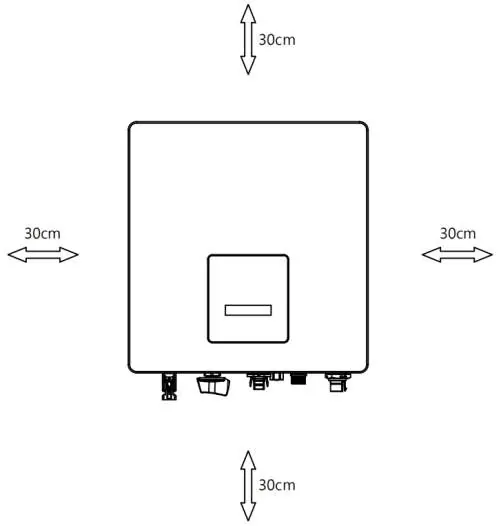
The inverter must be installed with adequate space for ventilation. Ensure a minimum distance of 30cm is maintained on all sides (Left, Right, Top, Bottom, and Front).
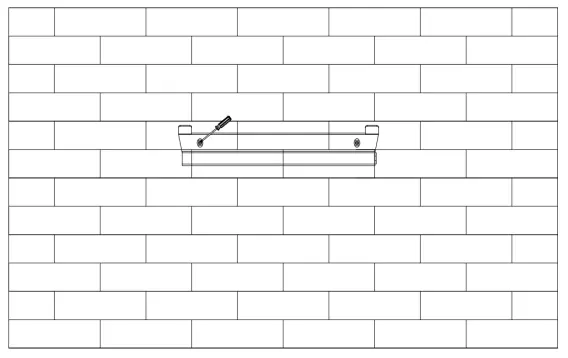
Wall Mounting Steps:
- Choose a suitable location for the inverter.
- Place the bracket on the wall and mark the positions for the 2 holes.
- Drill holes with an electric drill, ensuring they are at least 50mm deep.
- Insert expansion tubes and tighten them.
- Install the bracket using the expansion screws.
- Hang the inverter over the bracket, lowering it slightly to ensure the mounting grooves on the back are properly fixed with the bracket bars.
AC Wiring
Refer to the cable dimensions table to select the correct cable size based on your inverter model (0.7kW to 3.3kW). Use 2.5mm² cables for 0.7-1.5kW models and 4mm² cables for 2.0-3.3kW models.
Wiring Procedure:
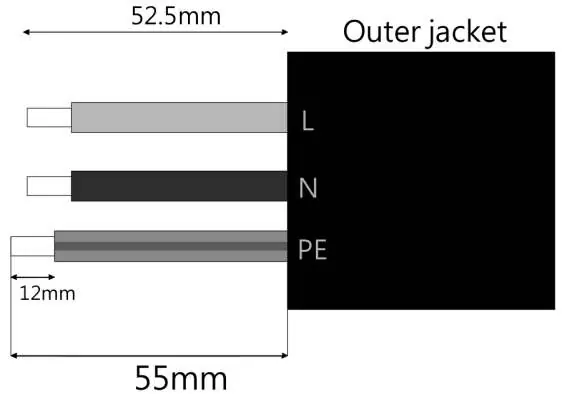
- Trim wires: 52.5mm for L/N wires and 55mm for the PE wire.
- Use crimping pliers to strip 12mm of insulation from all wire ends.
- Separate the AC plug into three parts.
- Slide the cable nut and back shell onto the cable.
- Insert wires into the female insert (L: Brown/Red, N: Blue/Black, PE: Yellow/Green).
- Push the threaded sleeve into the socket and tighten the cap on the terminal until it clicks.
DC Wiring
Ensure the DC switch is turned off before proceeding.
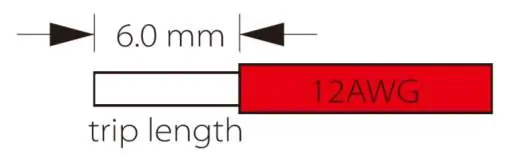
- Use 12 AWG wire to connect the PV module.
- Trim 6mm of insulation from the wire end.
- Insert the stripped cable into the pin contact, ensuring all conductor strands are captured.
- Crimp the pin contact using crimping pliers.
- Insert the pin contact through the cable nut into the back of the male or female plug until you hear a click.
Grounding
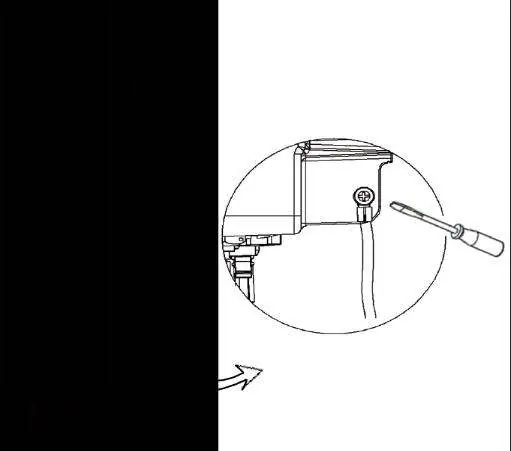
Secure the ground wire to the inverter using the ground screw and a screwdriver.
Startup Procedure
- Verify all electrical connections are correct.
- Turn on the external DC and AC breakers.
- Turn the DC switch to the ON position.
- The inverter will start automatically when the PV panels generate sufficient energy. The LED will turn green, and the LCD screen will display the main interface.
- During the first startup, verify that the country code is set correctly to local settings.
- Set the time on the inverter using the button or the app.
Practical help
Common problems
Difficulty removing the AC connector
Press the bayonet out of the slot with a small screwdriver or the provided unlock tool, or unscrew the threaded sleeve and pull it out.
Difficulty unlocking the DC connector
Use the specified wrench tool. For the DC+ connector, push the tool down from the top. For the DC- connector, push the tool down from the bottom.
Before use
- Verify all electrical connections are secure.
- Ensure the DC switch is in the OFF position before starting wiring.
- Check that the installation location allows for 30cm clearance on all sides.
- Verify the cable cross-section matches the inverter model (2.5mm² or 4mm²).
- Confirm the country code settings during the first startup.
Specs in practice
- Cable dimensions
- Required cross-section for AC cables based on inverter power (0.7-3.3kW).
- Micro-Breaker
- Recommended circuit breaker rating (16A or 25A) based on the model.
Images and diagrams
- Clearance requirements: Shows the 30cm minimum distance required around the inverter for ventilation.
- AC connector assembly: Illustrates the stripping lengths (52.5mm/55mm) and connector parts.
- DC connector assembly: Shows the stripping length (6mm) and pin contact insertion.
Model compatibility
- DC Wiring: Requires 12 AWG wire.
- AC Wiring: Cable size depends on model (2.5mm² for 0.7-1.5kW, 4mm² for 2.0-3.3kW).

Manual page author
Michael Turner
Technical manual editor
Reviews PDF manuals for structure, safety notes, and practical product details so readers can find the right information quickly.