Lighting / Decorative Lighting
User Manual for Gainsborough 150cm Light Up Acorn Garland H586
Quick guide for the Gainsborough 150cm Light Up Acorn Garland (H586). Learn how to install, charge, operate, replace the battery, and troubleshoot your solar-powered decorative lights.
Table of contents
Quick guide from the manual
The Gainsborough 150cm Light Up Acorn Garland is a solar-powered decorative lighting product. To ensure optimal performance, the solar panel must be placed in an area with direct sunlight for at least 8 hours per day. The light operates automatically at night once the switch is set to the ON position. Avoid placing the unit near other light sources like streetlights or porch lights, as these may interfere with the automatic sensor.
Product Overview
The garland features 9 warm white LED lights (non-replaceable) and is powered by a 1x Ni-MH AA 600mAh 1.2V rechargeable battery. The total length of the product is 150cm.
Operation
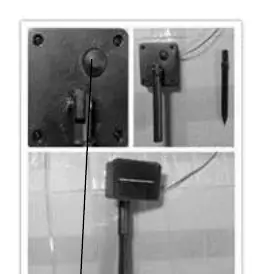
To operate the light, locate the button on the backside of the solar panel. Press the button to the ON position to enable charging and automatic operation. To turn the light off and stop charging, press the button again to the OFF position. To test the solar function, press the button to ON, place the panel in sunlight, and then cover the panel with your hand; the lights should turn on automatically.
Maintenance and Troubleshooting
If the product does not light up, ensure the switch is set to the ON position and that the solar panel is clean. Clean the solar panel with a soft sponge every couple of weeks. If the product has been used for 8–12 months and fails to light up, the rechargeable battery may need to be replaced. Ensure all connectors remain tight and free of water ingress. During winter, it is recommended to bring the unit inside and clean it for storage.
Battery Replacement
The battery compartment is located underneath the solar panel. To replace the battery: 1. Use a small Phillips head screwdriver to remove the battery compartment cover. 2. Remove the exhausted battery and install a new AA rechargeable battery, ensuring correct polarity. 3. Ensure the welding wires inside the terminals are not damaged. 4. Replace the cover and screw it back into position, ensuring it is properly sealed.
Disposal
At the end of the product's lifespan, dispose of the unit and its packaging in accordance with local recycling regulations. Do not dispose of batteries in a fire.
Manufacturer information
Gainsborough
Practical help
Common problems
Light does not turn on at night
Ensure the switch is in the ON position, the solar panel is clean, and the unit is not placed near other light sources like streetlights.
Light turns off automatically
Check if the unit is placed near other outdoor lighting that may be confusing the light sensor.
Light does not stay on for long
The unit may not be receiving enough direct sunlight. Ensure it gets at least 8 hours of direct sunlight daily.
Product fails to light up after 8-12 months
The rechargeable battery may be weak or worn out. Replace with a new AA 1.2V 600mAh Ni-MH rechargeable battery.
Before use
- Unpack all components carefully.
- Check that all parts are present.
- Locate the ON/OFF button on the back of the solar panel.
- Set the switch to the ON position.
- Place the solar panel in an area with direct sunlight for at least 8 hours.
Images and diagrams
- The solar panel unit contains an ON/OFF button on the back.
- The battery compartment is located underneath the solar panel and requires a Phillips screwdriver to open.
Model compatibility
- Requires direct sunlight for charging; shaded areas will limit illumination time.
- Do not place near other outdoor lighting (porch/streetlights) as this may prevent the sensor from activating.

Manual page author
David Miller
Documentation analyst
Organizes user manual content into clear summaries, with attention to model details, product context, and everyday usability.