Lighting / Decorative Lighting
User Manual for Gainsborough 120cm Solar Blossom Tree
Quick guide for the Gainsborough 120cm Solar Blossom Tree. Learn how to charge, operate, replace batteries, and maintain your solar light for optimal performance.
Table of contents
Manual images
Click an image to enlargeQuick guide from the manual
The Gainsborough 120cm Solar Blossom Tree is an outdoor solar-powered light. Before first use, remove the protective film from the solar panel. The unit requires at least 8 hours of direct sunlight to charge fully. It operates automatically, charging during the day and illuminating at night.
Charging and operation
To operate the light, locate the switch on the back of the solar case. You can set it to one of two positions:
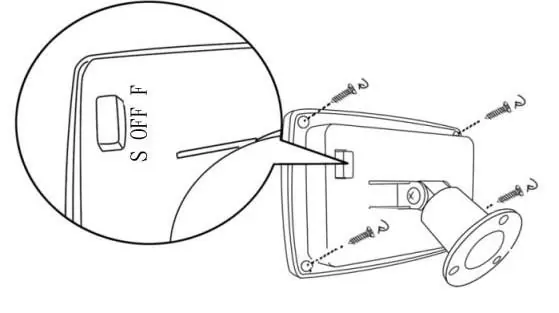
- S (steady on): The light remains constantly on.
- F (flash): The light flashes.
To verify the switch is in the correct position, cover the solar panel with your hand; the light should turn on automatically. For best results, install the product in an area with direct sunlight, away from other light sources like streetlights, which may interfere with the automatic night-time activation.
Maintenance and troubleshooting
Regularly clean the solar panel to ensure efficient charging. Do not use abrasive cleaners or sharp utensils. If the product fails to light up after 8-12 months of use, the rechargeable battery may need replacement.
Battery replacement
If the light stops working, replace the battery with a new rechargeable unit. Follow these steps:
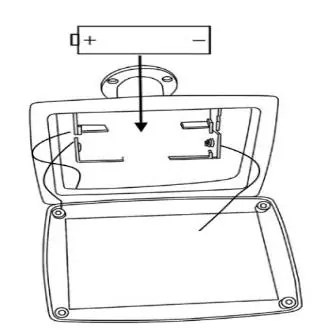
- Unscrew the battery compartment cover using a Phillips head screwdriver.
- Remove the exhausted battery.
- Install 1 pc new AA 1.2V 800mAh Ni-MH rechargeable battery, ensuring correct +/- polarity.
- Ensure the welding wires inside the battery terminals are not damaged.
- Replace the cover and screw it back into position, ensuring it is properly sealed.
Safety instructions
Follow these safety precautions:

- For domestic outdoor use only.
- Do not drop the appliance; heavy impacts may cause internal damage.
- Do not short-circuit battery terminals.
- Keep batteries away from children and pets.
- Do not dispose of batteries in fire.
- If batteries are swallowed, seek medical assistance immediately.
- Do not immerse the unit in water.
Manufacturer information
Gainsborough
Practical help
Common problems
Light does not turn on at night
Ensure the switch is set to 'S' or 'F'. Check if the solar panel is in an area with direct sunlight. Ensure the location is away from other light sources like streetlights.
Light is dim or lasts for a short time
Ensure the solar panel is clean and receiving at least 8 hours of direct sunlight. If the product is 8-12 months old, the battery may need replacement.
Before use
- Remove the protective film from the solar panel.
- Set the switch to 'S' (steady on) or 'F' (flash).
- Charge the product under direct sunlight for at least 8 hours.
Specs in practice
- Battery Type
- 1 pc AA 1.2V 800mAh Ni-MH rechargeable battery.
- Switch Positions
- 'S' for steady on, 'F' for flash.
Images and diagrams
- The switch is located on the back of the solar case.
- Battery replacement requires a Phillips head screwdriver to open the compartment.
- Observe correct +/- polarity when installing the new battery.
Model compatibility
- Use only the recommended battery type (AA 1.2V 800mAh Ni-MH rechargeable).

Manual page author
Emily Carter
User documentation editor
Prepares concise manual descriptions and highlights the most useful setup, operation, and maintenance information for readers.