Electronics / Marine Navigation
Installation Guide for Garmin GPSMAP 15X3 Marine Chartplotter
Quick installation guide for the Garmin GPSMAP 15X3 marine chartplotter. Includes mounting instructions, wiring diagrams, connector layouts, and technical specifications.
Table of contents
Manual images
Click an image to enlargeQuick guide from the manual
This document provides essential installation instructions for the Garmin GPSMAP 15X3. Before beginning, ensure you have the necessary tools: a drill with a 14 mm (9/16 in.) bit, a jigsaw or rotary tool, a file, sandpaper, and marine sealant. Always disconnect the vessel's power supply before starting the installation to prevent injury or damage. Ensure the mounting location is flat, vertical, and has sufficient clearance behind the surface for cables and brackets.
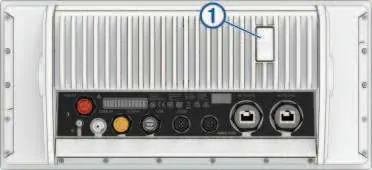
Mounting Considerations
The device can be mounted using either a flush-mount or bail-mount method. When flush-mounting, the surface curvature must not exceed 0.5 mm (1/64 in.). Ensure the location allows access to the back of the surface for securing brackets and connecting cables. The device should not be installed closer to a magnetic compass than the compass-safe distance specified in the technical data.
Flush Mounting the Device
To flush mount the device, follow these steps:
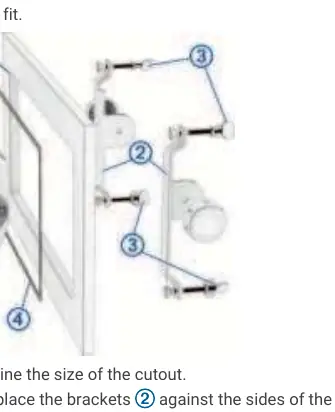
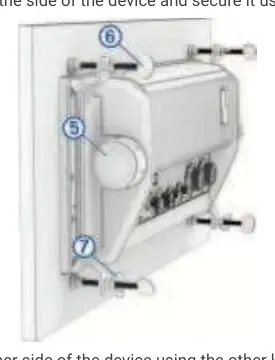
- Trim the included template and secure it to the desired location.
- Drill holes inside the corners of the template's solid line.
- Cut the mounting surface along the inside line using a jigsaw or rotary tool.
- Place the device in the cutout to test the fit, refining with a file if necessary.
- Install the foam gasket on the back of the device.
- Apply marine sealant along the inside of the bezel.
- Secure the device using the included brackets, knobs, and thumbscrews.
- Tighten the thumbscrews by hand only, then lock them with the wingnuts.
Bail Mounting the Device
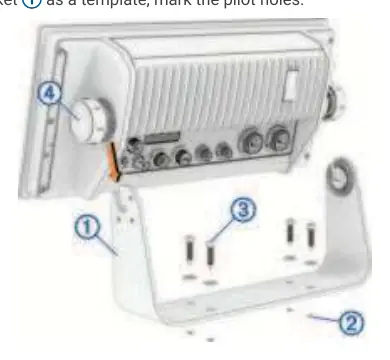
If you prefer a bail mount, you can purchase an optional bail-mount bracket. Use the bracket as a template to mark and drill pilot holes. Secure the bracket to the surface, install the bail-mount knobs on the sides of the device, and place the device into the bracket, tightening the knobs to secure it.
Wiring and Connections
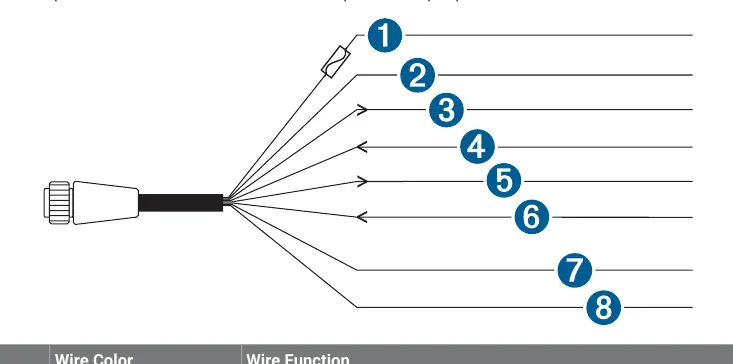
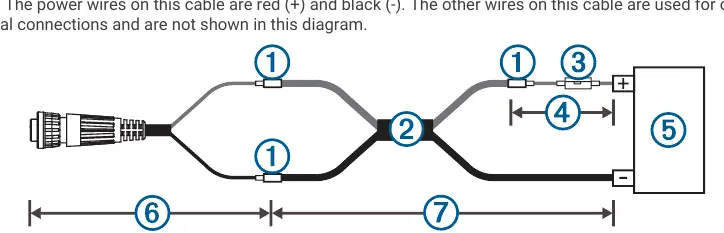
The device features several ports on the rear, including Power, NMEA 0183, Sonar, USB, J1939, NMEA 2000, and Garmin Marine Network. When connecting the power cable, do not remove the in-line fuse holder. If extending power wires, use the appropriate wire gauge for the length of the extension. Always cover unused connectors with the attached weather caps to prevent corrosion.
Network Considerations
The device supports NMEA 2000 and Garmin Marine Network connections. When connecting to an existing NMEA 2000 network, ensure only one power cable is used. If connecting third-party devices to the Garmin Marine Network, a PoE Isolation Coupler is required to prevent damage. The J1939 port is used for engine network connections; consult the engine manufacturer's documentation for specific requirements.
Specifications
The device operates on 10 to 32 Vdc and has an IPX7 water rating. The display resolution is 1920 x 720 pixels. The compass-safe distance is 50 cm (19.7 in.). For detailed PGN information and NMEA 0183 sentences, refer to the full technical reference sections in the manual.
Manufacturer information
Garmin Ltd.
Practical help
Common problems
Device failure due to extreme temperatures
Ensure the device is mounted in a location not exposed to extreme temperatures outside the specified range.
Corrosion of metal contacts
Cover all unused connectors with the attached weather caps.
Poor image quality
Test the viewing angle before installation; high viewing angles from above or below may result in a poor image.
NMEA 2000 network power issues
If the existing network manufacturer is unknown, use a NMEA 2000 Power Isolator.
Before use
- Ensure the mounting surface is flat and vertical.
- Verify there is sufficient clearance behind the mounting surface for cables.
- Check that the power source is between 10 and 32 Vdc.
- Install the in-line fuse holder as close to the battery as possible.
- Test the viewing angle before final installation.
- Cover unused connectors with weather caps.
Specs in practice
- Input voltage
- 10 to 32 Vdc
- Water rating
- IEC 60529 IPX7 (withstands incidental water exposure up to 1m for 30 min)
- Display resolution
- 1920 x 720 pixels (IPS)
- Compass-safe distance
- 50 cm (19.7 in.)
Images and diagrams
- Connector View: Shows the rear ports including Power, Sonar, NMEA 2000, and Network.
- Flush Mounting: Illustrates the bracket and screw assembly for dashboard installation.
- Wiring Harness: Details the color-coded wires for Power and NMEA 0183 connections.
Model compatibility
- Compatible with NMEA 2000 networks.
- Supports J1939 engine networks.
- Requires Garmin Marine Network cable for network connections.
- Supports microSD memory cards up to 32 GB (FAT32 or exFAT).

Manual page author
David Miller
Documentation analyst
Organizes user manual content into clear summaries, with attention to model details, product context, and everyday usability.