Music / Guitar Amplifiers
User Manual for Gear4music 15W Tweed Guitar Amplifier TA15
Quick guide for the Gear4music 15W Tweed Guitar Amplifier TA15. Learn how to connect your guitar, adjust EQ settings, use the headphone output, and understand the control panel functions.
Table of contents
Manual images
Click an image to enlargeQuick guide from the manual
The Gear4music 15W Tweed Guitar Amplifier is designed for practice and performance. To begin, connect your guitar to the Input using a 6.35mm jack cable. Connect the power using the supplied IEC cable to the AC input on the rear panel. Ensure the Master volume is set to a low level before switching the power on.
Control Panel
The top control panel allows you to shape your sound:
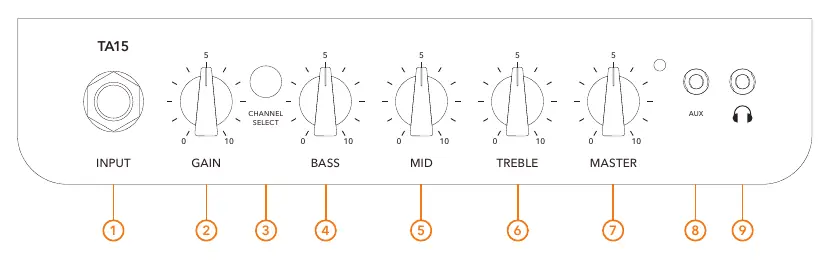
- Input: Connect your guitar here using a 6.35mm jack cable.
- Gain: Adjusts the amount of distortion in your signal.
- Channel Select: Switches between clean and drive channels.
- Bass, Mid, Treble: 3-band EQ controls to adjust low, mid, and high frequencies.
- Master: Controls the overall volume of the amplifier.
- Aux: Connect a media device via a 3.5mm cable for audio playback.
- Headphones: Connect headphones for silent practice. Note that connecting headphones automatically bypasses the speaker.
Rear Panel
The rear panel contains essential power and maintenance connections:
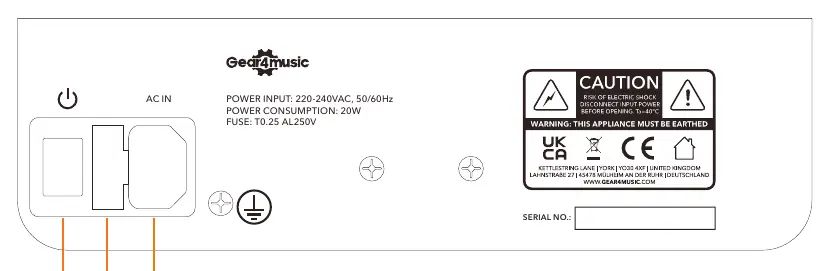
- Power: Switch to turn the amplifier on or off.
- AC Input: Connection point for the supplied IEC power cable.
- Fuse: If the fuse needs replacing, ensure you use the correct rating and type as specified on the back of the amplifier (T0.25 AL250V).
Specifications
Key technical specifications for the TA15 amplifier:
- Power Consumption: 15W
- Input: 6.35mm
- Aux Input: 3.5mm
- Headphones: 3.5mm
- Speaker Size: 6 inches
- Dimensions: 340 x 300 x 200mm
- Weight: 5.7kg
Safety Information
To ensure safe operation, do not open the cover as there are no user-serviceable parts inside. Keep the amplifier away from heat sources, direct sunlight, excessive dust, and mechanical vibrations. Do not expose the unit to liquids or naked flames. Ensure adequate ventilation by not obstructing the vents with items such as newspapers or curtains.
Practical help
Common problems
No sound from the speaker
Check if headphones are connected to the headphone output, as this automatically bypasses the speaker.
Amplifier will not turn on
Check the AC power connection and inspect the fuse on the rear panel.
Before use
- Ensure the amplifier is placed on a stable, flat surface.
- Connect the supplied IEC cable to the AC input on the rear panel.
- Ensure the Master volume is turned down before switching the unit on.
- Verify that the power source matches the required 220-240VAC, 50/60Hz input.
Images and diagrams
- Control Panel: Features 9 numbered controls including Input, Gain, Channel Select, 3-band EQ, Master volume, Aux, and Headphone output.
- Rear Panel: Contains the Power switch, AC Input, and Fuse holder.
Model compatibility
- The amplifier is designed for 220-240VAC power sources.
- Headphone output mutes the speaker automatically.

Manual page author
Michael Turner
Technical manual editor
Reviews PDF manuals for structure, safety notes, and practical product details so readers can find the right information quickly.