Music / Guitar Amplifiers
User Manual for Mooer Hornet 15i 15 Watt Combo
Quick guide and user manual for the Mooer Hornet 15i 15 Watt Combo amplifier. Learn how to connect your instrument, use the Super Knob for volume and presets, record via USB-C, and manage Bluetooth settings.
Table of contents
Manual images
Click an image to enlargeQuick guide from the manual
This document provides essential instructions for the Mooer Hornet 15i 15 Watt Combo amplifier. It covers initial setup, connection procedures, control operations, and technical specifications. For advanced features, firmware updates, and tone editing, users are encouraged to download the MOOER iAMP App.
Safety Precautions
- Power Supply: Use only the original 18V 2.0A power supply to avoid noise or damage. Unplug during electrical storms or when idle for long periods.
- Environment: Avoid direct sunlight, extreme temperatures, high humidity, dust, magnetic fields, and strong vibrations.
- Cleaning: Use a soft, dry cloth. Do not use abrasive cleaners, alcohol, solvents, or chemical-impregnated cloths.
- Operation: Do not force knobs or switches. Keep debris out of the unit. Do not modify the unit without authorization.
Top Panel Layout and Controls
The amplifier features a Super Knob for primary control:
- Power On/Off: Rotate the Super Knob clockwise until it clicks to turn on. Rotate counter-clockwise until it clicks to turn off.
- Volume Control: When the amplifier is on, rotate the Super Knob clockwise to increase volume and counter-clockwise to decrease it.
- Preset Switching: Press the Super Knob to cycle through four preset patches (A, B, C, D). The LED color indicates the selected preset (Blue, Green, Pink, Red).
Connections
The amplifier includes the following ports:
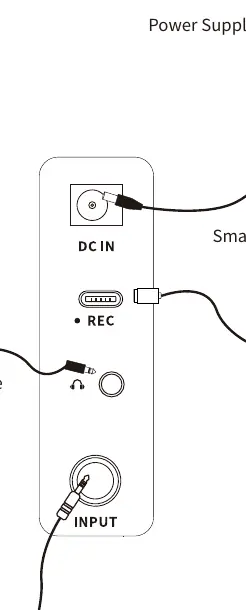
- DC IN: Connect the 18V power supply here.
- USB-C: Used for OTG direct recording and audio playback via mobile devices.
- Headphone: 3.5mm TRS jack. Plugging in headphones automatically mutes the internal speaker.
- Input: 6.35mm TS jack for connecting your guitar or other electric instruments.
OTG Recording and Bluetooth
- OTG Recording: Connect your smartphone or tablet to the USB-C port using an OTG cable. Note that this is designed for mobile device recording and may require ASIO drivers if used with a Windows DAW.
- Bluetooth Playback: Enable Bluetooth on your mobile device, search for "Hornet 15i", and connect to stream audio.
App Control
The Hornet 15i supports the MOOER iAMP App. Connect via Bluetooth to access tone editing, preset management, and firmware updates. The app is available on Google Play and the App Store.
Technical Specifications
- Power: 15-watt class D amplifier.
- Speaker: 6.5-inch customized full-range flat-response speaker.
- Effects: 52 amp models, 49 effects.
- Looper: 80-second stereo looper.
- Dimensions: 290mm (D) x 173mm (W) x 255mm (H).
- Weight: 3kg.
Practical help
Common problems
No sound from the speaker
Check if headphones are plugged into the 3.5mm jack, as this mutes the internal speaker.
Unexpected noise or damage
Ensure you are using the original 18V 2.0A power supply.
Windows DAW compatibility issues
If using the USB-C port for recording on Windows, ASIO audio drivers are required.
Before use
- Verify the power supply is 18V 2.0A.
- Ensure the amplifier is powered off before connecting or disconnecting devices.
- Place the unit in a stable, dry location away from direct sunlight.
- Download the MOOER iAMP App for full functionality.
Specs in practice
- 15-watt class D amplifier
- Provides efficient power output suitable for practice and small settings.
- 6.5-inch speaker
- Full-range flat-response speaker designed to accurately reproduce digital amp models.
Images and diagrams
- The connection diagram illustrates the correct setup: Power supply to DC IN, smartphone/tablet to USB-C, headphones to the headphone jack, and guitar to the INPUT jack.
Model compatibility
- Supports wireless footswitch control.
- Bluetooth 5.0 for audio playback and app control.
- Compatible with iOS and Android devices via the MOOER iAMP App.

Manual page author
David Miller
Documentation analyst
Organizes user manual content into clear summaries, with attention to model details, product context, and everyday usability.