Music / Guitar Amplifiers
User Manual for Mooer Hornet 15i/30i Guitar Amplifier
Quick guide for the Mooer Hornet 15i/30i guitar amplifier. Learn how to use the Super Knob, connect to the iAMP app, manage effects, use the looper, and troubleshoot common issues.
Table of contents
Manual images
Click an image to enlargeQuick guide from the manual
The Mooer Hornet 15i/30i is a digital modeling amplifier. To power on the device, rotate the Super Knob until you hear a click and the LED illuminates. You can switch between 4 preset patches by pressing the Super Knob, and adjust the volume by rotating it clockwise or anticlockwise.
Device Layout
The amplifier features several physical controls and ports:
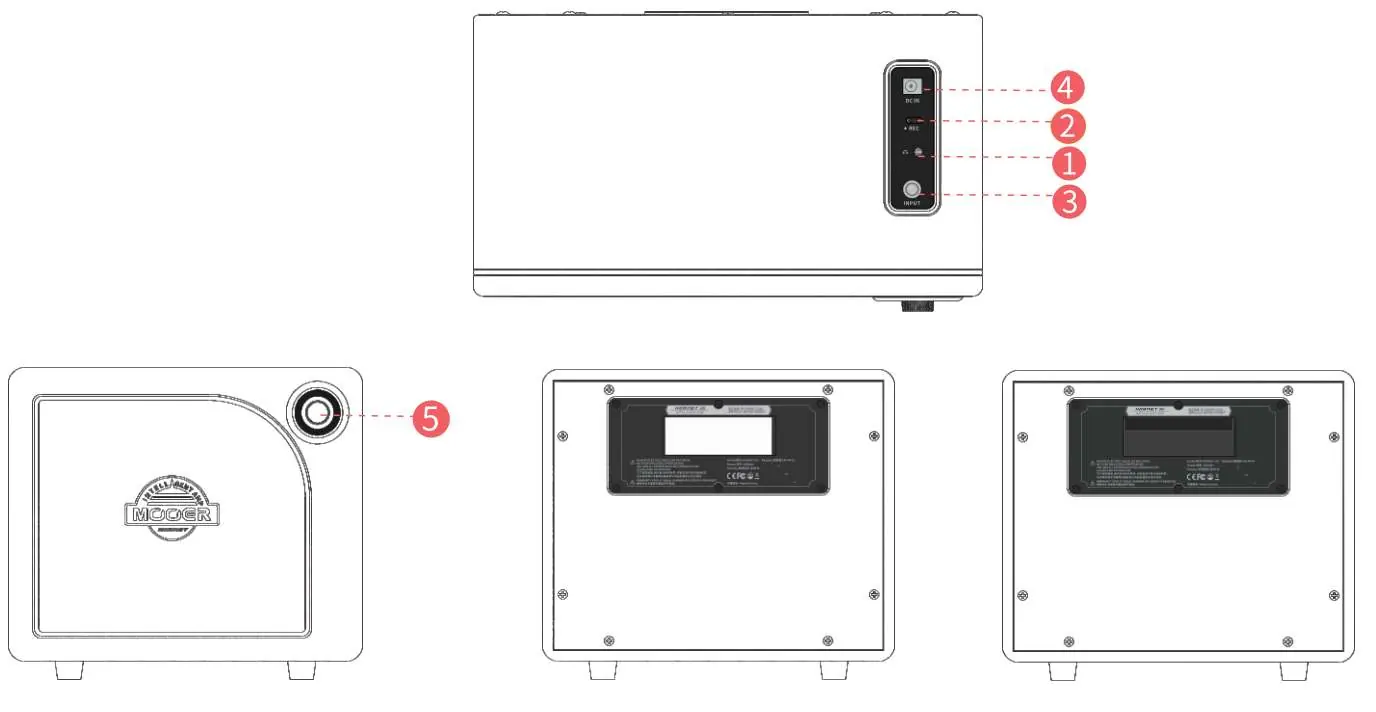
- Headphone jack: For silent practice or connecting to external speakers.
- OTG port: Used for audio playback and direct recording.
- INPUT: 6.35mm jack for your guitar.
- Power jack: Connect the appropriate power supply (18V for 15i, 24V for 30i).
- Super Knob: The primary control for power, volume, and preset switching.
App Connectivity
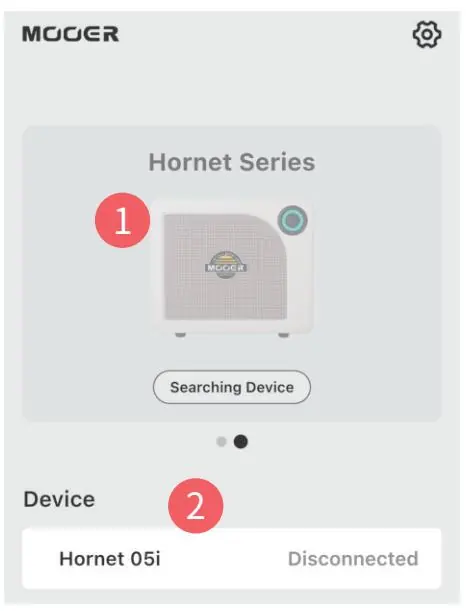
The Mooer iAMP App allows for deep editing and control. Download the app from the official Mooer website, Google Play Store, or Apple App Store. To connect: select your amplifier model in the app, choose the Hornet Series, click the Bluetooth icon, and confirm the connection.
Effect Chain and Presets
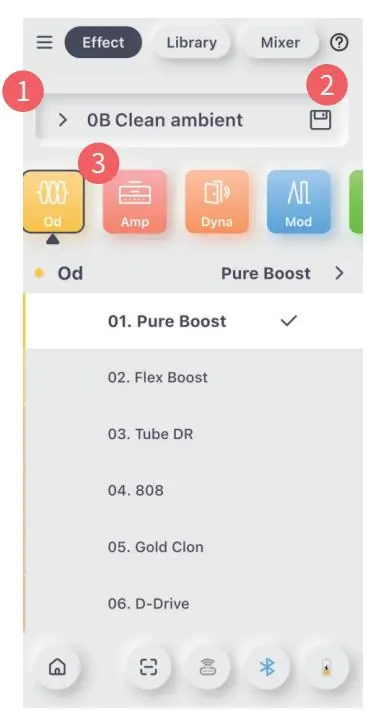
The app provides access to 52 amp models and 49 effects. The Effect Chain screen allows you to select and toggle modules (OD, Amp, Dyna, Mod, Delay, Reverb). The color of the module indicates its status: chromatic for On, grey for Off. You can save presets to target slots using the save icon.
Mixer and Audio Levels
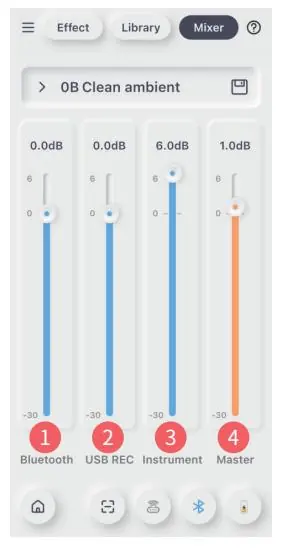
The Mixer section allows you to manage input/output levels for Bluetooth audio, USB recording, the instrument signal, and the master output. Simply slide up or down to adjust the levels for each channel.
Tools and Practice
The amplifier includes integrated practice tools accessible via the app:
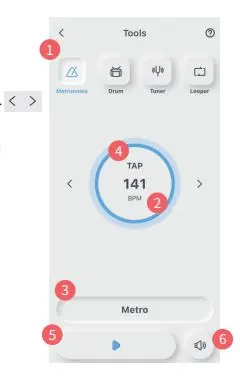
- Metronome: Adjust BPM, rhythm type, and volume.
- Drum Machine: Syncs with the looper. When Sync is On, the drum machine provides a 4-beat count-in before recording starts.
- Tuner: Allows for precise tuning with adjustable frequency (435Hz to 445Hz).
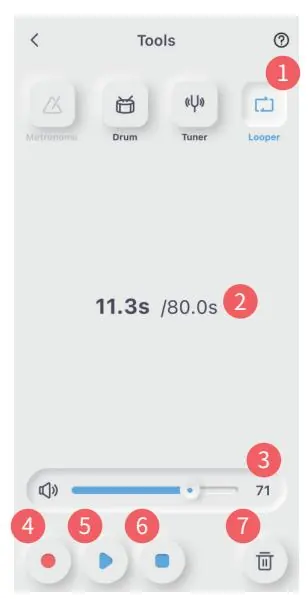
- Looper: Offers 80 seconds of recording time. Use REC to standby, PLAY to start, PAUSE to stop, and DELETE to clear the track.
Troubleshooting and Maintenance
If you experience issues with the device, try resetting it to factory settings via the Side Menu in the iAMP app before contacting customer service. Keep the device away from direct sunlight, extreme temperatures, humidity, and magnetic fields. Clean only with a soft, dry cloth.
Practical help
Common problems
Device malfunction or unexpected behavior
Try resetting the device to factory settings via the 'Reset' option in the Side Menu of the iAMP app.
Before use
- Ensure the power supply matches the voltage (18V for 15i, 24V for 30i).
- Turn off the amplifier and other devices before making connections.
- Ensure the amplifier is powered off before moving it.
- Unplug the power adapter during electrical storms or when not in use for long periods.
- Do not use abrasive cleaners or solvents for cleaning.
Images and diagrams
- The Super Knob is the main interface for power, volume, and preset selection.
- The rear panel contains the power jack, OTG port, headphone jack, and instrument input.
Model compatibility
- Supports wireless footswitch control.
- Compatible with Android, iOS, and iPad OS via the MOOER iAMP App.

Manual page author
Emily Carter
User documentation editor
Prepares concise manual descriptions and highlights the most useful setup, operation, and maintenance information for readers.