Lighting / Ceiling Fans
User Manual for Globo Lighting 106710SH Series LED Bulb
Quick guide for Globo Lighting 106710SH series LED bulbs. Learn how to use the remote control, pair with the Tuya Smart App, and manage lighting settings.
Table of contents
Manual images
Click an image to enlargeQuick Guide
This LED bulb can be controlled via the included remote control or the Tuya Smart App. Ensure you have a 2.4GHz Wi-Fi network available for app connectivity. The bulb supports RGB colors, adjustable color temperature (2700K-6500K), dimming, and a night light mode.
Remote Control Operation
The remote control requires a CR2025 3.0V lithium battery. To install, slide the battery compartment open and insert the battery with the positive side facing up.
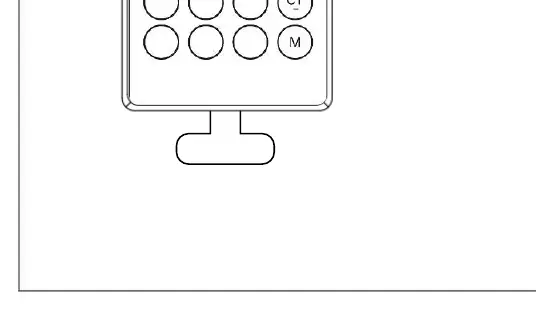
- ON/OFF: Turns the light on or off.
- Color Selection: Dedicated buttons for Green, Red, and Blue.
- Brightness: Use Lumen+ and Lumen- buttons to adjust intensity.
- Color Temperature: Use Kelvin+ and Kelvin- buttons to adjust between 2700K and 6500K.
- Modes: Includes buttons for switching color temperature modes and a memory function.
Tuya App Pairing
To connect the bulb to the Tuya Smart App:
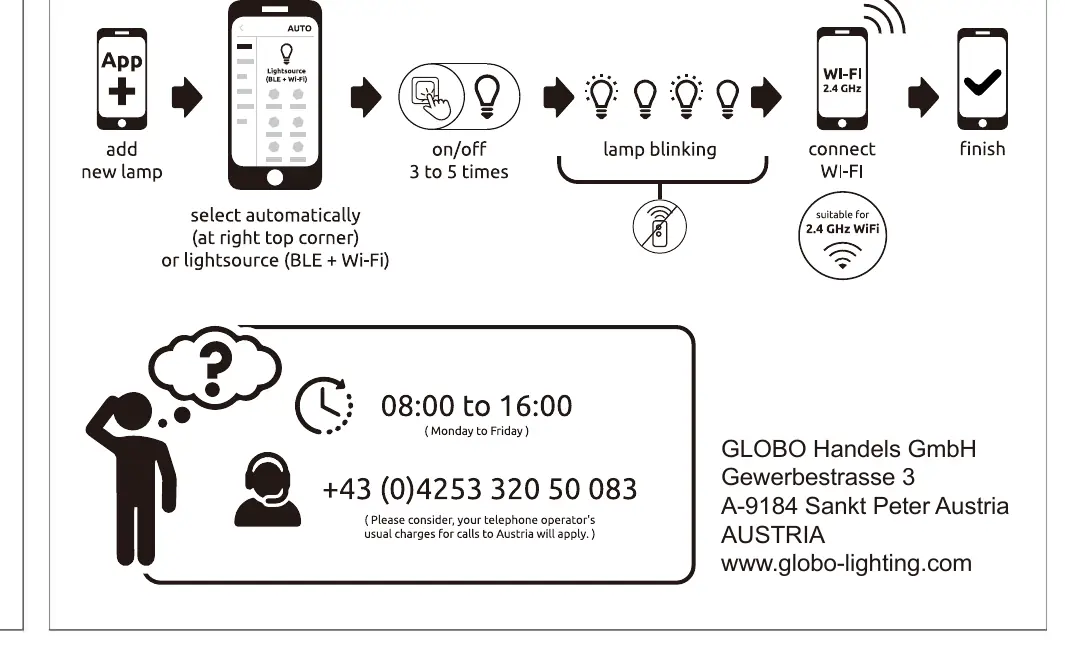
- Download the Tuya Smart App on your smartphone.
- Ensure your phone is connected to a 2.4GHz Wi-Fi network.
- Reset the lamp to pairing mode by turning the light switch on and off 3 to 5 times until the lamp starts blinking.
- Open the app and select 'Add new lamp'.
- The app should automatically detect the light source (BLE + Wi-Fi).
- Follow the on-screen instructions to finish the connection.
Technical Specifications
- Frequency Bandwidth: 2402MHz - 2480MHz
- Maximal Radiation Transmitting Power: 16dBm
- Battery Type: 1x Li-metal CR2025 150mAh 3.0V
Manufacturer information
Globo Lighting
Practical help
Common problems
Lamp not appearing in the app
Ensure your smartphone is connected to a 2.4GHz Wi-Fi network. 5GHz networks are not supported.
Lamp not entering pairing mode
Turn the light switch on and off 3 to 5 times consecutively. The lamp should start blinking to indicate it is ready for pairing.
Remote control not responding
Check if the CR2025 battery is installed correctly and has sufficient charge.
Before use
- Verify you have a 2.4GHz Wi-Fi network.
- Download the Tuya Smart App.
- Install the CR2025 battery into the remote control.
- Ensure the lamp is installed in a standard socket.
Specs in practice
- Frequency Bandwidth
- The radio frequency range (2402-2480MHz) used for wireless communication between the bulb, remote, and router.
- Maximal radiation transmitting power
- The maximum signal strength (16dBm) emitted by the device for wireless connectivity.
Images and diagrams
- The remote control diagram illustrates button placement for color, brightness, and temperature adjustments.
- The pairing process diagram shows the sequence of turning the switch on/off to trigger the blinking reset state.
Model compatibility
- Compatible with Amazon Alexa.
- Compatible with Google Assistant.
- Requires 2.4GHz Wi-Fi for app control.

Manual page author
David Miller
Documentation analyst
Organizes user manual content into clear summaries, with attention to model details, product context, and everyday usability.