Lighting / Portable Lighting
User Manual for Glocusent Rotatable Book Light
Quick guide for the Glocusent Rotatable Book Light. Learn how to operate the light, adjust brightness and color temperature, use the timer, and charge the device.
Quick answers from the manual
Quick answer
- The Glocusent Rotatable Book Light is operated via buttons on the light head for power and timer functions, and buttons on the base for brightness and color temperature. It charges via USB-C. p. 5, 6
Key actions
- Turn On/Off p. 6
- Set Timer p. 6
First start
- Charge fully before first use. p. 7
Technical specifications
| Parameter | Value | Meaning | Pages |
|---|---|---|---|
| Battery | 1000mAh | Lithium battery capacity | p. 8 |
Where to find it in the PDF
- Product Details p. 5
- Instructions p. 6
- Charging p. 7
Table of contents
Manual images
Click an image to enlargeQuick guide from the manual
The Glocusent Rotatable Book Light is a portable reading light featuring a 340-degree rotatable head, adjustable brightness, and color temperature settings. It is powered by a rechargeable 1000mAh lithium battery and charges via a USB-C port. Before first use, ensure the device is fully charged using a 5V/1A power adapter.
Product Overview
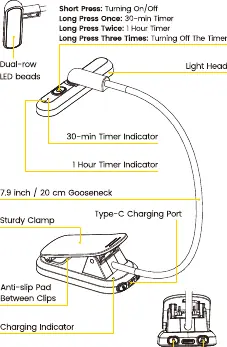
The device consists of a light head with dual-row LED beads, a 20 cm (7.9 inch) gooseneck, and a sturdy clamp base. The base includes buttons for color temperature and brightness adjustment, a charging port, and a charging indicator light.
Operation
The light is controlled via buttons located on the light head and the base:
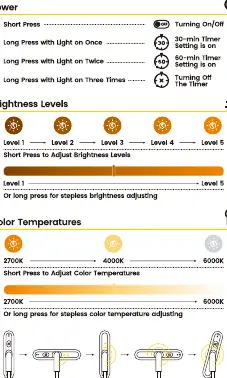
- Power On/Off: Short press the power button on the light head.
- Timer Function: Long press the power button once for a 30-minute timer, twice for a 60-minute timer, and three times to turn off the timer.
- Brightness Adjustment: Short press the brightness button on the base to cycle through 5 levels. Long press for stepless brightness adjustment.
- Color Temperature: Short press the color temperature button on the base to cycle between 2700K, 4000K, and 6000K. Long press for stepless adjustment.
- Head Rotation: The light head can be rotated from 0 to 340 degrees to achieve the desired lighting angle.
Charging
To charge the device:
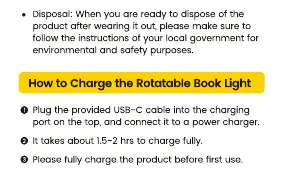
- Connect the provided USB-C cable to the charging port on the base.
- Plug the other end into a 5V/1A wall charger.
- The charging indicator will turn red while charging and green when fully charged.
- A full charge takes approximately 1.5 to 2 hours.
Precautions
- Use a 5V/1A output wall plug to ensure the light operates at full capacity.
- The power indicator light turns green when the light is connected to power or when the timer function is active.
- Avoid placing the light in extreme temperature environments (too hot or too cold).
- Follow local regulations for environmental disposal when the product reaches the end of its life cycle.
Specifications
- Model: GLCSNTA2401
- Brightness: 6LM - 60LM
- Color Temperature: 2700K, 4000K, 6000K
- Battery: 1000mAh Lithium
- LED Beads: 22 LEDs
- Input: 5V / 1A
- Weight: 69g (2.4oz)
Practical help
Common problems
Light does not charge
Ensure you are using a 5V/1A wall adapter and the provided USB-C cable.
Timer not working
Verify the timer indicator lights. Use long presses on the power button to cycle through timer settings.
Before use
- Fully charge the device before first use.
- Ensure you have a 5V/1A power adapter available.
- Check that the light head rotates freely (0-340 degrees).
- Verify the clamp mechanism is secure.
Specs in practice
- Color Temperature
- Adjustable between 2700K (warm), 4000K (neutral), and 6000K (cool).
- Battery Capacity
- 1000mAh rechargeable lithium battery.
Images and diagrams
- The light head rotates 0-340 degrees for flexible positioning.
- The base features a sturdy clamp with anti-slip pads.
- Charging port is USB-C type located on the base.
Model compatibility
- Requires 5V/1A input for optimal performance.

Manual page author
David Miller
Documentation analyst
Organizes user manual content into clear summaries, with attention to model details, product context, and everyday usability.