Power / Portable Power Stations
User Guide for Goal Zero 230W Power Supply
Quick guide for the Goal Zero 230W Power Supply. Includes setup instructions, compatibility with Yeti X power stations, safety warnings, and troubleshooting tips.
Quick answers from the manual
Quick answer
- The Goal Zero 230W Power Supply is designed to charge Yeti X power stations (1000X, 1500X, 3000X, 6000X) faster. It is not compatible with older Yeti Lithium or Lead Acid models. p. 3
Key actions
- Connect the AC wall plug to the power brick and then to a wall outlet. p. 3
- Connect the HPP cable to the Yeti X Power Station. p. 3
First start
- Plug the power supply into the wall, then connect the HPP cable to the Yeti X station. Look for the blue input indicator light on the Yeti. p. 3
Show 3 more answers Show less
Problems and fixes
Power supply is hot
Normal operation; can reach 140°F (60°C).
p. 4
Not charging
Check connections; if battery is >80%, overcharge protection may be active.
p. 4Technical specifications
| Parameter | Value | Meaning | Pages |
|---|---|---|---|
| Input | 100-240V, 50/60Hz, 3.0A | AC wall power requirements | p. 4 |
| Output | 19V, 12.5A, 230W | Power delivery to Yeti X | p. 4 |
Where to find it in the PDF
- Safety Instructions p. 2
- Getting to Know Your Gear p. 3
- Technical Specifications p. 4
Table of contents
Important Information
The Goal Zero 230W Power Supply is designed exclusively for the Yeti X line of power stations to improve charging times. It is not compatible with Yeti Lithium or Yeti Lead Acid power stations.
Safety Instructions
- Operating Temperature: -20°C to 40°C (-4°F to 104°F).
- Usage: Use only with Yeti X Lithium Portable Power Stations (1000X, 1500X, 3000X, 6000X).
- Handling: Do not disassemble or attempt to repair the module.
- Environment: Avoid exposure to rain or moisture to prevent electric shock or product damage. Use in a space large enough to facilitate heat dissipation.
- Maintenance: Unplug when not in use. Use only the original AC cable.
- Safety Features: Built-in short circuit, over-voltage, and over-current protection.
Getting to Know Your Gear
The power supply consists of a power brick with an indicator light, an AC wall plug input, and a High Power Port (HPP) output cable.
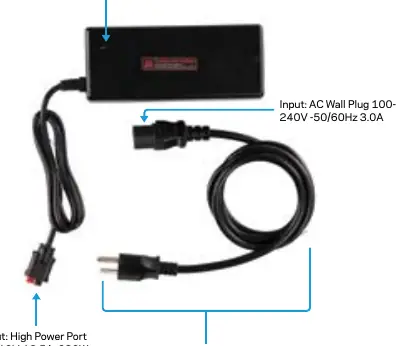
How It Works
- Connect the AC wall plug into the power brick.
- Plug the AC connection into a standard wall outlet. The indicator light on the power brick should be active.
- Connect the red and black High Power Port (HPP) connector into the HPP input on your Yeti X Power Station.
- The blue input indicator light on your Yeti power station will activate when charging begins.
Technical Specifications
- Input: AC Wall Plug 100-240V, 50/60Hz, 3.0A.
- Output: High Power Port (HPP) 19V, 12.5A, 230W.
- Dimensions: 2.5 x 5.9 x 1.4 in (6.5 x 15 x 3.5 cm).
- Gauge: 14 AWG.
Troubleshooting
Why is my power supply hot?Heat is normal and can reach temperatures up to 140°F (60°C) due to the voltage conversion from AC to DC.
Why is my power station not charging?Ensure all connections are firmly plugged in. The Yeti Power Stations have built-in overcharge protection. If the unit is fully charged or near full capacity, it may not charge. Confirm functionality when the battery level is below 80%.
Manufacturer information
Goal Zero
Practical help
Common problems
Power supply feels hot
This is normal during operation as the unit converts AC to DC voltage. It can reach up to 140°F (60°C).
Power station is not charging
Check that all connections are secure. If the battery is already near full capacity (>80%), the overcharge protection may prevent charging.
Before use
- Verify your power station is a Yeti X model (1000X, 1500X, 3000X, or 6000X).
- Ensure the ambient temperature is between -20°C and 40°C.
- Use only the original AC cable provided.
- Place the unit in a well-ventilated area to allow for heat dissipation.
Show more Show less
Images and diagrams
- The indicator light on the brick confirms power is flowing from the wall.
- The HPP (High Power Port) connector is the red and black plug that connects directly to the Yeti X station.
Model compatibility
- Compatible with: Yeti 1000X, 1500X, 3000X, 6000X.
- NOT compatible with: Yeti Lithium or Yeti Lead Acid power stations.

Manual page author
David Miller
Documentation analyst