Power / Portable Power Stations
User Manual for Goal Zero Yeti 200X Portable Power Station
Quick guide and user manual for the Goal Zero Yeti 200X Portable Power Station. Learn how to charge, operate, maintain, and troubleshoot your device.
Quick answers from the manual
Quick answer
- The Goal Zero Yeti 200X is a portable power station. Charge it fully before first use using the included AC wall charger or compatible solar panels (max 120W, <22V). Operate by pressing the power button above the desired port. p. 2, 4, 6
Key actions
- Charge the unit p. 4, 6
- Turn on ports p. 8
First start
- Charge fully before use p. 2
Problems and fixes
Output port not working/red light
Press the button again to reset. The light will turn white when reset.
p. 14Error codes
| Code | Meaning | Action | Pages |
|---|---|---|---|
| OVERLOAD | Power draw exceeds port's maximum allowance | Reduce load on the port | p. 14 |
Technical specifications
| Parameter | Value | Meaning | Pages |
|---|---|---|---|
| Capacity | 187Wh | Total energy storage | p. 11 |
Where to find it in the PDF
- Front Panel p. 4
- Technical Specs p. 11
Table of contents
Manual images
Click an image to enlargeQuick guide from the manual
The Goal Zero Yeti 200X is a portable power station designed to power various devices. Before using or storing, plug the unit into a wall outlet until it is fully charged. Keep the unit plugged in when not in use to maintain battery health.
Getting to know your gear
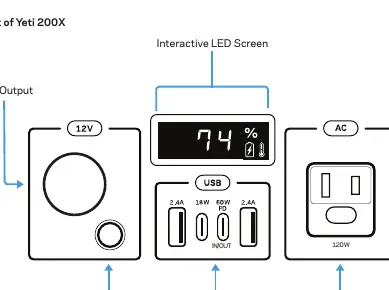
The front panel features an interactive LED screen, a 12V output, a 6mm output, USB inputs/outputs, and an AC output. The back panel contains the input port for charging via solar panels or AC power.
Charging your Goal Zero Yeti
Charging from the wall: Use the included AC wall charger. The unit will take approximately 5 hours to fully recharge. The AC wall adapter comes in two pieces; connect them before plugging into the wall.
Charging from solar: The 8mm input port on the back is designed for Goal Zero solar panels. It can accept up to 120W of solar power. Important: Do not exceed 22V input voltage, as this can cause serious damage to the unit.
Using your Goal Zero Yeti
To use the device, press the power button located above each port you intend to use. The port is active when the LED light on the button is illuminated. When not in use, turn off the ports to conserve power. You can charge the Yeti and power your devices simultaneously.
Best-use strategy
Be aware that high-power devices will drain the battery faster. The inverter converts DC battery power to AC, which involves some energy loss. For optimal performance in sub-zero temperatures, keep the Yeti in an insulated cooler to retain heat generated by the unit.
Storage and maintenance
If you cannot keep the unit plugged into a power source during storage, fully charge it every 3 months and store it in a cool, dry place. Failure to maintain the battery can void the warranty.
Troubleshooting
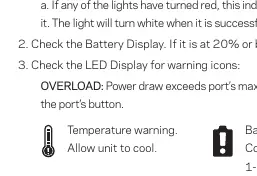
If devices are not charging, ensure the output port is turned on (LED lit). If the light is red, it indicates a trip; press the button again to reset it. Check the LED display for warning icons such as temperature warnings or overload indicators.
Manufacturer information
Goal Zero
Practical help
Common problems
Device not charging from Yeti
Ensure the output port is turned on (LED lit). If the button light is red, press it to reset. Check if the battery level is 20% or below and charge if necessary.
Short runtime
Check the power requirements of your device. High-draw devices drain the battery quickly. Also, note that inverter conversion results in some energy loss.
Overload warning
The power draw exceeds the port's maximum allowance. Reduce the number of devices or the power load on that specific port.
Before use
- Charge the unit fully before first use
- Check solar panel voltage (do not exceed 22V)
- Ensure the unit is in a well-ventilated area
- Identify the correct output port for your device
- Verify device compatibility with the Yeti's output specs
Specs in practice
- 120W AC Inverter
- The maximum continuous power output for AC devices.
- 22V Input Limit
- The maximum voltage allowed for solar charging to prevent damage.
Images and diagrams
- Front panel: Displays 12V, 6mm, USB, and AC output ports with corresponding power buttons.
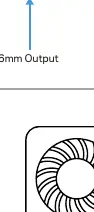
- Back panel: Shows the input port for charging via solar or AC.
Model compatibility
- Not chainable
- Operating temperature: 32-104°F (0-40°C)

Manual page author
Emily Carter
User documentation editor
Prepares concise manual descriptions and highlights the most useful setup, operation, and maintenance information for readers.