Electronics / Microphones
Godox XProII C TTL Wireless Flash Trigger User Manual
Comprehensive user guide for the Godox XProII C TTL Wireless Flash Trigger. Learn how to set up wireless flash triggering, adjust channels, groups, HSS, and troubleshoot common connectivity issues.
Quick answers from the manual
Quick answer
- The Godox XProII C is a wireless flash trigger for Canon cameras that supports E-TTL II, HSS, and multi-channel control. p. 1
Key actions
- Set channel and group p. 6
- Enable HSS p. 8
First start
- Install batteries and power on p. 4
Problems and fixes
Not triggering
Check batteries, channel settings, and distance.
p. 14Maintenance and reset
- Restore factory settings p. 13
Technical specifications
| Parameter | Value | Meaning | Pages |
|---|---|---|---|
| Transmission range | 0-100m | Effective wireless distance | p. 13 |
| Frequency | 2.4GHz | Wireless frequency band | p. 13 |
Where to find it in the PDF
- Body and Parts p. 3
- Technical Data p. 13
Table of contents
Manual images
Click an image to enlargeQuick guide from the manual
The Godox XProII C is a wireless flash trigger designed for Canon cameras. It supports E-TTL II autoflash, high-speed synchronization (HSS), and multi-channel triggering. Before using, ensure you have installed two AA batteries and that the trigger is securely mounted on the camera's hotshoe.
Device overview
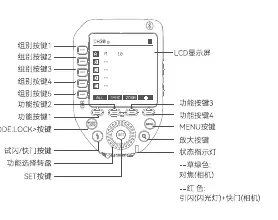
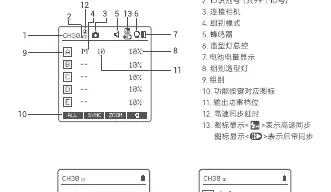
The device features a large LCD panel for monitoring settings, a select dial for adjustments, and various function buttons for group and mode control. Key ports include a 2.5mm sync cord jack and a USB-C port for firmware upgrades.
Battery installation
Slide the battery compartment lid open and insert two AA batteries according to the polarity markings. Check the battery level indicator on the LCD panel during use. If the icon is blinking, replace the batteries immediately to avoid flash failure.

Wireless triggering
To use the trigger with compatible flashes:
- Camera Flash: Mount the trigger on the camera, turn on both devices, and set them to the same channel and group.
- Outdoor/Studio Flash: Ensure the flash is set to 2.4G wireless mode and matches the channel/group of the trigger.
- Shutter Release: Connect a camera remote cable to the trigger's sync port to use it as a wireless shutter release.
Settings and functions
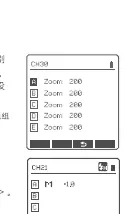
- Channel and ID: Use the MENU button to access custom functions. Set the channel (1-32) and ID (OFF, 01-99) to avoid interference.
- Mode Settings: Switch between TTL, Manual (M), and Multi modes. In Multi mode, you can adjust the flash frequency and number of flashes.
- HSS (High-Speed Sync): Press the SYNC button to enable HSS, allowing shutter speeds up to 1/8000s.
- TCM Function: This feature transforms TTL shooting values into M mode output values, useful for maintaining consistent lighting.
- Zoom: Adjust the zoom value (AUTO or 24-200) directly from the transmitter.
Troubleshooting
If the flash does not trigger:
- Ensure batteries are fresh and installed correctly.
- Verify that the trigger and flash are on the same channel and group.
- Check if the distance is too close (less than 0.5m); if so, enable the close-distance wireless mode.
- Check for interference from other 2.4G devices like Wi-Fi routers; try changing the channel.
Maintenance
Keep the device dry and avoid exposure to high humidity or extreme temperatures. Do not drop the device or expose it to strong magnetic fields. Use the USB-C port for firmware updates via the official Godox software.
Practical help
Common problems
Flash does not trigger
Check batteries, ensure channel/group match, verify distance is >0.5m, or change channel to avoid interference.
Camera shoots but does not focus
Ensure the camera or lens focus mode is set to AF (Autofocus).
Signal interference
Change the channel on the trigger or move away from other 2.4G devices like Wi-Fi routers.
Before use
- Install 2x AA batteries
- Mount trigger on camera hotshoe
- Turn on power switch
- Set channel and group to match the receiver flash
Images and diagrams
- LCD Panel displays channel, ID, group, and power settings.
- Side ports include 2.5mm sync jack and USB-C port.
Model compatibility
- Compatible with Canon EOS cameras.
- Supports Godox X system flashes.

Manual page author
Emily Carter
User documentation editor
Prepares concise manual descriptions and highlights the most useful setup, operation, and maintenance information for readers.