Electronics / Digital Signage
Gofanco 1080p Wireless HDMI Extender 100m
Quick setup guide for the Gofanco 1080p Wireless HDMI Extender 100m. Includes installation steps, pairing instructions, IR setup, and troubleshooting tips for wireless video transmission.
Table of contents
Manual images
Click an image to enlargeQuick guide from the manual
The Gofanco 1080p Wireless HDMI Extender 100m allows you to transmit HDMI signals wirelessly from a source device to a display up to 100 meters away. It operates on a 5GHz spectrum and supports 1080p resolution. For optimal performance, ensure the transmitter and receiver are in a clear environment with minimal obstacles, as walls and electronic interference can reduce signal range.
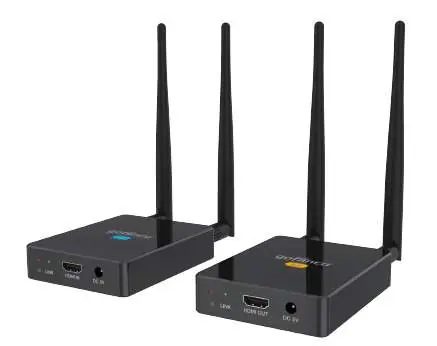
Package contents
- 1080p Wireless HDMI Extender (1 Transmitter and 1 Receiver)
- IR blaster cable
- IR receiver cable
- 4 Antennas
- 2 Power adapters
Hardware installation
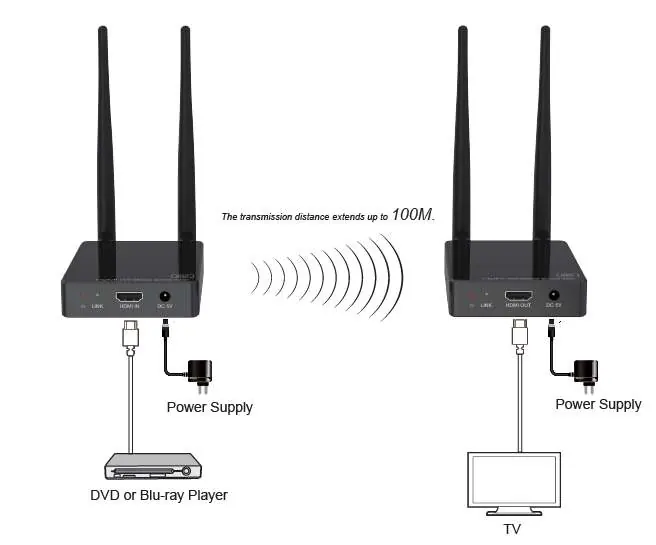
- Power off all devices, including the HDMI source and display.
- Attach the included antennas to both the Transmitter (TX) and Receiver (RX).
- Connect your HDMI source device to the Transmitter's HDMI In port using an HDMI cable (not included).
- Connect your HDMI display to the Receiver's HDMI Out port using an HDMI cable (not included).
- Connect the power adapters to the TX and RX units and plug them into reliable power outlets.
- Power on your HDMI source device and display.
Pairing instructions
If the units are not connecting, follow these steps to pair them:
- Power off and disconnect all devices.
- Connect the TX's HDMI In to the RX's HDMI Out using an HDMI cable.
- Power on the RX and wait for the Power LED and Link LED to remain solid.
- Power on the TX.
- Once pairing is successful, the Link LED on both units will flash.
- Power off both units after pairing is complete.
IR extension setup
The IR extension feature allows you to control your HDMI source device from the remote display location.
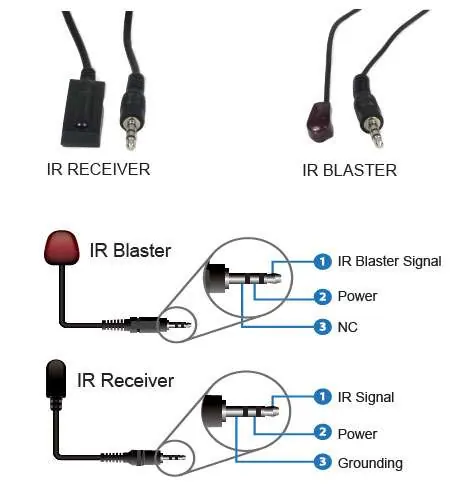
- IR Blaster: Connect to the Transmitter's IR interface port and position the eye towards the HDMI source device's IR window.
- IR Receiver: Connect to the Receiver's IR interface port.
- Note: Do not plug or remove IR cables while the unit is powered on.
Troubleshooting
No video output on the remote display:
- Ensure the HDMI source device is powered on.
- Check that the transmitter's HDMI Signal LED is lit.
- Verify all HDMI cable connections; try using different cables if necessary.
- Press the Reset button on both the TX and RX units.
- Test the source device by connecting it directly to the display.
Poor video quality:
- Ensure HDMI cables are connected properly.
- Adjust the angle of the antennas on both units; they should be positioned as far apart as possible.
- Ensure the units are within the required signal range and clear of obstacles.
- Remove other wireless signals that may cause interference.
- Decrease the distance between the transmitter and receiver.
Technical specifications
- Resolution: Up to 1080p @60Hz
- Wireless Spectrum: 5GHz
- Latency: Less than 120ms
- Power: 5VDC/2A
- Operating Temperature: 32 to 104 F (0 to 40 C)
Safety notices
- Do not expose the unit to rain, heavy moisture, or liquids.
- Keep the unit in a well-ventilated location to prevent overheating.
- Do not open the housing, as this may void the warranty and cause electric shock.
- Use only the included power adapters.
Practical help
Common problems
No video output on the remote display
Check if the source device is on, verify HDMI cable connections, press the Reset button on both units, or test the source directly on the display.
Poor video quality
Adjust antenna angles, ensure units are within range, remove obstacles, or move away from other wireless signal sources.
Before use
- Power off all devices before installation.
- Install antennas on both TX and RX units.
- Ensure HDMI cables are available (not included).
- Verify power adapters are connected to reliable outlets.
- Ensure the environment is clear of major obstacles for optimal range.
Specs in practice
- Wireless Range
- Up to 100 meters (328 feet) in ideal conditions.
- Operating Temperature
- 0 to 40 degrees Celsius (32 to 104 F).
Images and diagrams
- The Application Diagram shows the TX connected to the source and the RX connected to the display.
- The IR Application Diagram illustrates how to position the IR blaster and receiver for remote control functionality.
- IR Cable specifications show the pinout for the IR blaster and receiver cables.
Model compatibility
- Requires HDMI source device (e.g., DVD player, PC, set-top box).
- Requires HDMI display device (e.g., TV, monitor, projector).
- Not recommended for real-time applications due to latency.

Manual page author
Emily Carter
User documentation editor
Prepares concise manual descriptions and highlights the most useful setup, operation, and maintenance information for readers.