Home Appliances / Fans
User Manual for Goldair 1500W Ceramic Tower Heater GSCT215
Quick guide for the Goldair 1500W Ceramic Tower Heater (GSCT215). Includes safety precautions, operating instructions, thermostat settings, and maintenance tips.
Table of contents
Manual images
Click an image to enlargeQuick guide from the manual
This manual provides essential safety and operating instructions for the Goldair 1500W Ceramic Tower Heater (Model GSCT215). Always ensure the heater is placed on a flat, stable, heat-resistant surface and keep a minimum distance of 1 metre from the front, sides, and rear of the appliance to prevent fire hazards.
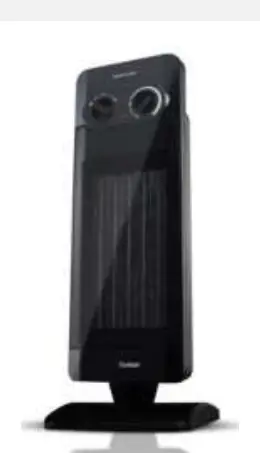
Safety precautions
- Do not cover: Covering the heater presents a fire risk and will activate the safety fuse, permanently disabling the unit.
- Clearance: Keep textiles, curtains, and flammable materials at least 1 metre away from the air outlet.
- Usage: For indoor, household use only. Do not use in bathrooms, near swimming pools, or in areas where flammable liquids are stored.
- Power: Plug directly into a wall socket. Avoid using power boards or extension cords if possible. Do not use with external timers or programmers.
- Handling: Always unplug when not in use. Do not use if the cord or plug is damaged.
Operating your heater
Ensure all packaging is removed before use. Once the heater is in a safe position and switches are set to off, plug into the mains and switch on.
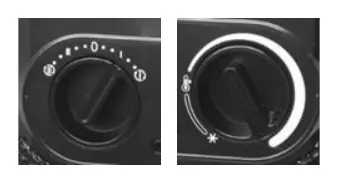
Control panel settings
- 0: OFF
- I: Low Heat
- II: High Heat
- (Icon with I): Low Heat with Oscillation
- (Icon with II): High Heat with Oscillation
Thermostatic control
- Rotate the thermostat knob clockwise to the maximum position.
- When the room reaches a comfortable temperature, slowly turn the knob anti-clockwise until the heater turns off (you will hear a click).
- The heater will now cycle on and off to maintain this set temperature.
Safety devices
- Tilt Switch: Automatically turns the appliance off if it is not in the correct operating position.
- Resettable Thermal Link: Disconnects power if the unit overheats. It will reset automatically after cooling down.
- Thermal Fuse: Disconnects the appliance permanently in case of severe overheating (non-resettable).
Care and cleaning
Regular maintenance ensures trouble-free operation:
- Always unplug the heater and allow it to cool down completely before cleaning.
- Regularly vacuum clean the air vents and grills to remove dust and fluff, which are common causes of overheating.
- Wipe the exterior with a damp cloth (not wet) rinsed in hot soapy water.
- Do not use abrasive cleaning products, petrol, thinners, or polishing agents.
- Do not attempt to dismantle the heater.
Manufacturer information
Goldair
Practical help
Common problems
Heater turns off automatically
Check if the unit has been knocked over (Tilt Switch) or if it has overheated (Thermal Link). Ensure vents are clean and the unit is not covered.
Heater does not turn on
Ensure it is plugged in, the wall socket is on, and the thermostat is set correctly. If the thermal fuse has tripped due to severe overheating, the unit may be permanently disabled.
Before use
- Remove all packaging materials.
- Place on a flat, stable, heat-resistant surface.
- Ensure hands are dry before handling the plug.
- Check for any transport damage.
- Ensure the power cord is not coiled or trapped under furniture.
Images and diagrams
- The control panel features a rotary knob for selecting heat levels (Low/High) and oscillation modes.
Model compatibility
- Do not use with external timers, programmers, or remote-control systems.
- Not intended for commercial or industrial use.

Manual page author
David Miller
Documentation analyst
Organizes user manual content into clear summaries, with attention to model details, product context, and everyday usability.