Power / USB Chargers
Hama 100W USB-C PD/QC Charger User Manual
Quick guide for the Hama 100W USB-C PD/QC Charger. Includes safety instructions, operation steps, and technical specifications for models 00125140, 00200027, and 00201997.
Table of contents
Important Information
This Hama charger is designed to provide up to 100W of power using Power Delivery (PD) and Quick Charge (QC) 3.0/2.0 technologies. It is suitable for worldwide use with mains voltages between 100-240V, though a country-specific adapter may be required.
Safety Instructions
- Protect the product from dirt, moisture, and overheating; use only in dry rooms.
- Do not drop the product or expose it to major shocks.
- Do not modify the device; doing so voids the warranty.
- Keep out of the reach of children.
- Do not use the product in the immediate vicinity of heaters or other heat sources, or in direct sunlight.
- Route all cables to avoid tripping hazards.
- Do not open the device or continue to operate it if it becomes damaged.
- Do not attempt to service or repair the product yourself; leave all service work to qualified experts.
Operation
The charger features Plug & Go technology, meaning no additional software is required. Simply plug in and start charging.
- Connect your device to the appropriate USB charging socket using a suitable USB cable.
- Connect the charger to a properly installed and easily accessible mains socket.
- The charging process will be displayed on your device.
- Disconnect the device from the charger when you wish to interrupt the charging process or when the device is fully charged.
- Disconnect the charger from the mains connection.
Note: For efficient and optimized charging, your terminal device must support the PD (Power Delivery) or QC 3.0/2.0 function. If you have a large number of PD/QC-enabled devices with different firmware, the function may not be fully supported.
Care and Maintenance
Only use soft, dry towels to clean the product. Always disconnect the device from the mains before cleaning and during prolonged periods of non-use.
Technical Data
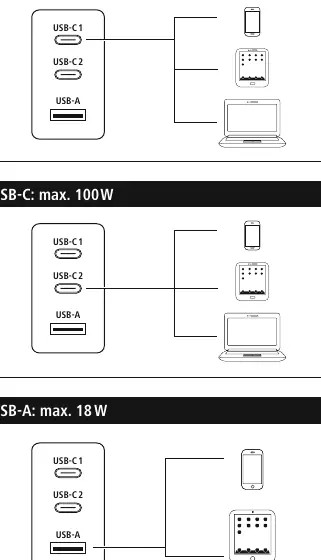
The charger supports various output voltages, currents, and power levels depending on the port used (USB-C1, USB-C2, USB-A) and whether multiple ports are used simultaneously. The maximum total power output is 100W. Input voltage is 100-240V at 50/60Hz.
Manufacturer information
Hama GmbH & Co KG
Practical help
Common problems
Device not charging efficiently
Ensure your device supports PD (Power Delivery) or QC 3.0/2.0 functions for optimized charging.
Charger not working
Check if the mains socket is active and the cable is securely connected.
Before use
- Check if the charger is compatible with your device's power requirements.
- Ensure the total power of connected devices does not exceed 100W.
- Verify the mains voltage is between 100-240V.
- Use a suitable USB cable for your device.
Specs in practice
- PD/QC 3.0, 2.0
- Fast charging protocols for optimized power delivery.
Images and diagrams
- The diagram on page 3 illustrates the power distribution when using different ports simultaneously.
Model compatibility
- Requires a country-specific adapter for international use.
- Efficient charging depends on device support for PD/QC protocols.

Manual page author
Emily Carter
User documentation editor
Prepares concise manual descriptions and highlights the most useful setup, operation, and maintenance information for readers.