Power / Batteries & Chargers
User Manual for Hama 1000in1 Universal Air Conditioner Remote Control
Quick guide for the Hama 1000in1 Universal Air Conditioner Remote Control. Learn how to install batteries, set up your remote using brand-specific codes, manual code entry, or automatic search, and troubleshoot common issues.
Table of contents
Manual images
Click an image to enlargeQuick Start Guide
To begin using your Hama 1000in1 Universal Air Conditioner Remote Control, install two new AAA batteries. You must then pair the remote with your air conditioner using one of the three available methods: Brand-Specific Fast Search, Manual Code Entry, or Digital Automatic Search. Ensure the air conditioner is plugged in and the remote is pointed at the unit's receiving window during setup.
Product Overview
The remote features a large LCD screen for easy monitoring of temperature, mode, and time. Key controls include:
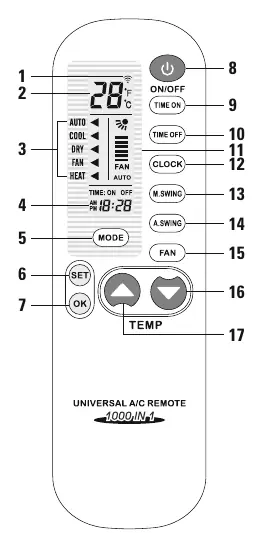
- Power Key: Turns the unit on/off.
- Mode Key: Cycles through operating modes.
- Temperature (+/-) Keys: Adjusts the desired temperature.
- SET Key: Used to enter programming modes.
- OK Key: Confirms and saves the selected code.
- Fan Key: Adjusts fan speed.
- Swing Keys (M.SWING/A.SWING): Controls airflow direction.
Battery Installation
1. Remove the battery cover on the back of the remote.
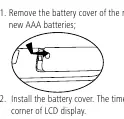
2. Insert two new AAA batteries, ensuring correct polarity (+/-).
3. Replace the battery cover. The time will appear on the LCD display.
Setting Up the Remote
Choose one of the following methods to pair the remote with your air conditioner:
Method A: Brand-Specific Fast Search
1. Manually plug in the air conditioner and point the remote at the receiving window.
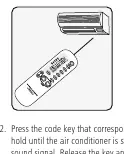
2. Press and hold the key corresponding to your air conditioner brand (see the table on page 5 of the manual) until the air conditioner emits a sound signal.
3. Release the key; the setting is complete.
Method B: Manual Code Entry
1. Find your air conditioner brand and the corresponding code in the provided Code List (pages 13-15).
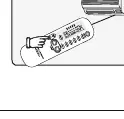
2. Press and hold the SET button for about three seconds until the code on the display flashes.
3. Press the Temperature + or - keys until the desired code appears on the screen.
4. Press the OK button to confirm. The code will stop flashing.
Method C: Digital Automatic Search
1. Point the remote at the air conditioner.
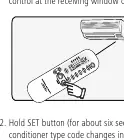
2. Press and hold the SET button for about six seconds until the code on the display changes, indicating the remote has entered high-speed search mode.
3. Once the air conditioner starts automatically, press the OK button to stop the search and save the code.
Care and Maintenance
Clean the remote only with a slightly damp, lint-free cloth. Do not use aggressive cleaning agents and ensure no water enters the device.
Troubleshooting and Support
If the remote does not control the air conditioner, repeat the setup process. If you cannot switch on the device manually, try pointing the remote at the switched-off device and repeating the setup. For further assistance, contact Hama Product Consulting via their hotline at +49 9091 502-115 or visit www.hama.com.
Official resources from the manual
Manufacturer information
Hama GmbH & Co KG
Practical help
Common problems
Remote does not control the air conditioner.
Ensure batteries are fresh and correctly inserted. Repeat the setup procedure (Method A, B, or C) to ensure the correct code is selected.
Cannot switch on the device manually.
Try repeating the setup process while pointing the remote at the switched-off air conditioner. Some brands require this specific approach.
Before use
- Install two new AAA batteries.
- Ensure the air conditioner is plugged into a power source.
- Identify the brand of your air conditioner.
- Locate the corresponding code(s) for your brand in the Code List.
Images and diagrams
- The remote features a large LCD screen displaying temperature, mode, and time.
- Buttons are clearly labeled for Power, Mode, Fan, Temperature (+/-), and specific timer/swing controls.
Model compatibility
- Compatible with a wide range of air conditioner brands listed in the provided code table.
- Some brands allow quick search, which may take up to 5 minutes to complete.

Manual page author
David Miller
Documentation analyst
Organizes user manual content into clear summaries, with attention to model details, product context, and everyday usability.