Power / USB Chargers
User Manual for Hama Universal USB-C Notebook Power Supply 100W
Quick guide for the Hama Universal USB-C Notebook Power Supply 100W (00200024). Learn how to safely connect, operate, and maintain your charger, including compatibility and technical specifications.
Table of contents
Manual images
Click an image to enlargeQuick guide from the manual
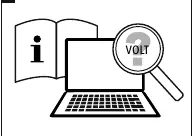
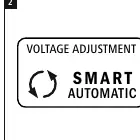
The Hama Universal USB-C Notebook Power Supply 100W is designed for worldwide use. It features automatic voltage adjustment via Power Delivery, Thunderbolt, and Quick Charge technologies. Before use, ensure your notebook requires a supply voltage of 5V, 9V, 12V, 15V, or 20V (+/- 1V) and that its total power consumption does not exceed 100W.
Safety instructions
- Keep the product out of the reach of children.
- Do not open the device or use it if damaged.
- Use only in dry environments.
- Do not modify the device; doing so voids the warranty.
- Always pull directly on the plug when disconnecting, never on the cable.
- Ensure cables do not pose a tripping hazard.
Start-up and operation
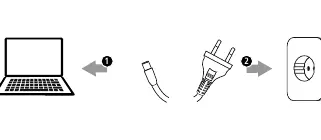
- Ensure your notebook's voltage requirements match the adapter's output (5V/9V/12V/15V/20V).
- Connect the USB-C cable to your terminal device.
- Connect the mains plug to a properly installed socket.
- The device will automatically adjust voltage and power.
Care and maintenance
Disconnect the product from the mains before cleaning. Clean only with a slightly damp, lint-free cloth. Do not use aggressive cleaning agents or allow water to enter the product.
Technical data
Input voltage: 100-240V. Output power: Up to 100W. Average active efficiency: 81.4%.
Manufacturer information
Hama GmbH & Co KG
Practical help
Common problems
Device not charging
Ensure the notebook supports PD/Thunderbolt/QC. Check if the total power consumption exceeds 100W.
Voltage mismatch
Verify your notebook requires 5V, 9V, 12V, 15V, or 20V (+/- 1V).
Before use
- Check if your notebook requires 5V/9V/12V/15V/20V.
- Ensure total power consumption is <= 100W.
- Check if the AC adapter/cable is undamaged.
- Ensure the socket is easily accessible.
Specs in practice
- Input Voltage
- 100-240V, suitable for worldwide use.
- Output Power
- Maximum 100W.
Images and diagrams
- Page 3 shows the basic connection steps: 1. Check voltage requirements, 2. Automatic adjustment, 3. Connect cable to device and then to power outlet.
Model compatibility
- Compatible with Power Delivery (PD), Thunderbolt 3/4/5, and Quick Charge (QC) enabled devices.

Manual page author
David Miller
Documentation analyst
Organizes user manual content into clear summaries, with attention to model details, product context, and everyday usability.