Power / Batteries & Chargers
Hama Color 10/20 Power Pack
Quick guide for Hama Color 10/20 power banks (models 00201712-00201717). Learn how to charge the power bank, charge your devices, and understand LED indicators.
Table of contents
Manual images
Click an image to enlargeImportant Information
Before using the Hama Color 10/20 Power Pack, you must read the warnings and safety instructions provided in the enclosed information sheet. This document serves as a quick reference for operation and charging.
Device Overview
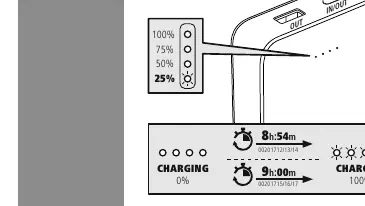
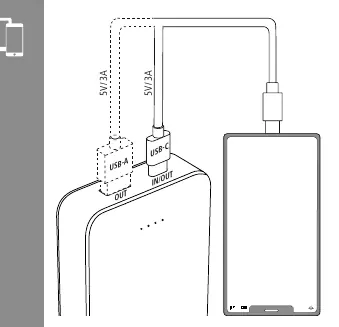
The power pack features a USB-C port for input and charging, and USB-A and USB-C ports for output to charge your devices. LED indicators on the side of the unit display the current battery level in 25% increments (25%, 50%, 75%, 100%).
Operation
The power pack is controlled via a single button:
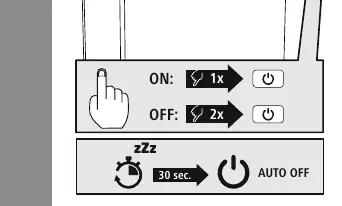
- Switching ON: Press the button once.
- Switching OFF: Press the button twice.
- Auto-OFF: The device will automatically turn off after 30 seconds of inactivity to conserve power.
Charging the Power Pack
To charge the power pack, connect a power source to the USB-C input port. The LED indicators will show the charging progress. A full charge takes approximately 8 hours and 54 minutes for the 10k models, and 9 hours for the 20k models.
Charging Devices
To charge your mobile devices, connect them to the power pack using the USB-A or USB-C output ports. The power pack supports 5V/3A output. Ensure your device is compatible with these specifications before connecting.
Service and Support
For further assistance, downloads, or technical support, visit the official website at www.hama.com. You can also contact Hama GmbH & Co KG at +49 9091 502-0.
Official resources from the manual
Manufacturer information
Hama GmbH & Co KG
Practical help
Common problems
Power pack turns off unexpectedly
The device has an auto-off feature that activates after 30 seconds of inactivity. Press the button once to turn it back on.
Device not charging
Ensure the cable is securely connected to both the power source and the power pack. Verify the power source is active.
Before use
- Read the enclosed safety and warning instructions.
- Check the battery level using the LED indicators.
- Ensure you are using the correct cable for your device (USB-A or USB-C).
- Verify the power source provides 5V/3A for optimal charging.
Specs in practice
- LED Indicators
- Shows remaining capacity in 25% steps (25%, 50%, 75%, 100%).
Images and diagrams
- The LED lights blink during charging and remain solid when fully charged.
- The power button is used to toggle the device on (1x press) and off (2x press).
Model compatibility
- Compatible with devices requiring 5V/3A charging via USB-A or USB-C.

Manual page author
David Miller
Documentation analyst
Organizes user manual content into clear summaries, with attention to model details, product context, and everyday usability.