Electronics / Remote Controls
Hama 4K HDMI Splitter 2-Way User Manual
Quick user guide for the Hama 4K HDMI Splitter (2-way). Learn how to install, connect, and operate your device, including troubleshooting and technical specifications.
Quick answers from the manual
Quick answer
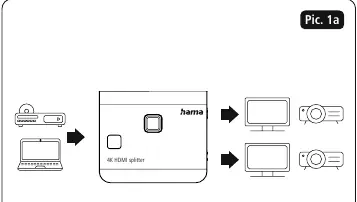
- The Hama 4K HDMI Splitter (2-way) allows you to distribute one HDMI signal to two monitors simultaneously. It features an integrated downscaler to adjust the input signal to the maximum resolution suitable for both connected monitors. p. 4
Key actions
- Connect the HDMI source device to the HDMI input. p. 4
- Connect two display devices to the HDMI outputs. p. 4
- Connect the USB-C power cable. p. 5
First start
- Connect all devices, power the splitter via USB-C, and turn on the source and display devices. p. 4, 5
Problems and fixes
No picture
Check cable connections, ensure the correct channel is set on the output device, and verify all devices are on.
p. 5Maintenance and reset
- Clean with a lint-free, slightly damp cloth. Use the button (4) to retrigger the scaling process if needed. p. 5
Technical specifications
| Parameter | Value | Meaning | Pages |
|---|---|---|---|
| HDMI Resolutions | 480p, 576p, 720p, 1080p, 4K@30Hz | Supported output resolutions | p. 5 |
Where to find it in the PDF
- Operating Instructions p. 4, 5
Table of contents
Manual images
Click an image to enlargeQuick guide from the manual
The Hama 4K HDMI Splitter (2-way) allows you to distribute one HDMI signal to two monitors simultaneously. It features an integrated downscaler to adjust the input signal to the maximum resolution suitable for both connected monitors. For optimal 4K signal transmission, the total length of the cables should not exceed 6 meters. For longer signal paths, we recommend the use of active HDMI cables.
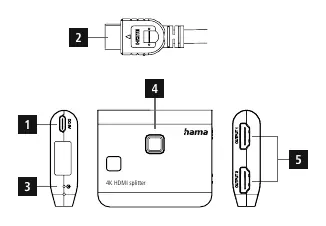
Product Description
The 4K HDMI splitter from Hama splits an HDMI signal evenly across 2 monitors. The integrated downscaler scales a high-resolution input signal to the maximum resolution that is suitable for both monitors.
Installation and Connection
Follow these steps to connect your devices:
- Connect the HDMI plug to your HDMI source device (e.g., Blu-ray or set-top box).
- Connect your two HDMI playback devices (e.g., flat TV and projector or two flat TVs) via HDMI cables (not included) to the HDMI sockets.
- Connect the USB cable to an available USB input on your TV or set-top box. Alternatively, use an external USB power supply unit to provide the power.
- Switch the source and playback devices on.
Operation
During commissioning, the resolutions of the monitors are checked and the input signal is adjusted (scaled) accordingly. The button (4) retriggers the scaling process if required.
- The green LED shows that OUTPUT 1 is active.
- The blue LED shows that OUTPUT 2 is active.
Troubleshooting
If you encounter issues, check the following:
- No picture: Check the correct connection of all cables, ensure the correct channel has been set on the output device, and verify that all devices are switched on.
- No sound: Check that all devices are properly connected and switched on.
Care and Maintenance
Only clean this product using a lint-free, slightly damp cloth and do not use any harsh cleaners.
Technical Data
- Power supply: USB-C
- Connections: 1x HDMI in, 2x HDMI out, 1x USB-C (power supply)
- HDMI Resolutions: 480p, 576p, 720p, 1080p, 4K@30Hz
- Max. video bandwidth: 3.4 Gbps / 340 MHz per channel
- Transfer: Bidirectional
- Dimensions (L x W x H): 65.5 x 55.5 x 16 mm
Manufacturer information
Hama GmbH & Co KG
Practical help
Common problems
No picture
Check the correct connection of all cables, ensure the correct channel is set on the output device, and verify all devices are switched on.
No sound
Ensure all devices are properly connected and switched on.
Before use
- Ensure you have the HDMI splitter, USB-C to USB-A cable, and the operating instructions.
- Verify that your HDMI source device (e.g., Blu-ray player, set-top box) is ready.
- Ensure you have two HDMI cables (not included) for the output devices.
- Check that your display devices (TVs, projectors) are ready.
Specs in practice
- HDMI Resolutions
- Supports up to 4K@30Hz, 1080p, 720p, 576p, 480p.
- Max. video bandwidth
- 3.4 Gbps / 340 MHz per channel.
- Power supply
- USB-C connection required.
Images and diagrams
- Pic 1a shows the connection flow: Source device -> HDMI Splitter -> Two display devices.
- The device has a USB-C power input, HDMI input, Status LED, Scale/Reset button, and two HDMI outputs.
Model compatibility
- For optimal 4K signal transmission, total cable length should not exceed 6 meters.
- For longer signal paths, use active HDMI cables.

Manual page author
Michael Turner
Technical manual editor
Reviews PDF manuals for structure, safety notes, and practical product details so readers can find the right information quickly.