Electronics / AV Splitters
Operating Instructions for Hama 00223615 Universal Power Supply Unit 18W
Quick guide for the Hama 00223615 18W Universal Power Supply Unit. Learn how to set the voltage, select the correct DC plug, check polarity, and safely connect your devices.
Quick answers from the manual
Quick answer
- This is a universal power supply unit with adjustable voltage (3V-12V) and multiple adapters. To use it, check your device's voltage and polarity, set the voltage selector using the included key, select the correct plug, and connect. p. 4, 5
Key actions
- Set the voltage selector switch using the adjusting key. p. 5
- Check polarity before connecting. p. 5
First start
- Determine mechanical compatibility, check polarity, set voltage, and plug in. p. 5
Maintenance and reset
- Clean with a soft, dry cloth. Disconnect from mains before cleaning. p. 5
Technical specifications
| Parameter | Value | Meaning | Pages |
|---|---|---|---|
| Input voltage | 100-240 V | Worldwide mains voltage compatibility | p. 5 |
| Output power | 18.0 W | Maximum power output | p. 5 |
Where to find it in the PDF
- Safety instructions p. 4
- Operation p. 5
- Technical data p. 5
Table of contents
Manual images
Click an image to enlargeImportant information from the manual
This universal power supply unit is designed for powering various electronic devices. It features adjustable output voltage (3V to 12V) and comes with multiple DC plug adapters and a USB-A adapter. Before use, it is critical to verify the voltage requirements and polarity of your target device to avoid damage.
Package contents
- Universal switching power supply unit
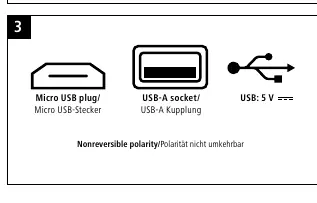
- 2 USB adapters: micro-USB plug / USB Type A socket
- 5 DC plugs: 1.35x3.5 / 1.7x4.0 / 1.5x5.5 / 2.1x5.0 / 2.5x5.5
- Adjusting key
- Operating instructions
Safety instructions
- Use the product only in dry indoor environments.
- Do not modify the device; doing so voids the warranty.
- Keep out of reach of children.
- Route cables to avoid tripping hazards.
- Do not use if the device, AC adapter, or cables are visibly damaged.
- Disconnect from mains power if not in use for a prolonged period.
Operation
Before connecting any device, follow these steps:
- Check compatibility: Without plugging into the wall, check if the universal power supply's adapter fits your device's connection socket.
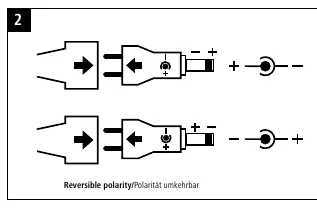
- Check polarity: Verify the polarity of your device's connection socket and connect the adapter accordingly (see Fig. 2).
- Set voltage: Use the provided adjusting key to set the voltage selector switch to the voltage required by your device.
- Connect: Plug the power supply into a suitable wall socket.
- Power on: Your terminal device can now be used and switched on.
Care and maintenance
Clean the product only with a soft, dry cloth. Always disconnect the device from the mains before cleaning or if it will not be used for a long time.
Technical data
The charger is suitable for mains voltages of 100-240 V, allowing for worldwide use. Output voltage settings include 3.0V, 4.5V, 5.0V, 6.0V, 7.5V, 9.0V, and 12.0V DC, with a maximum output power of 18.0 W.
Manufacturer information
Hama GmbH & Co KG
Practical help
Common problems
Device not charging
Verify that the voltage selector is set to the correct voltage required by your device and that the polarity of the DC plug is correct.
Plug does not fit
The unit includes 5 different DC plugs and a USB-A adapter. Ensure you are using the correct size for your device.
Before use
- Check mechanical compatibility of the adapter with your device.
- Verify the required voltage of your device.
- Check the polarity of your device's connection socket.
- Ensure the charger's current capacity is sufficient for your device.
Specs in practice
- Input voltage
- 100-240V, suitable for worldwide use.
- Output voltage
- Adjustable: 3.0V, 4.5V, 5.0V, 6.0V, 7.5V, 9.0V, 12.0V DC.
- Output power
- Maximum 18W total output.
Images and diagrams
- Figure 2 illustrates how to set the polarity (plus/minus) for the DC plug.
- Figure 3 shows the included adapters: Micro USB plug and USB-A socket.
Model compatibility
- Suitable for mains voltages of 100-240V.
- Requires country-specific adapter if the wall socket type differs.

Manual page author
David Miller
Documentation analyst
Organizes user manual content into clear summaries, with attention to model details, product context, and everyday usability.