Electronics / Security Cameras
Hama C-400 PC Webcam
Quick guide for the Hama C-400 PC Webcam. Learn about installation, system requirements, technical specifications, and features like the privacy lens and tripod mount.
Table of contents
Quick guide from the manual
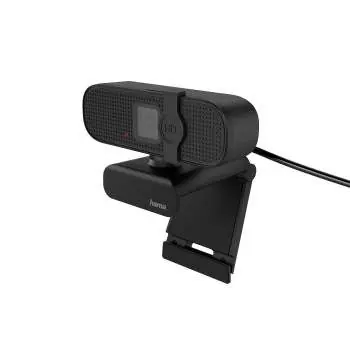
The Hama C-400 is a Plug & Play PC webcam designed for streaming and video conferencing. It features a Full HD resolution, an integrated microphone, and a closable lens for privacy. The device is designed for easy setup without the need for manual driver installation.
System Requirements
Before connecting the webcam, ensure your computer meets the following requirements:
- Operating System: Windows 11, 10, 8.1, 8, 7, Vista, XP, or Mac OS 10.4.3 and later.
- Connection: Available USB 2.0 port.
Installation and Usage
The webcam utilizes UVC (USB Video Class) technology, which allows for driver-free installation.
- Connect the USB-Typ-A plug of the webcam directly into an available USB port on your computer.
- The operating system will automatically detect and configure the device.
- Once detected, the webcam is ready to use with applications such as Skype, Teams, Zoom, or YouTube.
Features
- Privacy Protection: The webcam includes a closable lens cover to prevent unauthorized access.
- Mounting Options: The stand/clamp foot allows for secure mounting on TFT or notebook screens. Additionally, a 1/4 inch thread is provided for mounting the camera onto standard tripods.
- Adjustability: The camera features an adjustable angle of inclination and a maximum swivel range of 360 degrees.
Technical Specifications
- Resolution: 1920 x 1080 pixels (Full HD)
- Frame Rate: 30 photos per second at 1080p
- Focus: Fixed Focus
- Cable Length: 1.8 m
- Microphone: Integrated Mono microphone
- Visual Angle: 75 degrees
Manufacturer information
Hama GmbH & Co KG
Practical help
Common problems
Webcam not detected by the computer
Ensure the USB cable is plugged directly into a USB port on the computer, not a USB hub. Verify that your operating system is updated.
Image appears blurry
This model uses a fixed focus lens. Ensure the subject is within the optimal distance range for the camera.
Before use
- Verify your operating system is Windows XP or newer, or Mac OS 10.4.3 or newer.
- Ensure you have a free USB 2.0 port available.
- Check that the privacy lens cover is open before use.
Images and diagrams
- The webcam includes a flexible stand/clamp foot for screen mounting.
- A 1/4 inch thread is located on the base for tripod compatibility.
Model compatibility
- Compatible with Windows 11, 10, 8.1, 8, 7, Vista, XP.
- Compatible with Mac OS 10.4.3 and later.

Manual page author
David Miller
Documentation analyst
Organizes user manual content into clear summaries, with attention to model details, product context, and everyday usability.