Power / Power Banks
Hama PD20-HD 20000mAh Power Pack User Manual
Comprehensive user guide for the Hama PD20-HD 20000mAh Power Pack. Includes charging instructions, safety guidelines, LED indicator explanations, and technical specifications.
Quick answers from the manual
Quick answer
- To charge the power pack, connect it to a suitable USB charger using the provided USB-C cable or a micro-USB cable. To charge your devices, connect them to the USB-C or USB-A output ports. p. 3
Key actions
- Check battery level p. 3
- Turn off power pack p. 3
First start
- Fully charge the power pack once before using it for the first time. p. 3
Maintenance and reset
- Clean with a slightly damp, lint-free cloth. Do not use aggressive cleaning agents. p. 4
Technical specifications
| Parameter | Value | Meaning | Pages |
|---|---|---|---|
| Battery Type | 3.7 V / Li-Po | Lithium-polymer battery | p. 5 |
| Max Output | 18W | Maximum power delivery | p. 5 |
Where to find it in the PDF
- Operating Instructions p. 2, 3, 4
- Technical Data p. 5
Table of contents
Manual images
Click an image to enlargeQuick guide from the manual
The Hama PD20-HD is a 20000 mAh power pack designed for charging mobile devices. Before first use, ensure the power pack is fully charged. To charge the power pack, use the provided USB-C cable or a micro-USB cable connected to a suitable USB charger. To charge your devices, connect them to the USB-C or USB-A output ports.
Safety instructions
- The product is intended for private, non-commercial use only.
- Protect the product from dirt, moisture, and overheating; use only in dry environments.
- Do not drop the product or expose it to major shocks.
- Do not modify the product; doing so voids the warranty.
- Keep out of reach of children.
- Do not charge and discharge the power pack simultaneously.
- Do not charge the power pack via a PC or notebook USB port, as charging currents may damage the port.
Operation
Charging the power pack
Connect the enclosed USB-C cable to the USB-C input on the power pack and a suitable USB-C charger. Alternatively, use the micro-USB input. The charging process begins and ends automatically.
LED Capacity Indicators
- Each status LED corresponds to 25% of the capacity.
- Permanent illumination of an LED indicates that the capacity level has been reached.
- If three LEDs light up and the fourth flashes, the power pack is at least 75% charged.
- If all four LEDs light up, the power pack is at full capacity.
- Press the button on the power pack to check the current capacity.
- Press the button twice to switch the power pack off.
Charging devices
Connect your device to the USB-C or USB-A output port using a suitable cable. The charging process starts automatically. Note that charging simultaneously via both USB-A and USB-C outputs significantly reduces the charging current and increases charging time.
Care and maintenance
Clean this product only with a slightly damp, lint-free cloth. Do not use aggressive cleaning agents.
Technical data
- Battery type: 3.7 V / Li-Po
- Min. capacity: 20000 mAh / 74.00 Wh
- Total output: 3 A – 18W (max.)
- USB-C input: 5 V / 3 A; 9 V / 2 A
- USB-C output: 5 V / 3 A; 9 V / 2 A; 12 V / 1.5 A (PD 18 W max.)
- USB-A output: 5 V / 2.4 A; 9 V / 2 A; 12 V / 1.5 A (QC 3.0)
Manufacturer information
Hama GmbH & Co KG
Practical help
Common problems
Power pack not charging devices
Ensure the device is compatible and the cable is securely connected. Check if the power pack has sufficient charge by pressing the button.
Charging is slow
Avoid charging devices via both USB-A and USB-C simultaneously, as this reduces charging current and may overload the power pack.
Power pack won't turn on
Press the button once to check the current capacity. If no LEDs light up, the power pack needs to be recharged.
Before use
- Fully charge the power pack before first use.
- Check that your device is compatible with the power pack's output specifications.
- Ensure you have the correct charging cable (USB-C or USB-A).
Specs in practice
- Total Output
- Max 3A / 18W. The maximum combined current the power pack can deliver.
- Battery Type
- 3.7V Li-Po. High-density lithium-polymer cells.
Images and diagrams
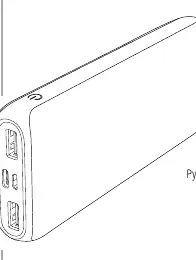
- The power pack features status LEDs where each LED represents 25% of the total capacity.
- USB-C port serves as both input and output.
- USB-A port is for output only.
Model compatibility
- Ensure your device supports Power Delivery (PD) or Quick Charge (QC) 3.0/2.0 for optimized charging speeds.
- Total current consumption of connected devices should not exceed 3000 mA.

Manual page author
David Miller
Documentation analyst
Organizes user manual content into clear summaries, with attention to model details, product context, and everyday usability.