Garden / Portable Garages
User Manual for Pittsburgh Pro 1/4-Inch Drive Click-Type Torque Wrench 63881
Quick guide for the Pittsburgh Pro 1/4-Inch Drive Click-Type Torque Wrench (63881). Includes setup, torque adjustment, operation, safety warnings, and maintenance instructions.
Table of contents
Manual images
Click an image to enlargeQuick guide from the manual
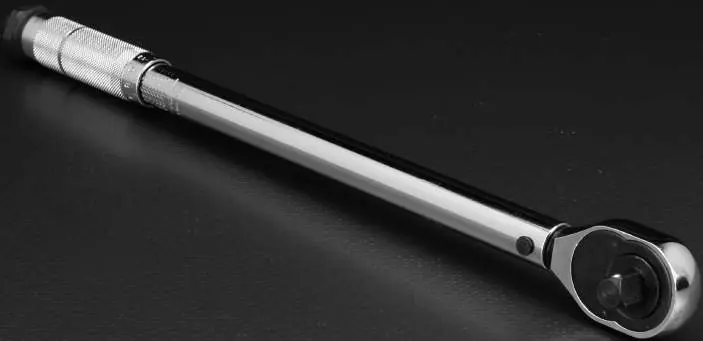
This torque wrench is a precision tool designed for tightening fasteners to a specific torque. Before using the tool for the first time, you must exercise it three times by turning the handle to the maximum and minimum settings. Always loosen the Lock Knob before adjusting the torque and tighten it securely before use. This tool is for clockwise operation only and should not be used for loosening fasteners.
Specifications
- Torque Range: 20 - 200 in-lb
- Drive: 1/4 inch
- Accuracy: +/- 4%
Important Safety Information
- Wear ANSI-approved safety goggles during use.
- Do not use the wrench for loosening fasteners.
- Do not use the tool as a hammer or pry bar.
- Do not use handle extensions to increase force; do not use as a breaker bar.
- If the wrench has been dropped, have it tested before further use.
- Keep the tool away from children.
Operating Instructions
Setting the Torque:
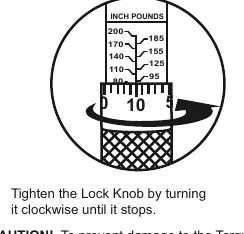
- Loosen the Lock Knob by turning it counterclockwise until it stops.
- Turn the Knurled Handle to align the desired torque value on the scale.
- Tighten the Lock Knob clockwise until it stops to lock the setting.
Using the Wrench:
- Thread the fastener with another tool until it is snug.
- Place the correct socket onto the Square Drive.
- Grasp the Knurled Handle and pull smoothly and slowly.
- Stop pulling immediately when the handle breaks away and a click is heard or felt.
- Release pressure to allow the handle to reset.
Maintenance and Servicing
- Before each use: Inspect for loose hardware, misalignment, binding, or cracked parts.
- After each use: Loosen the Lock Knob, set the wrench to the lowest torque setting, and tighten the Lock Knob. Wipe the wrench with a clean cloth; do not immerse in liquid.
- Every 6 months: Have the torque wrench calibrated and serviced by a qualified technician.
Manufacturer information
Harbor Freight Tools
Practical help
Common problems
Tool does not click
Ensure you are operating in the clockwise direction and that the fastener is not already over-tightened.
Misleading torque reading
Clean the fastener's threads before use, as dirt can affect the reading.
Damage to tool
Do not use the wrench for loosening fasteners, as this can damage the internal mechanism.
Before use
- Wear ANSI-approved safety goggles.
- Inspect the tool for loose hardware or cracked parts.
- Exercise the wrench three times (turn to max and min settings) before first use.
- Ensure fastener threads are clean.
- Select a socket that fits the fastener properly.
Specs in practice
- Torque Range
- The operational range of the tool (20-200 in-lb).
Images and diagrams
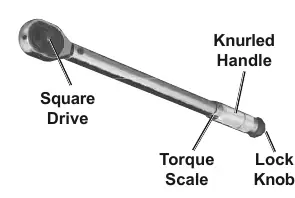
- Square Drive: The attachment point for sockets.
- Knurled Handle: The rotating part used to set the torque value.
- Lock Knob: The mechanism to secure the torque setting.
Model compatibility
- Use only sockets with the correct drive size.
- Ensure sockets are rated to at least the torque being applied.

Manual page author
Michael Turner
Technical manual editor
Reviews PDF manuals for structure, safety notes, and practical product details so readers can find the right information quickly.