Home Appliances / Vacuum Cleaners
Lauben Stick Vacuum 2-in-1 User Manual
User manual and quick guide for the Lauben Stick Vacuum 2-in-1 (LBNSV22BL, LBNSV22WB). Includes setup, charging instructions, maintenance, and troubleshooting.
Quick answers from the manual
Quick answer
- The Lauben Stick Vacuum 2-in-1 is a cordless vacuum. Charge it for at least 4 hours before first use. Empty the dust bin after every use and clean the filters regularly to maintain performance. p. 12, 13
Key actions
- Charge the battery p. 12
- Empty the dust bin p. 13
- Clean the filters p. 13
First start
- Charge the battery fully (at least 4 hours) before the first use. p. 12
Show 4 more answers Show less
Problems and fixes
Vacuum cleaner will not turn on
Charge battery, clean contacts, check power source.
p. 14
Weak suction
Empty dust bin, clean filters, charge battery, clear pipe.
p. 14Maintenance and reset
- Empty dust bin after each use and clean filters after every other use. p. 13
Technical specifications
| Parameter | Value | Meaning | Pages |
|---|---|---|---|
| Power output | 140 W | Motor power | p. 10 |
| Battery | Li-ion 22.2V, 2200 mAh | Battery type and capacity | p. 10 |
| Dust bin capacity | 0.5 L | Volume of dust bin | p. 10 |
| Suction | > 10 kPa | Suction power | p. 10 |
Where to find it in the PDF
- Technical specifications p. 10
- Safety instructions p. 10, 11
- Appliance description p. 11
- Maintenance p. 13
Table of contents
Manual images
Click an image to enlargeQuick guide from the manual
The Lauben Stick Vacuum 2-in-1 is designed for household use. Before first use, ensure the battery is fully charged (at least 4 hours). Empty the dust bin after every use and clean the filters regularly to maintain suction power.
Appliance description
The vacuum consists of the main unit with a motor, battery, dust bin, suction pipe, and various attachments. Key components include:
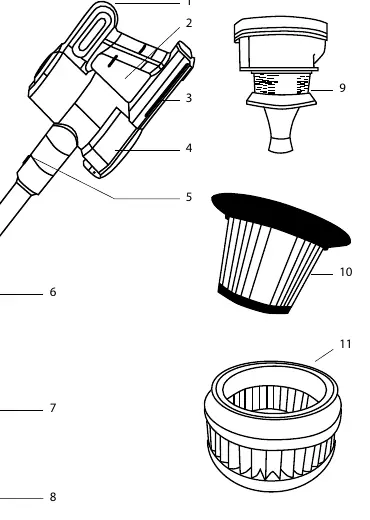
- Main button for power control
- Dust bin with cyclone and HEPA filters
- Suction pipe and release buttons
- Head with brush and LED lighting
Charging
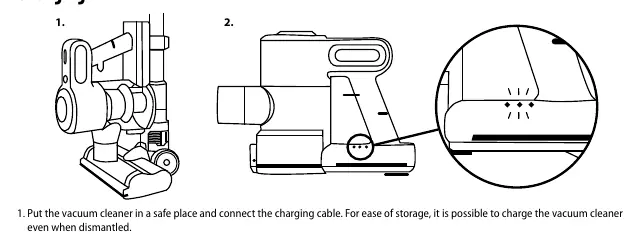
Place the vacuum in a safe location and connect the charging cable. The vacuum can be charged even when dismantled. During charging, LED indicators will blink. When the lights stop blinking and remain on, the battery is fully charged. Charge for at least 4 hours before the first use.
Usage
Attach the desired accessory to the main unit or suction pipe. Use the main button to turn the vacuum on. Pressing the button again increases the power level. Pressing it a third time turns the vacuum off. Change attachments only when the vacuum is turned off.
Maintenance
Regular maintenance is essential for optimal performance:
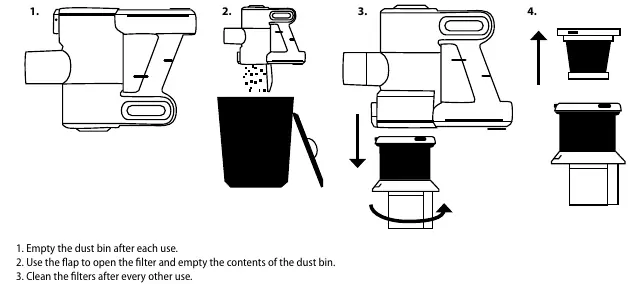
- Dust bin: Empty after each use.
- Filters: Clean filters after every other use. Open the dust bin lid, remove the cyclone and HEPA filters, and wipe with a clean, dry cloth.
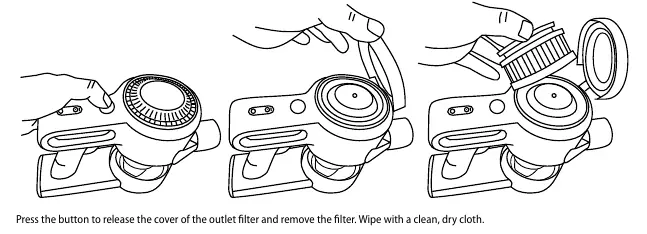
- Outlet filter: Clean after every third use. Press the release button on the filter cover to remove and clean it.
- Main brush: Press the release lever on the head to remove the brush for cleaning.
Troubleshooting
If the vacuum does not turn on, check if the battery is charged, contacts are clean, or if there is a power issue. If suction is weak, empty the dust bin, clean the filters, or check for blockages in the suction pipe. If dust leaks, ensure the dust bin is empty and the filter is correctly installed.
Technical specifications
- Power output: 140 W
- Battery: Li-ion 22.2V, 2200 mAh
- Dust bin capacity: 0.5 L
- Suction: > 10 kPa
- Noise output: ≤ 76 dBA
Manufacturer information
Lauben
Practical help
Common problems
Vacuum cleaner will not turn on
Charge the battery (min 4 hours), clean battery contacts, or check the power source.
Weak or no suction
Empty the dust bin, clean the filters, charge the battery, or clear blockages in the suction pipe.
Dust leaking from vacuum
Empty the dust bin, ensure the dust filter is correctly installed, or replace the filter if damaged.
Before use
- Charge the battery fully (at least 4 hours)
- Ensure all filters are correctly installed
- Check for blockages in the suction pipe or attachments
- Remove large or sharp objects from the floor
Show more Show less
Specs in practice
- Power output
- 140 W
- Dust bin capacity
- 0.5 L
- Noise output
- ≤ 76 dBA
Images and diagrams
- Main unit with motor and filter assembly
- Dust bin and cyclone filter removal
- HEPA and outlet filter cleaning
- Brush head removal and cleaning
Model compatibility
- Flexible hose is only for model LBNSV22BL
- PetCarpet brush is only for model LBNSV22BL
- Special brush for hard floors is only for model LBNSV22BL

Manual page author
David Miller
Documentation analyst