Electronics / Video Transmission
User Manual for 150M HDMI Wireless Extender
Quick guide for the 150M HDMI Wireless Extender. Learn how to connect the transmitter and receiver, pair devices, and understand technical specifications for 1080p wireless video transmission.
Table of contents
Manual images
Click an image to enlargeQuick guide from the manual
The 150M HDMI Wireless Extender allows for high-speed wireless transmission of HD video between consumer electronics, computers, and mobile devices. It operates on 2.4G and 5G frequency bands to minimize interference and supports transmission distances of up to 150 meters in open areas or 40 meters through walls.
Product Overview
The system consists of two units: a Transmitter (TX) and a Receiver (RX). It supports HDCP 1.3 and is capable of one-to-one or one-to-four transmission modes.
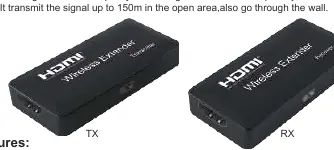
Connection and Operation
Follow these steps to set up the wireless extender:
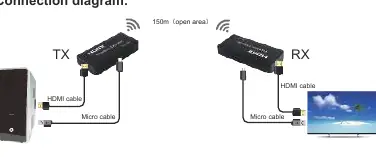
- Connect the HD source device to the input of the Transmitter (TX) using an HDMI cable.
- Connect the output of the Receiver (RX) to your display device using an HDMI cable.
- Connect power to both the TX and RX units using the provided Micro USB cables.
Pairing Instructions
The transmitter and receiver are matched at the factory. If you need to re-pair them (e.g., when using a different transmitter or receiver), follow these steps:
- Connect both the transmitter and receiver to a power supply.
- Use an HDMI cable to connect the HDMI port of the Transmitter to the HDMI port of the Receiver.
- Wait approximately 10 seconds for the code matching to complete.
Technical Specifications
- HDMI Resolution: Up to 1920x1080p at 60Hz
- Audio Format: Stereo audio
- Max Bandwidth: 148.5MHz
- Max Baud Rate: 1.485Gbps
- Cable Distance: ≤8m (AWG26 HDMI standard cable) for both input and output
- Operating Temperature: -15°C to +55°C
- Dimensions: 70 x 33 x 13 mm
- Power Consumption: TX: 800mA; RX: 500mA
Package Contents
- 1x HDMI Transmitter
- 1x HDMI Receiver
- 2x HDMI cables (0.2M)
- 2x Micro USB cables
- 1x User manual
Practical help
Common problems
Need to re-pair transmitter and receiver
Connect the TX and RX units directly using an HDMI cable while both are powered on for 10 seconds to complete the matching process.
Signal interference
The device utilizes 2.4G/5G frequency bands to reduce interference from other wireless signals.
Before use
- Ensure both TX and RX units are connected to a power source via Micro USB.
- Use AWG26 HDMI standard cables for optimal performance.
- Verify that the distance between units does not exceed 150m in open space or 40m through walls.
- Ensure the HDMI source and display are compatible with 1080p/60Hz resolution.
Specs in practice
- HDMI Resolution
- Supports high-definition video up to 1920x1080p at 60Hz.
- Max Baud Rate
- 1.485Gbps, ensuring sufficient data throughput for HD video.
- Operating Temperature
- The device functions within a range of -15°C to +55°C.
Images and diagrams
- The connection diagram illustrates the signal flow from the HD source into the TX unit, wirelessly to the RX unit, and finally to the display device.
- Both units require a separate Micro USB power connection.
Model compatibility
- Supports HDCP 1.3.
- Supports one-to-one and one-to-four transmission modes.
- Compatible with standard IEEE802.11a/b/g/n wireless protocols.

Manual page author
Emily Carter
User documentation editor
Prepares concise manual descriptions and highlights the most useful setup, operation, and maintenance information for readers.