Electronics / USB Extenders
User manual for Speaka Professional HDMI Wireless Extender 150m
Quick guide for the Speaka Professional HDMI Wireless Extender 150m. Learn how to set up wireless HDMI transmission, configure Splitter and Switch modes, connect KVM peripherals, and troubleshoot signal issues.
Table of contents
Manual images
Click an image to enlargeQuick Guide
The Speaka Professional HDMI Wireless Extender allows for wireless transmission of 1080p HDMI signals up to 150 meters. For optimal performance, ensure a clear line of sight between the transmitter (TX) and receiver (RX) and keep the devices away from other wireless equipment like routers or microwaves, which may cause interference.
Device Overview
The receiver (RX) features several ports for versatile connectivity:
- DC 12V: Power input.
- HDMI OUT: Connection for display units (monitor, projector).
- AUX OUT: Audio output for external speakers.
- IR IN: Connection for the infrared receiver.
- USB K/M: USB port for keyboard and mouse control.
- RST: Reset button (press for >5 seconds to restore factory defaults).
- LED Indicators: PWR (power), LINK (data connection), and STA (status).
Installation
Before starting, ensure all devices are powered off. Screw the antennas onto the rear of the receiver and point them vertically upwards for the initial setup. Connect the power adapter (12V/1A) to the receiver and connect your monitor to the HDMI OUT port.
Operating Modes
The system supports two primary modes, which must be set on both the transmitter and receiver:
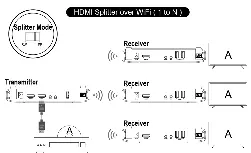
- Splitter Mode (SP): One transmitter to multiple receivers (up to 4).
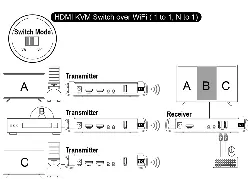
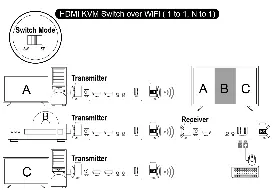
- Switch Mode (SW): One receiver to multiple transmitters (up to 32).
In Switch mode, you can toggle between different transmitters by changing the channel on the receiver.
Advanced Features
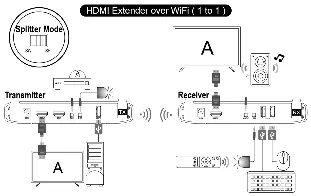
Remote Control (IR Repeater): Connect the infrared receiver to the RX unit and the infrared transmitter to the TX unit. Point the IR transmitter at the target device to relay signals.
KVM Function: Connect a keyboard and mouse to the USB K/M port on the receiver to control the PC connected to the transmitter remotely.
Audio Transmission: The device supports various audio configurations, including HDMI-to-HDMI, AUX-to-HDMI, and HDMI-to-AUX, allowing you to route audio independently or alongside video.
Troubleshooting
If you experience issues, follow these steps:
- No signal: Re-pair the units by switching both to SP mode, connecting them via HDMI, and waiting for the status LEDs to stop flashing.
- Poor range: Ensure there are no solid obstacles (steel, concrete) between units and that they are not placed behind other electronic devices.
- General malfunction: Check all cable connections, restart all devices, or perform a factory reset using the RST button.
Technical Data
The system operates on the 5 GHz frequency band (5.180 – 5.240 GHz) using IEEE 802.11a/n/ac standards. It supports HDMI 1.3 and HDCP 1.3 with a latency of ≤0.3 seconds. The operating temperature range is 0 to +45 °C.
Practical help
Common problems
Monitor connected to the receiver has no signal
Re-pair the RX and TX units: Switch both off, set both to SP mode, switch on, and connect TX HDMI-IN to RX HDMI-OUT with an HDMI cable until status LEDs stop flashing.
Short transmission range or signal loss
Ensure a clear line of sight. Avoid placing units behind TVs or near other wireless equipment like routers and microwaves.
General product malfunction
Check all cable connections, ensure you are within the transmission range, restart all devices, or reset the receiver to factory defaults.
Before use
- Ensure all devices are powered off before connection.
- Screw antennas onto the receiver (RX) and point vertically.
- Verify that the transmitter and receiver are set to the same mode (SP or SW).
- Ensure the transmitter and receiver are within 150m line-of-sight.
- Verify the 12V/1A power adapter is connected.
Specs in practice
- WLAN Standard
- IEEE 802.11a/n/ac, 5 GHz for wireless transmission.
Images and diagrams
- Diagrams illustrate the setup for 1-to-1 HDMI extension, Splitter mode (1 to N), and Switch mode (N to 1).
- IR repeater setup requires connecting the IR receiver to the RX unit and the IR transmitter to the TX unit.
Model compatibility
- Supports HDMI 1.3 and HDCP 1.3.
- Splitter mode supports up to 4 receivers.
- Switch mode supports up to 32 transmitters.

Manual page author
David Miller
Documentation analyst
Organizes user manual content into clear summaries, with attention to model details, product context, and everyday usability.