Electronics / AV Controllers
Extron 12G HD-SDI 101 Cable Equalizer Setup Guide
Quick setup guide for the Extron 12G HD-SDI 101 cable equalizer. Includes detailed wiring instructions for the 12V power connector, mounting options for rack or table, and troubleshooting steps for signal issues.
Table of contents
Manual images
Click an image to enlargeQuick guide from the manual
The Extron 12G HD-SDI 101 is a 1-input, 1-output signal equalizer designed to recondition and equalize digital video signals (SDI, HD-SDI, 3G-SDI, 6G-SDI, and 12G-SDI) to compensate for signal loss over long cable runs. Installation and service must be performed by authorized personnel only.
Connections and Indicators
The unit features a rear panel with a power connector, an HD-SDI input, and an HD-SDI output. The front panel includes a power LED indicator.
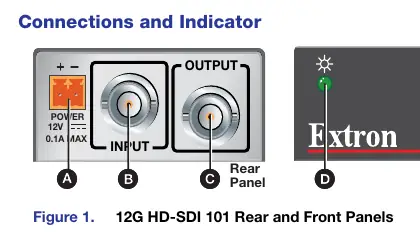
- Power connector: Connects to the provided external 12 VDC, 6 watt power supply using a 2-pole, 3.5 mm captive screw connector.
- HD-SDI input: Female BNC connector. Maximum cable length varies by format: 12G SDI (230 ft / 70 m), 6G SDI (295 ft / 90 m), 3G SDI (590 ft / 180 m), HD-SDI (787 ft / 240 m), and SDI (984 ft / 300 m).
- HD-SDI output: Female BNC connector providing an equalized and reclocked signal.
- Power LED: Lights green when the unit is receiving power.
Power Connector Wiring
Proper wiring of the power connector is critical to prevent damage to the unit.
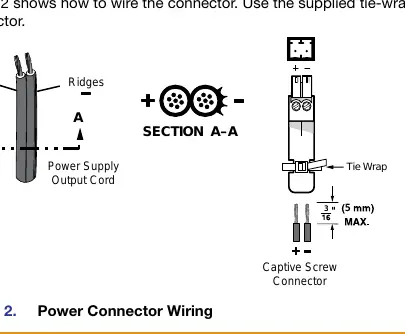
- Ensure power is removed before wiring.
- Strip the wires to an ideal length of 3/16 inch (5 mm).
- Do not tin the power supply leads before installation.
- Use the supplied tie-wrap to secure the power cord to the connector tail.
- Identify the negative lead by the ridges on the side of the cord.
- Verify polarity with a voltmeter before connecting to the unit.
Mounting the Unit
The unit can be installed in several ways:
- Tabletop Use: Affix the included rubber feet to the bottom of the unit.
- Rack Mounting: Use optional compatible mounting kits. Ensure the installation adheres to UL requirements, including maintaining adequate ambient temperature (max 122 °F / 50 °C), ensuring sufficient airflow, and providing reliable earthing.
Troubleshooting
If no image appears, perform the following checks:
- Verify that all devices are plugged in and powered on (check the green power LED).
- Ensure an active input is applied to the equalizer.
- Confirm that the proper signal format is being supplied.
- Inspect all cabling and make corrections if necessary.
- Contact the Extron S3 Sales & Technical Support Hotline if the issue persists.
Manufacturer information
Extron Electronics
Practical help
Common problems
No image appears on the display
Ensure the unit is powered (green LED lit), an active input is connected, the signal format is correct, and all cables are securely connected.
Power connector wiring issues
Ensure wires are stripped to exactly 3/16 inch (5 mm). Do not tin the wires. Ensure correct polarity (ridges on the cord indicate the negative lead).
Before use
- Verify the power supply is 12 VDC, 0.1A minimum.
- Ensure the installation environment is not an air handling space or wall cavity.
- Check that the cable length does not exceed the maximum for the specific SDI format.
- Confirm the power supply polarity before connection using a voltmeter.
- Ensure authorized personnel perform the installation.
Specs in practice
- 12G SDI Max Length
- 230 feet (70 meters)
- 6G SDI Max Length
- 295 feet (90 meters)
- 3G SDI Max Length
- 590 feet (180 meters)
- HD-SDI Max Length
- 787 feet (240 meters)
- SDI Max Length
- 984 feet (300 meters)
Images and diagrams
- The rear panel diagram identifies the power input, BNC input, and BNC output ports.
- The power connector wiring diagram illustrates the correct stripping length and polarity identification using the cord ridges.
Model compatibility
- Requires a UL Listed power source marked Class 2 or LPS.
- Not suitable for use in air handling spaces or wall cavities.
- Installation must comply with National Electrical Code ANSI/NFPA 70 and Canadian Electrical Code.

Manual page author
Michael Turner
Technical manual editor
Reviews PDF manuals for structure, safety notes, and practical product details so readers can find the right information quickly.