Tools / Power Tools
User Manual for HiKOKI DS 18DBSL and DV 18DBSL Cordless Drills
Quick guide for HiKOKI DS 18DBSL and DV 18DBSL cordless drills. Includes safety instructions, charging, operation, maintenance, and troubleshooting.
Table of contents
Manual images
Jump to the sectionQuick guide from the manual
This manual provides essential information for operating the HiKOKI DS 18DBSL (Cordless Driver Drill) and DV 18DBSL (Cordless Combi Drill). Always ensure the battery is charged before use and that the work area is clear of hidden obstructions like electrical wiring or pipes.
Safety Warnings
Follow all general power tool safety warnings, including keeping the work area clean, avoiding explosive atmospheres, and using appropriate personal protective equipment. Always wear eye protection. When using long drill bits, start at a low speed and maintain contact with the workpiece.
Names of Parts
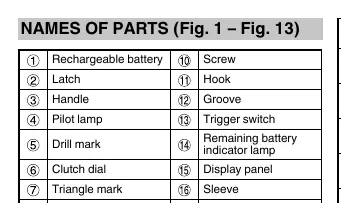
Key components include the rechargeable battery, handle, trigger switch, clutch dial, shift knob, and keyless chuck. Refer to the diagrams in the manual for specific locations.
Charging
Before using the tool, charge the battery. Connect the charger to a power source; the pilot lamp will blink in red. Insert the battery firmly into the charger. The pilot lamp will light continuously in red during charging and blink when charging is complete. If the lamp blinks rapidly, check for foreign objects in the battery terminal.
Mounting and Operation
The tool supports various actions including battery removal/insertion, tightening torque adjustment, drill/impact position selection, and rotation speed changes. Ensure the switch is off before changing speeds or settings.
LED Light Warning Signals
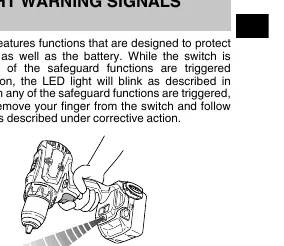
The tool features LED light signals to protect the tool and battery. If the LED blinks, it indicates either Overburden Protection (0.1s on/0.1s off) or Temperature Protection (0.5s on/0.5s off). Follow the corrective actions provided in the manual, such as adjusting the shift knob to LOW or allowing the tool to cool.
Maintenance and Inspection
Regularly inspect the tool for dull bits, loose mounting screws, and motor winding condition. Keep the tool clean and store it in a place where the temperature is below 40°C and out of reach of children.
Troubleshooting
If the tool does not operate normally, consult the troubleshooting table in the manual. Common issues include battery not charging, tool stopping suddenly, or bits not attaching properly. If problems persist, contact a HiKOKI Authorized Service Center.
Manufacturer information
HiKOKI
Practical help
Common problems
Tool doesn't run
Check if the battery is charged and securely attached until a click is heard.
Tool suddenly stopped
The tool may be overburdened or overheated. Release the switch, remove the cause of the overload, and allow the tool/battery to cool.
Battery takes a long time to charge
Charge in a warmer environment or ensure the charger vents are not blocked.
Before use
- Ensure the battery is fully charged
- Check that the work area is clean and well-lit
- Verify the area is free of hidden electrical wiring or pipes
- Ensure the drill bit is securely mounted in the keyless chuck
- Check that the rotation direction is set correctly
Images and diagrams
- Fig 1: Removing and inserting the battery
- Fig 2: Charging the battery
- Fig 14: LED light warning signals
Model compatibility
- Use only designated genuine HiKOKI batteries

Manual page author
Emily Carter
User documentation editor
Prepares concise manual descriptions and highlights the most useful setup, operation, and maintenance information for readers.