Tools / Power Tools
User Manual for HiKOKI WH 18DC Cordless Impact Driver
Quick guide and user manual for the HiKOKI WH 18DC Cordless Impact Driver. Includes safety instructions, operation, tightening modes, maintenance, and troubleshooting.
Table of contents
Manual images
Jump to the sectionQuick Guide
This manual provides essential information for the safe and efficient operation of the HiKOKI WH 18DC Cordless Impact Driver. Always read the safety warnings before use.
Safety Warnings
General Power Tool Safety: Keep your work area clean and well-lit. Do not operate power tools in explosive atmospheres. Keep children and bystanders away. Use personal protective equipment, including eye protection.
Cordless Impact Driver Safety: Hold the tool by insulated gripping surfaces when performing operations where the fastener may contact hidden wiring. Fasteners contacting a live wire may make exposed metal parts of the tool live and could give the operator an electric shock.
Battery and Charging
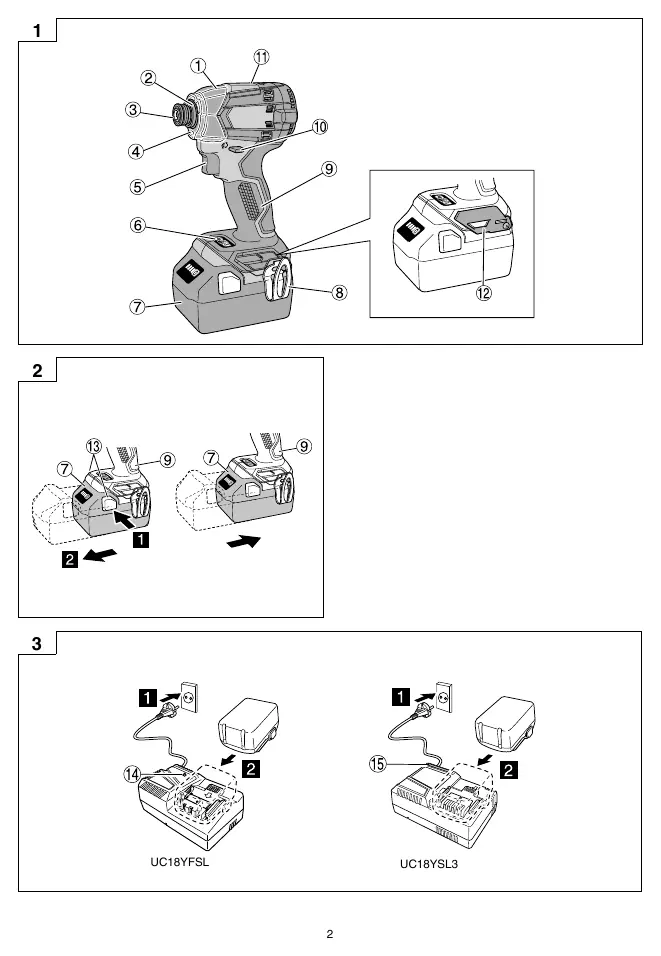
Before using the tool, ensure the battery is charged. The tool is compatible with HiKOKI 18V batteries. Use only the specified chargers (UC18YFSL or UC18YSL3). Follow the pilot lamp indications on the charger to determine the battery status (e.g., charging, fully charged, overheating).
Operation
Mounting the Bit
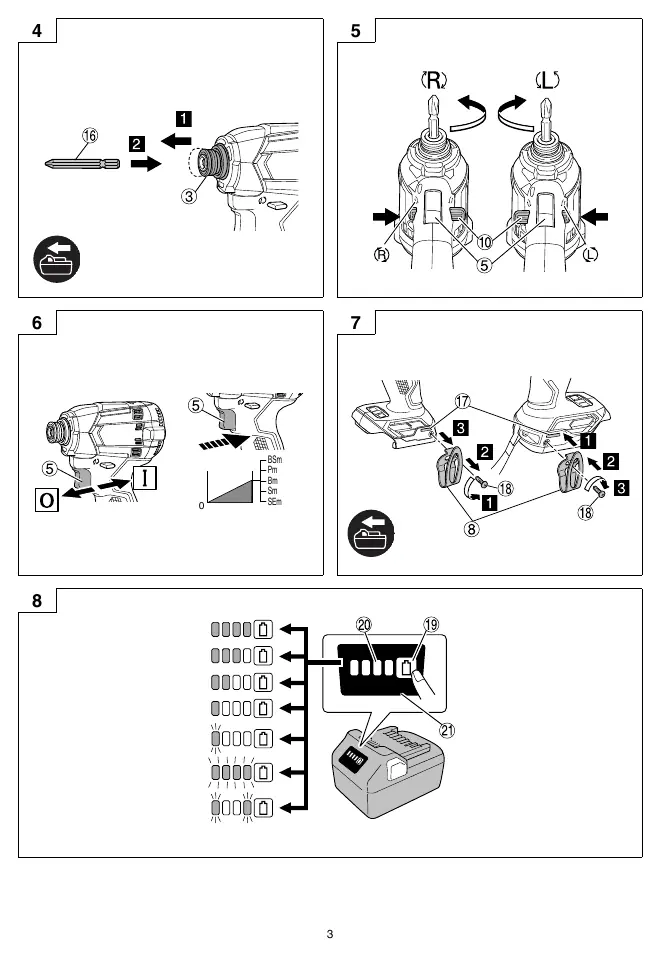
Insert the driver bit into the guide sleeve. Pull the bit lightly to ensure it is securely installed. If the guide sleeve does not return to its original position, the bit is not installed properly.
Tightening Modes
The tool features a tightening mode selector switch. Press the switch to cycle between 5 modes:
- Soft mode: For delicate work (e.g., thin nails, decorative materials).
- Power mode: For normal to heavy-load work.
- Bolt mode: Ideal for high-speed tightening.
- Bolt single mode: Controls impact for delicate work (e.g., racks, fences, furniture).
- Self-drilling screw mode: Reduces the risk of overtightening.
LED Light
Press the light section switch to change the lighting mode: Always ON → SW interlocked → OFF. The light turns off automatically after about 2 minutes to conserve battery.
Maintenance and Inspection
- Driver Bit: Replace broken or worn bits immediately.
- Mounting Screws: Regularly inspect and tighten all mounting screws.
- Motor: Keep the motor winding clean and free from oil or water.
- Terminals: Keep the tool and battery terminals free of swarf and dust.
- Cleaning: Wipe the tool with a soft, dry cloth or a cloth moistened with soapy water. Do not use solvents.
Troubleshooting
If the tool does not operate normally, check the following:
- Tool doesn't run: Check battery charge or if the safety function was activated (release and pull the trigger again).
- Tool suddenly stopped: Overburdened, battery overheated, or trigger held for 5+ minutes.
- Tool bits fall off: Ensure the bit has a 6.35mm hexagonal shaft and is properly installed.
Manufacturer information
HiKOKI
Practical help
Common problems
Tool doesn't run
Charge the battery or release the trigger switch and pull it again if the safety function was activated.
Tool suddenly stopped
Tool was overburdened, battery is overheated, or trigger was held for 5+ minutes.
Tool bits fall off
Ensure the bit has a 6.35mm hexagonal shaft and is properly installed.
Before use
- Check battery charge
- Ensure work area is clean and well-lit
- Check bit is properly installed
- Check rotation direction
Specs in practice
- Tightening modes
- Adjustable torque settings for different tasks (Soft, Power, Bolt, Bolt Single, Self-drilling).
Images and diagrams
- Fig 1: Parts identification
- Fig 2: Battery removal/insertion
- Fig 3: Charger connection
- Fig 5: Rotation direction
- Fig 10: Tightening mode selector
Model compatibility
- Compatible with HiKOKI 18V batteries
- Chargers UC18YFSL and UC18YSL3

Manual page author
Emily Carter
User documentation editor
Prepares concise manual descriptions and highlights the most useful setup, operation, and maintenance information for readers.