Tools / Power Tools
User Manual for HiKOKI WH 18DE Cordless Impact Driver
Quick guide and user manual for the HiKOKI WH 18DE Cordless Impact Driver. Includes safety instructions, operation, maintenance, and troubleshooting.
Table of contents
Manual images
Jump to the sectionQuick guide from the manual
This manual provides essential information for the safe and efficient operation of the HiKOKI WH 18DE Cordless Impact Driver. Always read the safety warnings before use.
Description of the tool
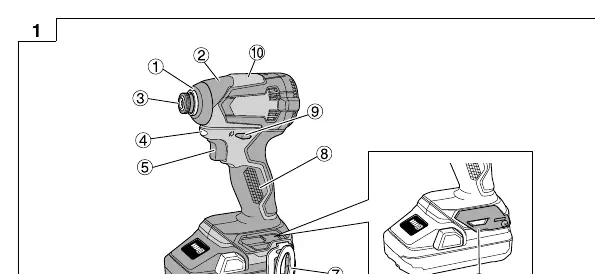
The WH 18DE is a portable cordless impact driver designed for tightening and loosening screws, bolts, and nuts. It features an LED light for visibility and a temperature protection circuit to prevent motor damage.
Operation
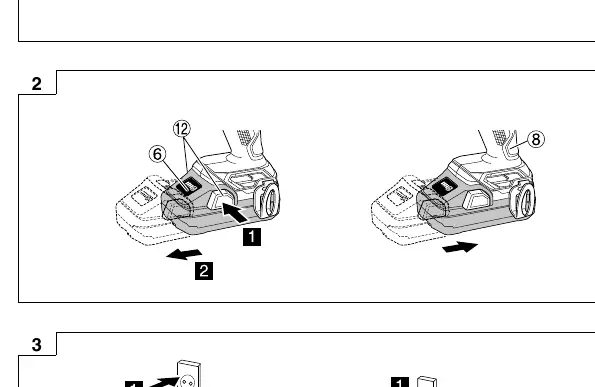
- Battery: To remove or insert the battery, use the latch mechanism (Fig. 2).
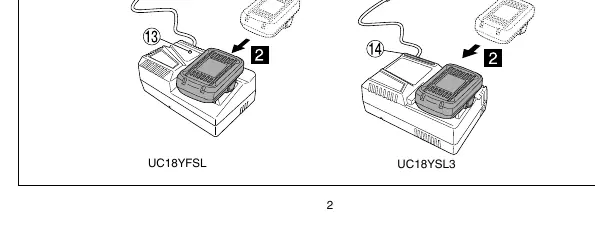
- Charging: Use the specified charger (UC18YFSL or UC18YSL3). Insert the battery firmly (Fig. 3). The pilot lamp indicates the charging status (see tables in the manual).
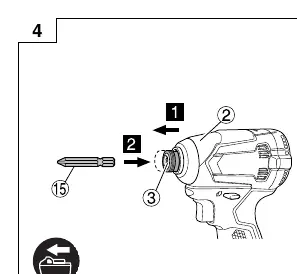
- Mounting the bit: Insert the bit into the guide sleeve (Fig. 4). Pull lightly to ensure it is secure.
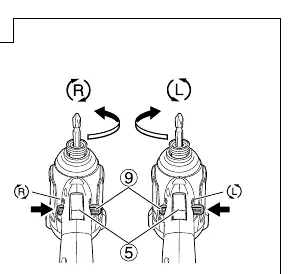
- Rotation: Use the push button to reverse the rotational direction (Fig. 5).
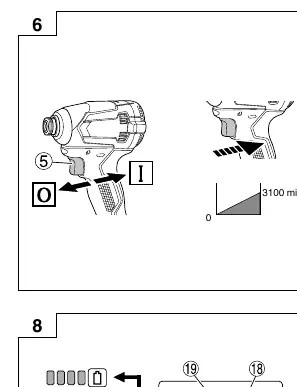
- Switching: Use the trigger switch to operate the tool (Fig. 6).
Maintenance and Inspection
- Driver bit: Regularly inspect for wear or damage. Replace if necessary.
- Mounting screws: Periodically check all screws for tightness.
- Motor: Keep the motor winding clean and free from oil or water.
- Cleaning: Wipe the exterior with a soft, dry cloth or a cloth moistened with soapy water. Do not use solvents.
- Storage: Store in a cool, dry place (below 40°C) out of reach of children.
Troubleshooting
If the tool does not operate normally, check the following:
- Tool doesn't run: Check battery charge or if the safety function was activated (release and pull the trigger again).
- Tool suddenly stopped: The tool may be overburdened or the battery overheated. Allow the tool and battery to cool.
- Bit issues: Ensure the bit shape matches the tool and is properly installed.
Manufacturer information
HiKOKI
Practical help
Common problems
Tool doesn't run
Charge the battery or release and pull the trigger switch again if the safety function was activated.
Tool suddenly stopped
The tool was overburdened (remove the cause) or the battery is overheated (let it cool down).
Tool bits fall off or cannot be attached
Ensure you are using a bit with a hexagonal shaft (6.35 mm width across flats) and that it is properly installed.
Before use
- Ensure the work area is clean and well-lit.
- Check that the battery is fully charged.
- Verify the bit is correctly installed and secure.
- Check that the rotation direction is set correctly.
- Ensure the battery is firmly inserted.
Specs in practice
- No-load speed
- The rotational speed of the tool when not under load.
- Tightening torque
- The maximum force applied to the fastener.
Images and diagrams
- Fig 1: Overview of parts including trigger, LED light, and battery.
- Fig 2: Battery removal and insertion procedure.
- Fig 3: Battery charging process with UC18YFSL and UC18YSL3.
- Fig 4: Mounting the driver bit.
- Fig 5: Reversing the rotational direction.
Model compatibility
- Compatible with HiKOKI BSL14xx and BSL18xx series batteries.
- Compatible with UC18YFSL and UC18YSL3 chargers.

Manual page author
David Miller
Documentation analyst
Organizes user manual content into clear summaries, with attention to model details, product context, and everyday usability.