Tools / Drills
User Manual for HiKOKI DS 18DD / DV 18DD Cordless Driver Drill
Quick guide and user manual for the HiKOKI DS 18DD and DV 18DD cordless driver drills. Includes setup, operation, battery charging, maintenance, and troubleshooting.
Table of contents
Manual images
Jump to the sectionQuick Guide
This manual covers the operation and maintenance of the HiKOKI DS 18DD and DV 18DD cordless driver drills. Key operations include battery installation, bit mounting, adjusting torque and speed, and mode selection. Always ensure the tool is stopped before changing settings.
Safety Warnings
- General: Keep work area clean and well-lit. Do not operate in explosive atmospheres. Keep children and bystanders away.
- Electrical: Do not expose tools to rain or wet conditions. Do not abuse the cord.
- Personal: Stay alert, wear eye protection, and avoid loose clothing.
- Battery: Use only designated chargers. Do not short-circuit terminals. Do not dispose of batteries in fire.
Parts Identification
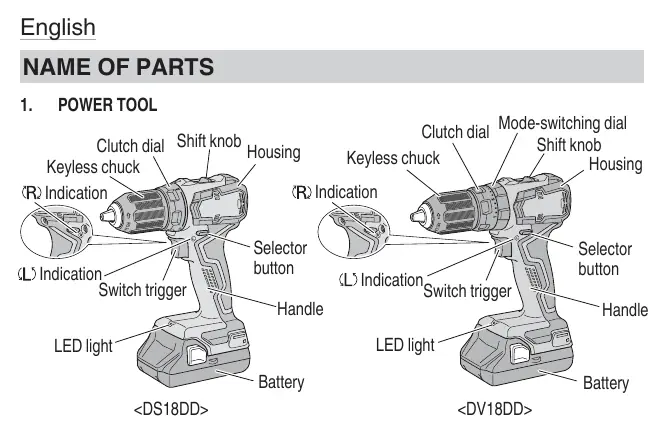
The tool features a keyless chuck, clutch dial, mode-switching dial (DV18DD only), shift knob, switch trigger, LED light, and battery mount.
Specifications
- Voltage: 18 V
- No-load speed: Low: 0-440/min, High: 0-1700/min
- Impact rate (DV18DD only): Low: 0-6600/min, High: 0-25500/min
- Drill chuck capacity: 2.0 - 13 mm
Battery Charging
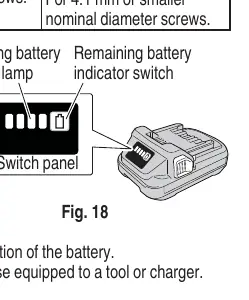
Before use, charge the battery using the specified charger. The pilot lamp indicates the status:
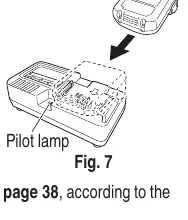
- Blinking red (1s interval): Before charging.
- Continuous red: Charging in progress.
- Blinking red (1s interval): Charging complete.
- Blinking red (0.5s interval): Overheat standby (let battery cool).
- Flickering red (0.1s interval): Malfunction (contact service center).
Operation
Bit Mounting
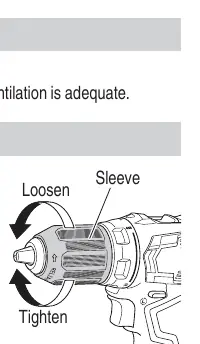
Loosen the sleeve by turning it counterclockwise, insert the bit, and tighten the sleeve clockwise to secure.
Rotation and Speed
Use the selector button to change rotation direction. Use the shift knob to select speed (LOW for high torque, HIGH for high speed).
Clutch and Mode Settings
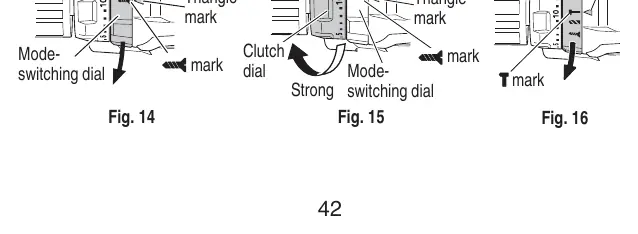
- Clutch Dial: Adjusts tightening torque (1-20). Do not set between numbers.
- Mode Switching (DV18DD): Switch between screwdriver, drill, and impact drill modes by aligning the mark with the triangle on the body.
Maintenance and Inspection
- Inspect the tool regularly for dullness or damage.
- Check mounting screws for tightness.
- Keep terminals free of swarf and dust to prevent short circuits.
- Store in a cool, dry place (below 40°C) out of reach of children.
Troubleshooting
If the tool fails to operate, check the battery charge and connection. If the tool stops suddenly, it may be overloaded or overheated; allow it to cool. If the battery will not charge, ensure it is correctly inserted and the charger is plugged in.
Manufacturer information
HiKOKI
Practical help
Common problems
Tool doesn't run
Check battery charge level or ensure the battery is securely attached until a click is heard.
Tool suddenly stopped
The tool is overburdened or overheated. Release the switch, remove the cause of the overload, and allow the tool and battery to cool.
Battery will not charge
Ensure the battery is correctly inserted into the charger and the charger is plugged into a working outlet. If the battery is too hot or cold, move it to a suitable temperature environment.
Bit falls out or cannot be attached
Ensure the bit diameter is within the 2-13 mm range. If the chuck lock is worn, contact an authorized service center.
Before use
- Ensure the work area is clean and well-lit.
- Check that the battery is fully charged.
- Ensure the bit is securely mounted in the keyless chuck.
- Verify the rotation direction is set correctly.
- Check that the clutch dial and mode switch are set appropriately for the task.
Specs in practice
- No-load speed
- Rotational speed without resistance. Low: 0-440/min, High: 0-1700/min.
- Drill chuck capacity
- The range of bit shank diameters the chuck can hold (2.0 - 13 mm).
Images and diagrams
- Fig 3: Overview of tool parts and controls.
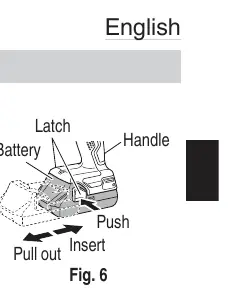
- Fig 6: How to remove and install the battery pack.
- Fig 7: Proper battery insertion into the charger.
- Fig 8: Mounting and dismounting drill bits.
- Fig 12/14-16: Adjusting the clutch dial and mode-switching dial.
Model compatibility
- Use only genuine HiKOKI batteries.
- DV18DD model includes an impact drilling mode for brick and concrete.
- Do not use the impact setting for materials that can be bored by rotation only.

Manual page author
Michael Turner
Technical manual editor
Reviews PDF manuals for structure, safety notes, and practical product details so readers can find the right information quickly.