Tools / Drills
User Manual for HiKOKI DH 18DPA Cordless Rotary Hammer
Quick guide for the HiKOKI DH 18DPA Cordless Rotary Hammer. Includes setup, operation modes, safety warnings, maintenance, and troubleshooting.
Table of contents
Manual images
Jump to the sectionQuick guide from the manual
The HiKOKI DH 18DPA is a cordless rotary hammer designed for drilling in concrete, tile, steel, and wood. It features a Reactive Force Control (RFC) system to reduce jerking and an auto-stop function for consistent drilling. Always ensure the battery is charged and the tool is switched off before performing any adjustments or maintenance.
Product Overview
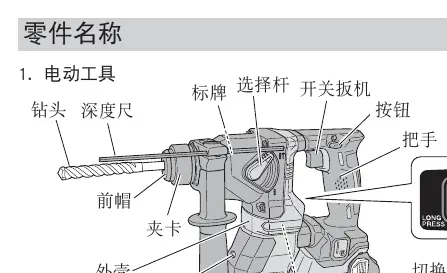
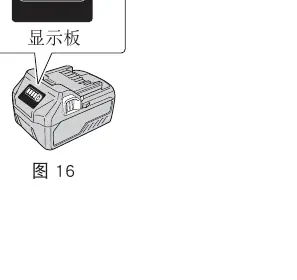
The tool consists of a main body with a switch trigger, change lever for mode selection, side handle, and a display panel. The battery is removable and features a remaining capacity indicator. The tool uses SDS-plus shank drill bits.
Safety Warnings
- Personal Safety: Always wear eye protection and ear protectors. Keep children and bystanders away.
- Battery Safety: Charge only with specified chargers. Do not short-circuit terminals. Keep battery away from metal objects.
- Operation Safety: Hold the tool firmly by the body and side handles. Do not touch the bit immediately after operation as it becomes very hot.
- Environment: Do not operate in explosive atmospheres. Ensure the work area is clean and well-lit.
Battery and Charging
Charge the battery at an ambient temperature between 0°C and 40°C. The pilot lamp on the charger indicates the status:
- Blinking Red (1s interval): Before charging or charging complete.
- Continuous Red: Charging in progress.
- Blinking Red (0.5s interval): Overheat standby.
- Flickering Red (0.1s interval): Malfunction.
Operation

Mode Selection
Use the change lever to switch between modes:
- Rotation + Hammering: For drilling in concrete or tile.
- Rotation only: For drilling in steel or wood (requires optional drill chuck and adapter).
Auto Stop Function
This function stores the time taken for a drilling operation to allow for consistent repetitive drilling. Press the changeover switch for over two seconds to enter memory mode, then perform the drilling operation. The tool will record the time and stop automatically in subsequent operations.
Reactive Force Control (RFC)
If the bit is suddenly overburdened, the RFC feature stops the motor to reduce jerking. If this occurs, the RFC indicator lamp will blink. Release the switch, remove the cause of the overburden, and resume operation.
Maintenance and Inspection
- Cleaning: Regularly clean the battery installation compartment and terminals of concrete dust using a dry cloth.
- Grease: The tool uses low-viscosity grease. If grease leaks from loosened screws, contact an authorized service center for replacement.
- Storage: Store the tool in a place with a temperature below 40°C, out of reach of children. Ensure the battery is fully charged before long-term storage.
Troubleshooting
If the tool does not operate normally, check the following:
- Tool doesn't run: Check battery charge and ensure it is securely attached.
- Tool suddenly stopped: Check for overload or if RFC was activated. Let the battery cool if overheated.
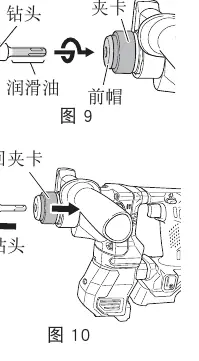
- Drill bits fall off: Ensure the correct SDS-plus shank bit is used and properly latched.
Manufacturer information
HiKOKI
Practical help
Common problems
Tool does not run
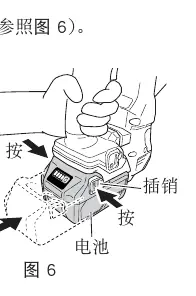
Check battery charge and ensure it is securely attached until a click is heard.
Tool suddenly stopped
Check for overload or if Reactive Force Control (RFC) was activated. Let the battery cool if overheated.
Drill bits cannot be attached or fall off
Ensure the correct SDS-plus shank bit is used and properly latched.
Holes cannot be drilled smoothly
Check if the drill bit is worn or rotating in reverse.
Before use
- Ensure the battery is fully charged.
- Check that the power switch is in the OFF position before inserting the battery.
- Clean battery terminals of any dust or swarf.
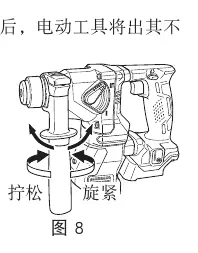
- Ensure the side handle is securely tightened.
- Verify the correct operation mode (Rotation or Rotation + Hammering).
Specs in practice
- No-load speed
- 0-1080/min
- Full-load impact rate
- 0-5500/min
- Capacity (Concrete)
- 3.4-18mm
Images and diagrams
- Fig 3: Overview of tool parts including switch trigger, change lever, and display panel.
- Fig 6: Battery removal and installation procedure.
- Fig 19-21: Operation mode selection using the change lever.
Model compatibility
- Compatible with HiKOKI Multi Volt or BSL18 series batteries.
- Use only genuine HiKOKI parts for drill bits and accessories.

Manual page author
David Miller
Documentation analyst
Organizes user manual content into clear summaries, with attention to model details, product context, and everyday usability.