Tools / Power Tools
Operating Instructions for Hilti AG 125-7SE / AG 125-8SE Angle Grinder
Quick guide for the Hilti AG 125-7SE and AG 125-8SE angle grinders. Includes setup, safety instructions, disc replacement, operation, and maintenance procedures.
Table of contents
Manual images
Click an image to enlargeQuick guide from the manual
This document provides essential operating instructions for the Hilti AG 125-7SE and AG 125-8SE angle grinders. These tools are designed for professional use in cutting, grinding, and sanding metal and mineral materials. Always read the full safety warnings before use. Ensure the tool is disconnected from the power supply before making any adjustments or changing accessories.
Product Overview
The angle grinder consists of several key components, including the arbor lockbutton, on/off switch, speed adjustment thumbwheel, side handle, and various guards. Refer to the product overview illustration for specific part identification.
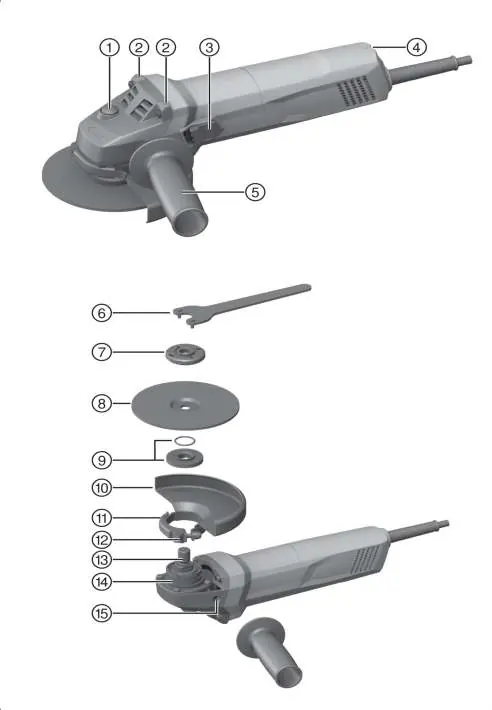
Safety Instructions
- Personal Protective Equipment: Always wear eye protection, dust mask, and appropriate clothing.
- Work Area: Keep the area clean, well-lit, and free from flammable materials.
- Operation: Maintain a firm grip with both hands. Never place hands near the rotating accessory.
- Kickback: Avoid pinching or snagging the accessory. Use the correct guard for the specific application.
- Electrical Safety: Ensure the power cord is undamaged and the plug matches the outlet. Use an RCD if operating in damp locations.
Operation
Fitting the Guard: Release the clamping lever, fit the guard onto the spindle collar, rotate to the desired position, and secure by closing the clamping lever.
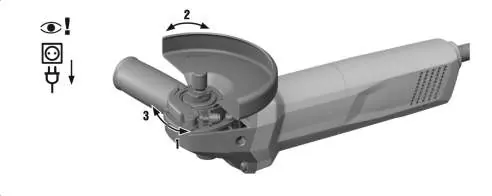
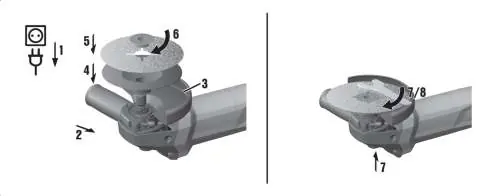
Fitting Discs: Disconnect the power. Ensure the O-ring is in the clamping flange. Fit the flange, the disc, and the clamping nut. Use the pin wrench to tighten the nut while holding the spindle lockbutton.
Switching On/Off: Press the rear section of the on/off switch and slide it forward to lock. Press the rear section to switch off.
Care and Maintenance
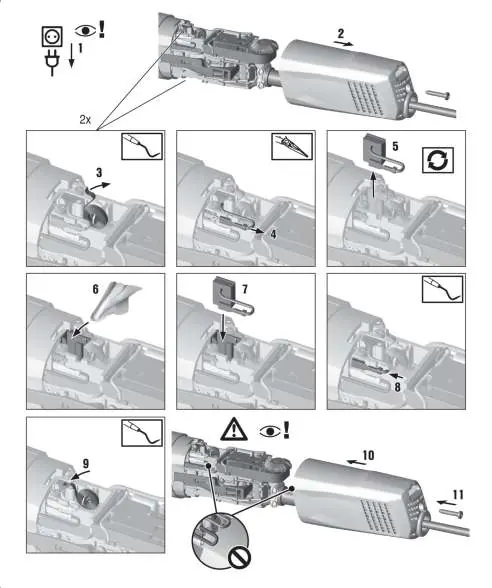
Regularly clean air vents with a dry brush. Do not use water or steam cleaners. If the tool fails to start, check the power supply, supply cord, and carbon brushes. Electrical repairs must be performed by trained specialists using genuine Hilti spare parts.
Troubleshooting
If the tool does not start, check for power supply interruptions, damaged cords, or worn carbon brushes. If the tool is overloaded, release the switch, press it again, and run under no load for 30 seconds. If the tool lacks power, ensure the extension cord has an adequate conductor cross-section.
Manufacturer information
Hilti Corporation
Practical help
Common problems
Tool does not start
Check power supply, inspect supply cord/plug for damage, or replace worn carbon brushes.
Tool does not work
Tool may be overloaded. Release the on/off switch, press it again, and allow the tool to run under no load for approx. 30 seconds.
Tool does not achieve full power
The extension cord conductor cross-section (gauge) is inadequate. Use a cord with a larger cross-section.
Before use
- Check for damaged power cord or plug.
- Ensure the correct guard is fitted for the specific application (grinding vs. cutting).
- Verify the disc is compatible, undamaged, and within the max diameter (125mm).
- Wear eye protection and appropriate PPE.
- Ensure the switch is in the off position before plugging in.
Specs in practice
- Spindle thread
- M14 standard thread.
Images and diagrams
- Page 2: Overview of components (1-15).
- Page 4: Guard fitting and disc mounting procedures.
- Page 7: Carbon brush replacement steps.
- Page 6: Switch replacement procedure.
Model compatibility
- Use only synthetic-resin-bonded, fiber-reinforced wheels (max 125mm).
- Do not use cut-off wheels for grinding.
- Use specific dust hoods (DG-EX or DC-EX) when working on mineral materials.

Manual page author
Emily Carter
User documentation editor
Prepares concise manual descriptions and highlights the most useful setup, operation, and maintenance information for readers.