Tools / Power Tools
Operating Instructions for Hilti SFD 2-A12 Cordless Screwdriver
Quick guide for the Hilti SFD 2-A12 cordless screwdriver. Includes setup, operation, safety instructions, maintenance, and troubleshooting.
Quick answers from the manual
Quick answer
- The Hilti SFD 2-A12 is a hand-held cordless drill/driver for driving and removing screws, and for drilling in metal, wood, and plastic. p. 12, 27
Key actions
- Insert the battery into the tool until it engages with an audible click. p. 14, 29
- Set the forward/reverse switch to the middle position or remove the battery before changing accessories. p. 15, 29
First start
- Charge the battery fully before using it for the first time. p. 14, 29
Problems and fixes
The power tool does not work.
Insert the battery or charge it.
p. 18, 32Maintenance and reset
- Always remove the battery before carrying out care and maintenance tasks. p. 16, 31
Technical specifications
| Parameter | Value | Meaning | Pages |
|---|---|---|---|
| Rated voltage | 10.8 V | Battery operating voltage | p. 13, 27 |
Where to find it in the PDF
- Product Overview p. 2
- Technical Data p. 13, 27
- Troubleshooting p. 18, 32
Table of contents
Manual images
Click an image to enlargeQuick guide from the manual
The Hilti SFD 2-A12 is a professional-grade cordless drill/driver designed for driving screws and drilling in metal, wood, and plastic. Before using the tool, ensure the battery is fully charged and the tool is in perfect working order. Always remove the battery before performing any maintenance or changing accessories.
Product overview
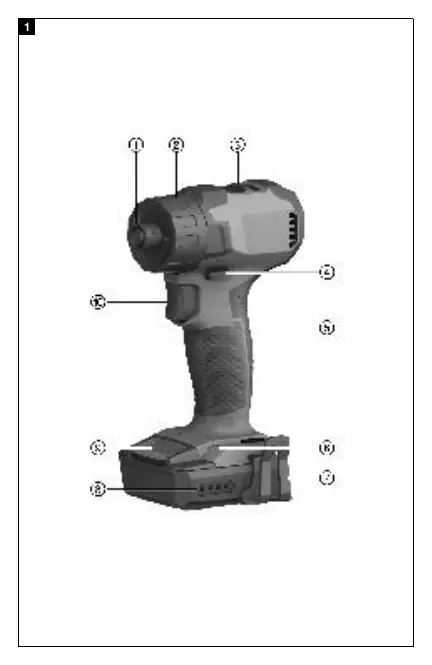
The tool features a 1/4" hex socket with a locking sleeve, a torque and drilling mode selector ring, a gear speed selection switch, and a forward/reverse selector switch with a safety lock. It also includes a battery state of charge indicator and a control switch with electronic speed control.
Preparation
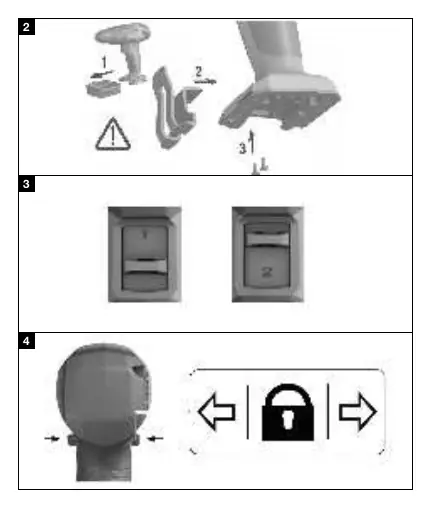
Before using the tool for the first time, charge the battery fully. Ensure the contacts on the battery and the charger are clean and dry. To insert the battery, push it into the battery holder until it engages with an audible click. To remove it, press the battery release buttons and pull the battery out.
Operation
To insert an accessory tool, set the forward/reverse switch to the middle position or remove the battery. Insert the tool into the chuck and check that it is held securely. Select the desired gear using the gear selector switch. Set the torque using the selector ring; note that torque is only limited in the screwdriving mode. Use the forward/reverse switch to select the direction of rotation. Press the control switch to start the tool; speed can be controlled steplessly by varying the pressure on the switch.
Care and maintenance
Remove stubborn dirt carefully and clean air vents with a dry brush. Use only a slightly damp cloth to clean the casing; do not use silicone-based cleaning agents. Keep battery contacts free from oil and grease. If the tool or battery gets very hot, it may be overloaded; check the technical data for application limits.
Transport and storage
Always transport and store the tool with the battery removed. Store in a cool, dry place, away from children and unauthorized persons. Never store batteries in direct sunlight, on heating units, or behind window panes.
Manufacturer information
Hilti Corporation
Practical help
Common problems
The power tool does not work.
Check if the battery is fully inserted or if it is discharged.
The battery runs down more quickly than usual.
Very low ambient temperature may affect battery performance; allow it to warm up to room temperature.
The tool or battery gets very hot.
The tool is overloaded; check the application limits in the technical data.
Before use
- Charge the battery fully.
- Ensure battery contacts are clean and dry.
- Check that the tool is switched off before inserting the battery.
- Ensure the belt hook is securely fitted if in use.
Images and diagrams
- 1: 1/4" hex socket with locking sleeve
- 2: Torque and drilling mode selector ring
- 3: Gear speed selection switch
- 4: Forward/reverse selector switch
- 8: Battery state of charge indicator
Model compatibility
- Use only Hilti Li-ion batteries of the B 12 series.
- Use only Hilti battery chargers of the C4/12 series.

Manual page author
Michael Turner
Technical manual editor
Reviews PDF manuals for structure, safety notes, and practical product details so readers can find the right information quickly.