Tools / Drills
Operating Instructions for Hilti SF 14-A and SFH 14-A Cordless Drill/Driver
Quick guide for the Hilti SF 14-A and SFH 14-A cordless drill/driver. Includes setup, operation, safety, maintenance, and troubleshooting.
Table of contents
Manual images
Click an image to enlargeQuick guide from the manual
This document provides essential operating instructions for the Hilti SF 14-A and SFH 14-A cordless drill/drivers. Always read the full documentation before initial operation to ensure safe and trouble-free handling.
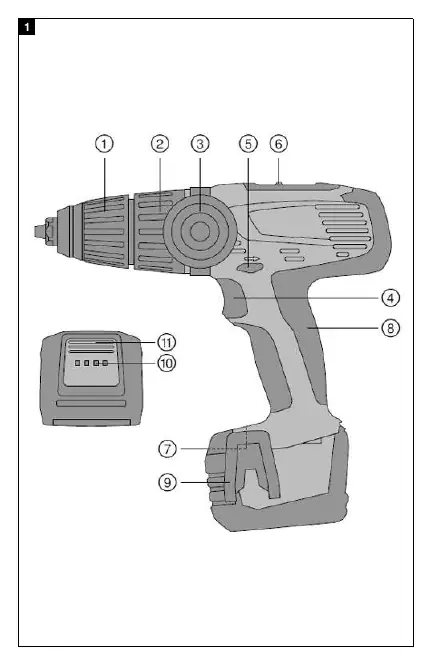
Product Overview
The drill/driver features a keyless chuck, torque and drilling mode selector ring, side handle, control switch, forward/reverse selector with safety lock, and gear speed selection switch. The battery includes a charge state indicator.
Intended Use
The SF 14-A is designed for driving and removing screws and for drilling in steel, wood, and plastic. The SFH 14-A includes these functions plus hammer drilling in cellular concrete and masonry. Use only Hilti B14 series Li-ion batteries and C4/36 series chargers.
Preparations
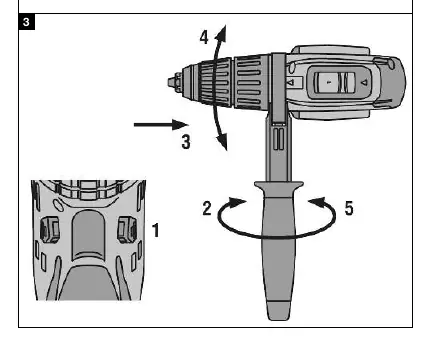

- Charging: Ensure battery contacts are clean and dry before charging. Use an approved Hilti charger.
- Inserting/Removing Battery: Push the battery into the holder until it engages with an audible click. Press the release buttons to remove.
- Side Handle: Adjust to the desired position.
- Belt Hook: Can be fitted to the left or right side of the tool base using two screws.
- Accessory Tool: Set the forward/reverse switch to the middle position. Open the keyless chuck, insert the tool, and turn the chuck firmly by hand until tight and clicks are heard.
Operation
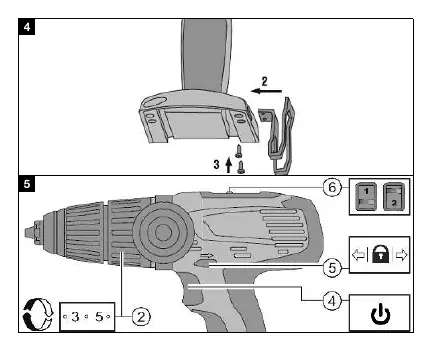
- Gear Selection: Adjust the two gear selector switches.
- Rotation: Set the forward/reverse switch to the desired direction. The switch is locked in the middle position.
- Switching On/Off: Press the control switch to start. Speed is controlled steplessly by varying the pressure. Release the switch to stop.
- Modes: Use the selector ring to choose between screwdriving, drilling, or hammer drilling (SFH 14-A only).
Care and Maintenance
Always remove the battery before maintenance. Clean air vents with a dry brush. Use a slightly damp cloth for the casing; do not use silicone-based cleaning agents. Check all parts for damage regularly.
Troubleshooting
If the tool does not work, check if the battery is fully inserted or needs charging. If the tool stops and all four LEDs blink, it may be overloaded or overheated; release the switch and allow the tool to cool down. If one LED flashes, the battery may be low or at an extreme temperature.
Manufacturer information
Hilti Corporation
Practical help
Common problems
The power tool does not work.
Check if the battery is fully inserted until it clicks, or if the battery is discharged and needs charging.
The power tool stops and all four LEDs blink.
The tool is overloaded or the overheating cut-out has been activated. Release the control switch, allow the tool to cool down, and clean the air vents.
The power tool does not work and one LED flashes.
The battery is discharged or at an extreme temperature. Charge the battery or bring it to the recommended operating temperature.
The on/off button is locked.
The forward/reverse selector switch is in the middle position. Push it to the left or right.
Before use
- Ensure the battery is fully charged.
- Check that battery contacts are clean and dry.
- Ensure the side handle is adjusted to the desired position.
- Verify the accessory tool is securely held in the keyless chuck.
- Set the forward/reverse switch to the desired rotation direction.
- Check that the torque/mode selector ring is set correctly for the task.
Specs in practice
- Rated voltage
- 14.4 V
- Speed in 1st gear
- 0 - 400 /min
- Speed in 2nd gear
- 0 - 1300 /min
- Speed in 3rd gear (SFH 14-A)
- 0 - 2250 /min
Images and diagrams
- 1: Keyless chuck
- 2: Torque and drilling mode selector ring
- 3: Side handle
- 4: Control switch
- 5: Forward/reverse selector with safety lock
Model compatibility
- Use only Hilti Li-ion batteries of the B14 series.
- Use only Hilti battery chargers of the C4/36 series.

Manual page author
David Miller
Documentation analyst
Organizes user manual content into clear summaries, with attention to model details, product context, and everyday usability.