Electronics / Televisions
User Manual for Hisense 120L5HTUKA Laser TV
Quick guide for the Hisense 120L5HTUKA Laser TV. Includes setup instructions, geometric image correction, remote control pairing, safety warnings, and troubleshooting tips.
Table of contents
Important Information
This Laser TV is designed for video and audio signal rendering in home or office environments. For your safety and optimal performance, read all instructions before installation. The device uses a laser module; do not look directly into the lens while the device is on, as laser light may damage your eyes.
Installation and Setup
Safety Precautions:
- Ensure the device is placed on a stable surface.
- Maintain at least 20 cm of free space on the sides and 5 cm on the back for proper ventilation.
- Do not block air vents or place the device in narrow, enclosed spaces.
- Connect all cables (HDMI, Antenna, LAN) to the ports on the back before positioning the unit.
- Two people are recommended when moving the device to protect the lens.
Connections:
- Connect the power cord to a wall outlet and press the Power button.
- Use the provided USB extension cable for easier access to USB ports.
- For network connectivity, use the LAN port or the built-in Wireless LAN Adapter.
Adjusting the Projected Image
The Laser TV features geometric correction to align the image with your screen:
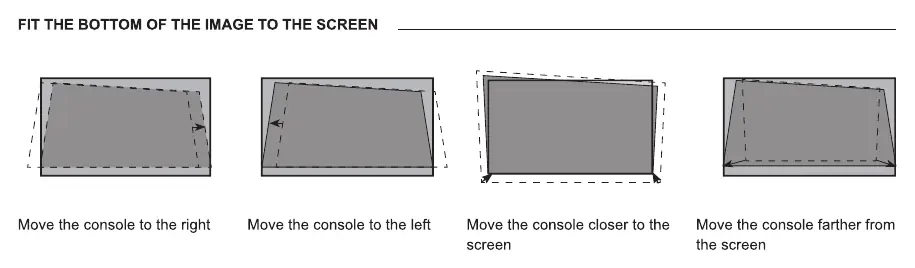
- Auto Geometric Correction: Ensure the device and your mobile device are on the same wireless network. Use the levelling feet to position the unit, then scan the QR code on the screen with your mobile device to start the automatic process.
- Manual Geometric Correction: Use the remote control buttons to select and adjust points to fit the image to the screen.
- Physical Adjustment: Use the wrench to rotate the feet to adjust the height and tilt of the console until the image is parallel with the screen.
Remote Control
Battery Installation: Slide the back cover open, insert two AA or AAA batteries, and close the cover. Do not mix old and new batteries or different battery types.
Pairing: After powering on, keep the remote close to the Laser TV and press any button (except power and mic) to pair. If pairing fails, press and hold the Menu button.
Maintenance and Care
- Cleaning: Unplug the device before cleaning. Use a soft, moist, color-neutral cloth. Do not use chemicals, solvents, or insect repellents.
- Lens Care: Do not touch the lens. Use a dust blower to remove dust. If cleaning is necessary, use professional optical cleaning cloth or lens wiping paper.
- Ventilation: Keep vents clear of dust and obstructions to prevent overheating.
Troubleshooting
- No sound or picture: Check if the power cord is plugged in, the unit is not in standby mode, and the input source is correctly selected.
- Distorted/wavy picture: Move the device away from other electric appliances that may cause interference.
- Remote not working: Check battery installation and ensure the device is not in standby mode.
- Black and white picture: Unplug the device for 60 seconds, check color saturation settings, and try different channels.
Technical Specifications
- Resolution: 3840 x 2160 (4K)
- Audio Power: 2 x 20 W
- Power Consumption: 350 W
- Wireless: IEEE802.11 a/b/g/n/ac/ax, Bluetooth 5.2
- Operating Conditions: 5°C - 40°C, 20% - 80% RH
Manufacturer information
Hisense
Practical help
Common problems
No sound or picture
Check if the power cord is connected to a powered outlet, ensure the unit is not in standby mode, and verify the correct input source is selected.
Distorted or wavy picture
An electric appliance may be causing interference. Turn off nearby appliances and move them farther away from the Laser TV.
Remote control does not work
Confirm the Laser TV has power, check that batteries are correctly installed, and replace them if necessary.
Black and white picture
Unplug the Laser TV from the AC outlet and replug it after 60 seconds. Check that the Colour Saturation setting is 50 or higher.
Before use
- Ensure two people handle the device when moving it.
- Connect all cables to the ports before positioning the unit.
- Remove protective materials from the lens.
- Ensure at least 20cm of free space on the sides and 5cm on the back for ventilation.
- Ensure the device is on a stable, level surface.
Specs in practice
- Screen Resolution
- 3840 x 2160 pixels (4K UHD).
- Power Consumption
- 350 W during operation; ≤ 0.5 W in standby.
- Wireless Connectivity
- Supports IEEE802.11 a/b/g/n/ac/ax and Bluetooth 5.2.
Images and diagrams
- The Laser TV features a remote control receiver, power indicator, and eye protection sensor on the front.
- Rear ports include HDMI 1/2/3, USB 1/2, LAN, Digital Audio Out, Headphone jack, and Antenna inputs.
Model compatibility
- Supports HDMI 4K@60Hz.
- Wireless network requires DHCP support from the router.
- Does not support external USB network adapters.
- Requires CI+ module and card from the service provider for encrypted channels.

Manual page author
Michael Turner
Technical manual editor
Reviews PDF manuals for structure, safety notes, and practical product details so readers can find the right information quickly.