Home / Seasonal Decorations
User Manual for Home Accents Holiday 3FT LED Pumpkin Twins 22PA36370
Quick guide for the Home Accents Holiday 3FT LED Pumpkin Twins (22PA36370). Includes assembly instructions, battery installation, operation modes (ON/SENSOR/OFF), and troubleshooting tips.
Quick answers from the manual
Quick answer
- The Home Accents Holiday 3FT LED Pumpkin Twins (22PA36370) is an animated decoration powered by 3 AA batteries. It features three operation modes: ON (continuous), SENSOR (motion/sound activated), and OFF. p. 1
Key actions
- Install 3 AA batteries in the compartment on the back of the boy pumpkin. p. 1
- Set the switch to 'SENSOR' for motion and sound activation. p. 1
First start
- Assemble the pumpkin bodies to the foot supports, install 3 AA batteries, and set the switch to the desired mode. p. 1
Show 4 more answers Show less
Problems and fixes
Product does not work
Check battery polarity and replace batteries.
p. 1
Sound does not work
Ensure sound source is within 39.5 inches (100cm).
p. 1Maintenance and reset
- Remove batteries if the product will be unused for a long period. p. 1
Technical specifications
| Parameter | Value | Meaning | Pages |
|---|---|---|---|
| Batteries | 3 x AA | Required power source | p. 1 |
| Sensor Range | 39.5 inches (100cm) | Maximum distance for sound activation | p. 1 |
Where to find it in the PDF
- Assembly and Operation p. 1
Table of contents
Manual images
Click an image to enlargeQuick Guide
The Home Accents Holiday 3FT LED Pumpkin Twins (22PA36370) is an animated Halloween decoration. This guide covers the assembly, battery installation, and operation modes to ensure proper functionality.
Assembly
Follow these steps to assemble the product:
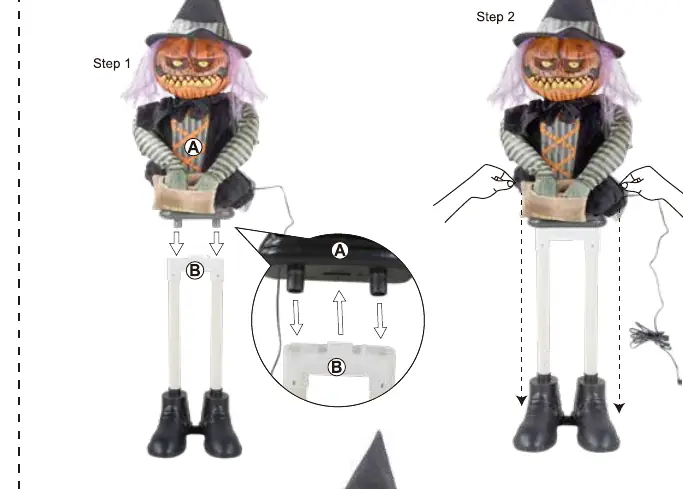
- Connect the Girl Pumpkin Body and Boy Pumpkin Body to the respective Foot Supports as shown in the assembly diagram.
- Ensure all connections are secure before operation.
Battery Installation and Operation
The unit is battery-operated and requires 3 AA batteries (not included).
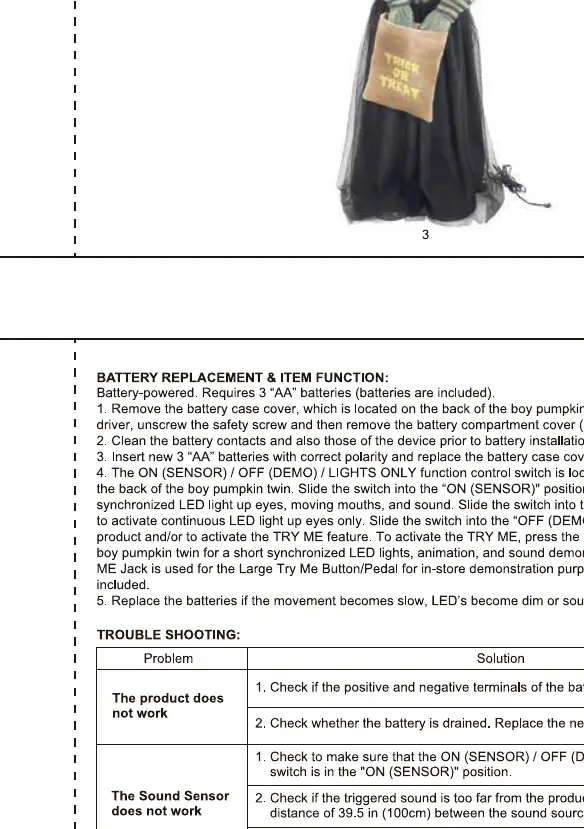
- Battery Installation: Locate the battery compartment on the back of the boy pumpkin. Use a small screwdriver to remove the screw and open the cover. Insert 3 AA batteries, ensuring correct polarity. Replace the cover and screw.
- Operation Modes: Use the switch on the control box to select the desired mode:
- ON: The LED lights stay on continuously, and the unit plays sounds and moves.
- SENSOR: The unit is activated by motion or sound.
- OFF: The unit is powered off.
- Try Me Button: The "TRY ME" jack is for the Large Try Me Button/Pedal (sold separately) for in-store demonstration purposes only.
Troubleshooting
If the product is not functioning correctly, check the following:
- Product does not work: Verify that the batteries are installed with the correct polarity. Replace with fresh batteries if necessary.
- Sound does not work: Ensure the sound trigger is not too far from the product (within 39.5 inches/100cm). If the sound is too quiet, ensure the environment is not too noisy.
Manufacturer information
Home Accents Holiday
Practical help
Common problems
Product does not work
Check that the batteries are installed with the correct polarity and replace them with fresh ones.
Sound does not trigger
Ensure the sound source is within 39.5 inches (100cm) of the product and that the environment is not too noisy.
Before use
- 3x AA batteries (not included)
- Small screwdriver for battery compartment
- Verify all parts are connected securely
- Set switch to desired mode (ON/SENSOR/OFF)
Show more Show less
Specs in practice
- Power Source
- Requires 3 AA batteries.
- Sensor Range
- Approximately 39.5 inches (100cm) for sound activation.
Images and diagrams
- Assembly diagram shows how to connect the pumpkin bodies to the foot supports.
- Control box diagram illustrates the location of the ON/OFF/SENSOR switch and battery compartment.
Model compatibility
- The 'TRY ME' jack is for store demonstration pedals only and is not required for home use.

Manual page author
David Miller
Documentation analyst