Furniture / TV Stands
Assembly and User Manual for Home Decorators Collection Hillrose 52" Electric Fireplace TV Stand
Comprehensive assembly and user guide for the Home Decorators Collection Hillrose 52" Electric Fireplace TV Stand (Model 2240FM-26-310). Includes step-by-step installation instructions, operating procedures for the heater and flame...
Quick answers from the manual
Quick answer
- This manual provides assembly instructions, operating procedures, and troubleshooting for the Home Decorators Collection Hillrose 52" Electric Fireplace TV Stand (Model 2240FM-26-310). p. 1, 18, 21
Key actions
- Assemble the unit p. 8, 9, 10, 11
- Operate the heater p. 18
- Engage/Disengage Heater Override p. 19
First start
- Plug into a grounded 120V outlet. Remove the plastic tab from the remote control. Use the control panel to set preferences. p. 4, 18
Show 5 more answers Show less
Problems and fixes
Error E1
Overheat sensor engaged. Unplug for 15-20 mins.
p. 21
Error E2
Thermostat sensor error. Unplug for 15-20 mins.
p. 21
Error E3
Heater override active. See page 19.
p. 21Error codes
| Code | Meaning | Action | Pages |
|---|---|---|---|
| E1 | Overheat sensor engaged | Unplug unit, wait 15-20 minutes, then plug back in. | p. 21 |
| E2 | Thermostat sensor broken or not working | Unplug unit, wait 15-20 minutes, then plug back in. | p. 21 |
| E3 | Heater override function engaged | See page 19 Heater Override Section. | p. 21 |
Maintenance and reset
- To reset the memory, unplug the unit from the wall. p. 19
Technical specifications
| Parameter | Value | Meaning | Pages |
|---|---|---|---|
| Voltage | 120V | Required power supply | p. 4 |
| Max Load | 70 lbs | Maximum weight for TV | p. 2, 17 |
Where to find it in the PDF
- Assembly Instructions p. 8, 9, 10, 11
- Operating Instructions p. 18, 19
- Troubleshooting p. 21
Table of contents
Manual images
Click an image to enlargeQuick guide from the manual
This document provides instructions for the assembly, operation, and maintenance of the Home Decorators Collection Hillrose 52" Electric Fireplace TV Stand. Before beginning, ensure you have a Phillips screwdriver and that all parts listed in the manual are present. The unit is designed for televisions up to 55 inches and weighing a maximum of 70 lbs.
Assembly and Installation
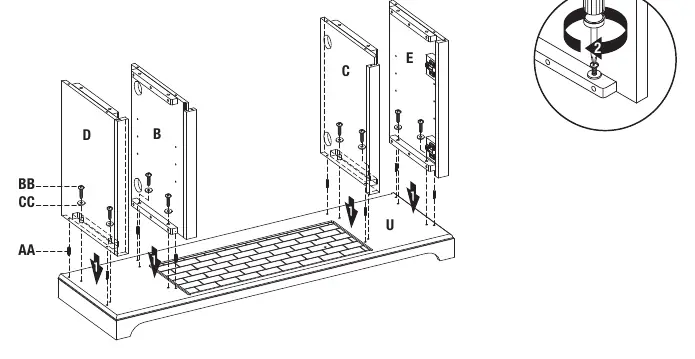
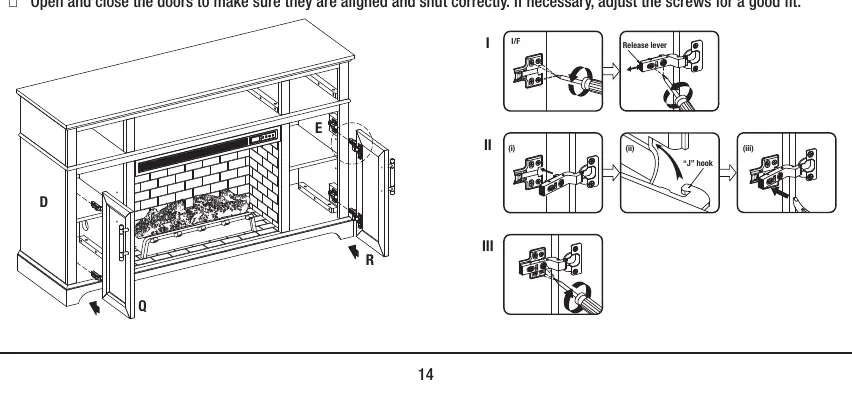
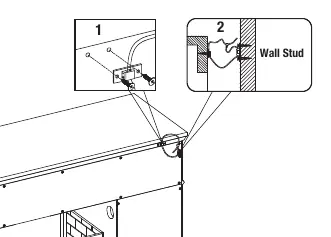
The assembly process involves 16 steps, including installing the base, walls, fireplace glass front, center shelf, outer panels, top, back panels, fireplace grate, fire log, L-brackets, brick wall, shelves, doors, and tip restraint hardware. Ensure the unit is placed on a level surface and use the included levelers if necessary. Warning: For safety, it is imperative that this unit be mounted to the wall or floor using the provided tip restraint hardware to prevent tipping.
Operating Instructions
The fireplace can be controlled via the control panel on the unit or the included remote control. Functions include:
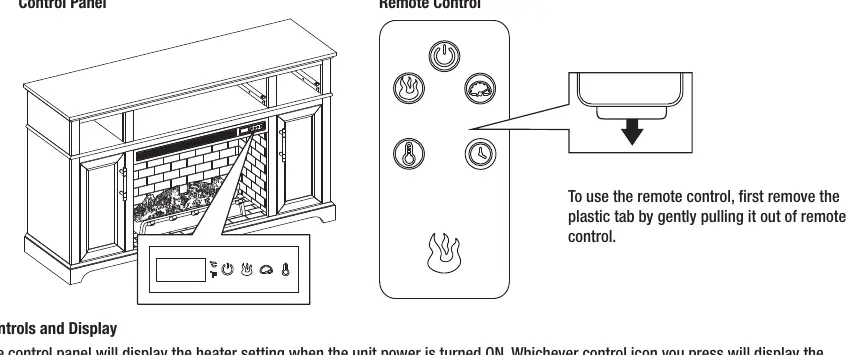
- Power: Turns the unit ON or OFF.
- Flame Brightness: Adjusts the flame intensity (settings 5, 4, 3, 2, 1, OFF).
- Flame Speed: Adjusts the speed of the flame effect (settings 5, 4, 3, 2, 1).
- Heater: Adjusts the heat output. Can be set to HI or OFF. The thermostat range is 65°F to 90°F (18°C to 43°C).
Heater Override: To prevent accidental activation, you can disengage the heater. With the power OFF, press the POWER icon, then long-hold the POWER icon for 20 seconds. The E3 symbol will display to confirm the heater is disengaged.
Care and Maintenance
Clean the metal trim with a water-dampened soft cloth; do not use brass polish or household cleaners. The fan and flame generator motors are pre-lubricated. If the remote control stops working, replace the battery with a CR2025 lithium battery.
Troubleshooting
If you encounter issues, check the following:
- Error E1: Overheat sensor engaged. Unplug the unit, wait 15-20 minutes, and plug it back in.
- Error E2: Thermostat sensor issue. Unplug the unit, wait 15-20 minutes, and plug it back in.
- Error E3: Heater override is engaged. See the Heater Override section in the manual.
- No Power: Ensure the power cord is securely plugged into a 120V outlet.
Manufacturer information
Home Decorators Collection
Practical help
Common problems
Error E1 displayed on control panel
The overheat sensor has been engaged. Unplug the unit, wait 15-20 minutes for the sensor to reset, then plug it back in.
Error E2 displayed on control panel
The thermostat sensor is broken or not working correctly. Unplug the unit, wait 15-20 minutes, then plug it back in.
Error E3 displayed on control panel
Heater override function is engaged. See the Heater Override section on page 19 to disengage.
Remote control does not work
Replace the CR2025 battery. Ensure the plastic tab has been removed.
Before use
- Verify all parts are present according to the parts list.
- Ensure you have a Phillips screwdriver available.
- Check that the outlet is a grounded 120V, 15A circuit.
- Ensure the unit is placed on a level surface.
- Remove the plastic tab from the remote control battery compartment.
Show more Show less
Specs in practice
- Max TV Weight
- 70 lbs
- Thermostat Range
- 65°F to 90°F (18°C to 43°C)
Images and diagrams
- Assembly steps show the sequence of attaching panels, shelves, and doors.
- Wiring diagrams show the USB connection for the fireplace insert.
- Control panel layout shows power, flame brightness, flame speed, and heater icons.
Model compatibility
- Fits most plasma and LCD TVs up to 55 inches.
- Do not use with TVs weighing more than 70 lbs.
- Not intended for use in bathrooms, laundry areas, or similar indoor locations.

Manual page author
Michael Turner
Technical manual editor