Power / Batteries & Chargers
User Manual for Honeywell Zest Charger 100W
Quick guide for the Honeywell Zest Charger 100W. Learn how to use the charger, understand port configurations, and troubleshoot common power issues.
Table of contents
Manual images
Click an image to enlargeQuick guide from the manual
The Honeywell Zest Charger 100W is a high-performance GaN wall charger designed for travel and home use. It features switchable plugs for different regions and multiple output ports to charge up to four devices simultaneously. Always ensure the charger is connected to a power source between 100-240V and avoid exposing it to liquids or extreme heat.
What's in the box

- 1x Zest Charger – GaN 100W
- Switchable Plugs (IN, EU, UK, US, CN)
- User Manual
- Warranty Card
- Thank You Card
Product Overview
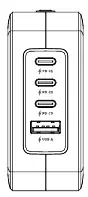
The charger is equipped with three USB-C ports (PD C1, PD C2, PD C3) and one USB-A port. The back of the unit features a slider button mechanism to attach or release the interchangeable regional plugs.
How to use the charger
- Select the appropriate switchable plug for your region.
- Attach the plug to the charger by sliding it into place.
- Connect a compatible charging cable to the charger and your device.
- Disconnect your device once charging is complete.
- To change the plug, push the slider button on the back and pull the plug out.
Troubleshooting
If the charger stops working suddenly, it may be due to the built-in protection circuits (over-current, over-temperature, over-voltage, or short-circuit protection). In this case, unplug the connected devices for 30 seconds to allow the charger to reset. It is normal for the charger to become warm during operation. Do not place the charger near heat sources like stoves or candles.
Technical Specifications
- Input: 100-240V, 50Hz/60Hz, 2.5A Max
- Type C1/C2 Output: 100W Max (5V/3A, 9V/3A, 12V/3A, 15V/3A, 20V/5A)
- Type C3 Output: 65W Max (5V/3A, 9V/3A, 12V/3A, 15V/3A, 20V/3.25A)
- USB A Output: 22.5W Max (5V/3A, 9V/2A, 12V/1.5A)
- Operating Temperature: 0-25°C
- Dimensions: 65.5 x 32 x 76 mm
- Weight: 250g ± 20g
Manufacturer information
Honeywell International Inc.
Practical help
Common problems
Charger stops charging suddenly
Unplug connected devices for 30 seconds to reset the over-current/over-temperature/over-voltage/short-circuit protection.
Charger feels hot during use
It is normal for the charger to heat up slightly during operation.
Before use
- Verify the wall outlet provides 100-240V.
- Select the correct regional plug (IN, EU, UK, US, CN).
- Ensure the plug is securely attached to the charger.
- Use compatible charging cables for your devices.
Specs in practice
- Type C1/C2 Output
- Supports up to 100W max power delivery for fast charging laptops and phones.
- USB A Output
- Provides up to 22.5W max for standard USB devices.
Images and diagrams
- The charger features a slider button on the back to release and change the switchable plugs.
- The front panel contains three USB-C ports (PD C1, PD C2, PD C3) and one USB-A port.
Model compatibility
- Supports PPS Ultra Fast Charging.
- Compatible with smartphones, iPad, iPad Pro, iWatch, Airpods, iPhone 15 series, and laptops with Type C.

Manual page author
David Miller
Documentation analyst
Organizes user manual content into clear summaries, with attention to model details, product context, and everyday usability.