Power / Batteries & Chargers
Honeywell Zest Charger – GaN 140W User Manual
Quick guide for the Honeywell Zest Charger – GaN 140W. Learn how to attach plugs, connect devices, understand output specifications, and troubleshoot common issues.
Table of contents
Manual images
Click an image to enlargeQuick Guide
The Honeywell Zest Charger – GaN 140W is a high-performance wall charger designed for travel and home use. It features four output ports (two Type C and two USB A) and supports PPS ultra-fast charging. The package includes the charger unit and five interchangeable plugs: IN, EU, UK, US, and CN.
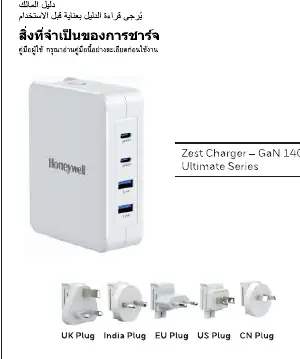
Product Overview
The charger is equipped with four ports:
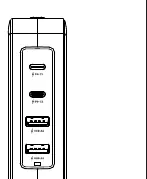
- PD C1 & PD C2: Two Type C ports for high-power delivery.
- USB A1 & USB A2: Two USB A ports for standard and fast charging.
The device includes built-in safety protections against over-current, over-voltage, short-circuit, and over-temperature.
Technical Specifications
The charger supports a wide input voltage range of 100-240V, 50Hz/60Hz, 3A Max. The total power output is 140W Max. Power distribution varies based on the number of devices connected:
- Type C1/C2 Output: 5V-3A, 9V-3A, 12V-3A, 15V-3A, 20V-5A, 28V-5A (140W Max).
- USB A1/A2 Output: 30W Max each.
- Combined Output: The charger intelligently distributes power when multiple devices are connected, supporting configurations up to 140W total.
Usage Instructions
- Attach Plug: Select the appropriate plug for your region (IN, EU, UK, US, or CN). Attach it to the charger until it clicks into place.
- Connect Device: Plug the charger into a wall outlet. Connect your charging cable to the charger and your device.
- Disconnect: Once charging is complete, disconnect your device.
- Change Plug: To remove or change the plug, push back the slider button on the charger and pull the plug out.
Troubleshooting and Safety
If the charger stops working suddenly, it may be due to the built-in protection features (over-current, over-voltage, or over-temperature). Unplug the connected devices, wait for 30 seconds, and reconnect. It is normal for the charger to heat up slightly during operation. Do not place the charger near heat sources like stoves or candles, and ensure no liquid is spilled on the device, as this voids the warranty.
Manufacturer information
Honeywell International Inc.
Practical help
Common problems
Charger stops working suddenly
Protection features may have triggered. Unplug connected devices, wait 30 seconds, and reconnect.
Charger feels hot during use
It is normal for the charger to heat up slightly during operation.
Before use
- Verify the wall outlet voltage is between 100-240V.
- Select the correct interchangeable plug for your region (IN, EU, UK, US, CN).
- Ensure the charger is not placed near heat sources like stoves or candles.
- Check that no liquid is spilled on the charger.
Specs in practice
- Protection Features
- Built-in safety systems against over-current, over-voltage, short-circuit, and over-temperature.
Images and diagrams
- The charger features a slider button on the back to release and change the interchangeable plugs.
- The front panel contains two Type C ports (PD C1, PD C2) and two USB A ports (USB A1, USB A2).
Model compatibility
- Compatible with smartphones, tablets (iPad, iPad Pro), iWatch, Airpods, iPhone 15 series, and laptops with Type C charging.

Manual page author
Michael Turner
Technical manual editor
Reviews PDF manuals for structure, safety notes, and practical product details so readers can find the right information quickly.