Home Appliances / Refrigerators
User Manual for Hoover FloorMate SteamScrub 2-in-1 WH20440
Comprehensive user guide for the Hoover FloorMate SteamScrub 2-in-1 (WH20440). Includes assembly, operation, maintenance, troubleshooting, and accessory usage instructions.
Quick answers from the manual
Quick answer
- The Hoover FloorMate SteamScrub 2-in-1 is a steam mop designed for household use on sealed hard floors and carpets. It features a detachable handheld steamer and various accessories for versatile cleaning. p. 1, 6
Key actions
- Assemble the unit p. 7
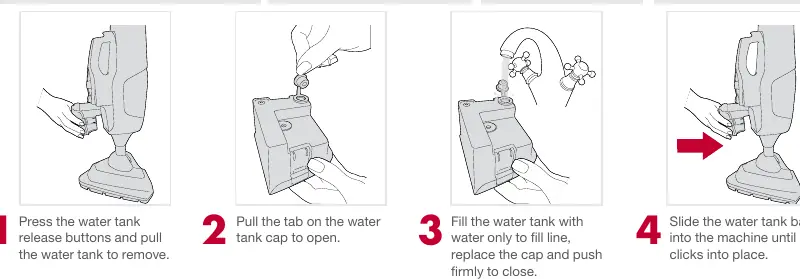
- Fill water tank p. 11
- Attach microfiber pad p. 8
First start
- Assemble the unit, fill the water tank with water, attach the microfiber pad, and plug into an outlet. p. 7, 8, 11, 14
Show 4 more answers Show less
Problems and fixes
Steam mop won't run
Check power, fuse, plug, and On/Off switch.
p. 30
No steam
Check water tank, filter, and thermal protector.
p. 30Maintenance and reset
- If the unit overheats, turn off, unplug, and allow to cool for 2 to 4 hours before restarting. p. 13
Technical specifications
| Parameter | Value | Meaning | Pages |
|---|---|---|---|
| Input Power | AC 120V / 60Hz / 10A | Electrical requirements | p. 10 |
Where to find it in the PDF
- Assembly p. 7
- Operation p. 14
- Maintenance p. 24
Table of contents
Manual images
Click an image to enlargeQuick guide from the manual
The Hoover FloorMate SteamScrub 2-in-1 is a versatile steam cleaner designed for household use on sealed hard floors and carpets. Before using, ensure the unit is fully assembled, the water tank is filled with water only (no chemicals), and the microfiber pad is correctly attached. Always test on an inconspicuous area of flooring first.
Getting started
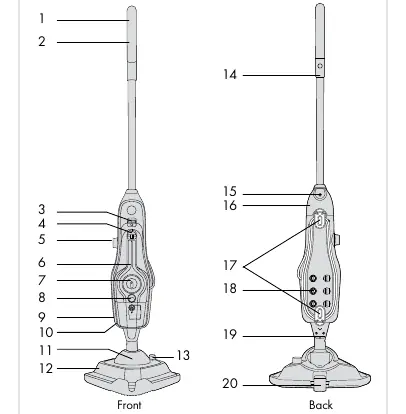
Unpack all items and identify them against the carton contents list, which includes the handle, steam mop body, microfiber pads, carpet glider, water filter, cleaning solution, hose, and various brushes and nozzles.
Assembly
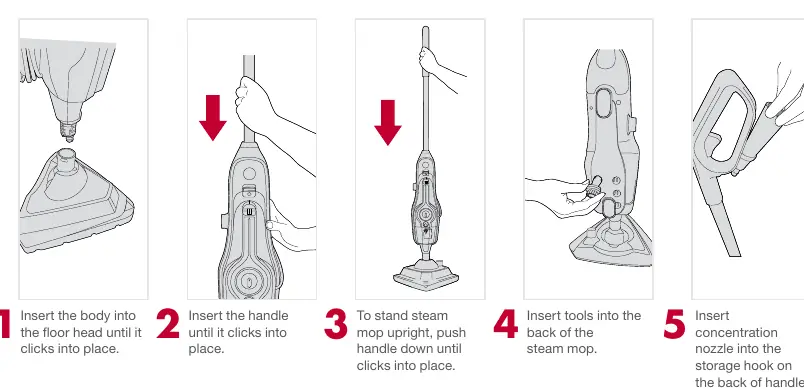
- Insert the body into the floor head until it clicks into place.
- Insert the handle until it clicks into place.
- To stand the unit upright, push the handle down until it clicks.
- Insert tools into the back of the steam mop.
- Insert the concentration nozzle into the storage hook on the back of the handle.
Operation
Hard floors
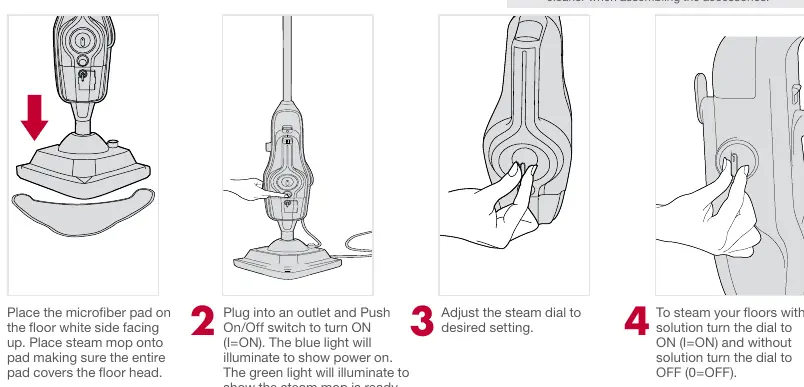
Place the microfiber pad on the floor, white side up. Place the steam mop on top. Plug in and push the On/Off switch to ON. The blue light indicates power, and the green light indicates the unit is ready. Adjust the steam dial to the desired setting. Squeeze the trigger in short bursts to produce steam.
Refreshing carpets
Attach the carpet glider to the floor head. Ensure the microfiber pad is attached. Turn the solution dial to OFF when refreshing carpets. Move the mop slowly backwards and forwards.
Handheld steamer
Lift the handheld release button to detach the handheld unit. Attach the concentration nozzle or hose by pushing and twisting clockwise. Adjust the steam setting and use the trigger to release steam.
Maintenance
Cleaning pads
Hold the corner of the pad down with your foot and lift the steam mop to peel it away. Pads are machine washable on a WARM setting. Lay flat to dry.
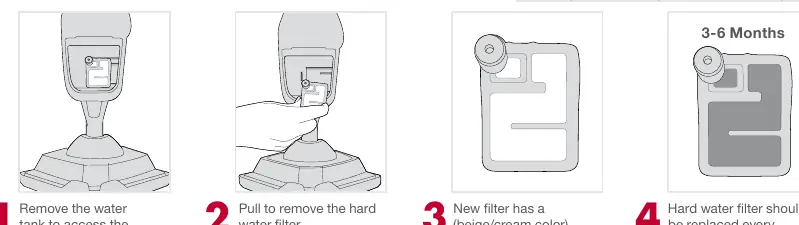
Hard water filter
The filter should be replaced every 6-8 months or when discolored. Remove the water tank to access and pull out the old filter to replace it.
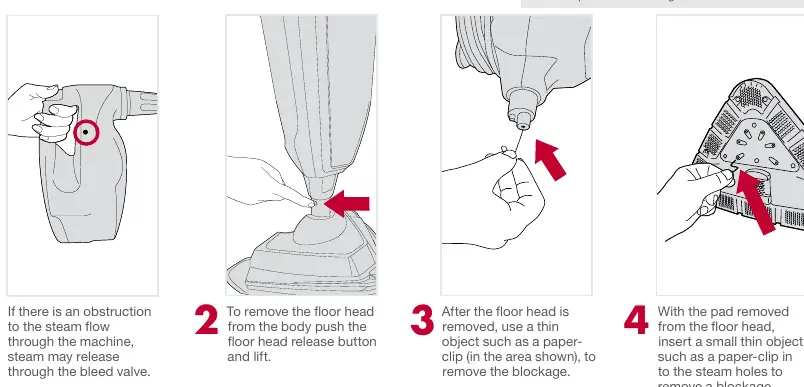
Clearing blockages
If steam flow is obstructed, remove the floor head and use a thin object like a paper clip to clear the steam holes or the bleed valve area.
Manufacturer information
Hoover
Practical help
Common problems
Steam mop won't run
Check power outlet, fuse/breaker, ensure plug is secure, or check On/Off switch.
Steam mop not producing steam
Check if water tank is empty, not attached correctly, or if water filter is clogged.
Microfiber pad doesn't pick up dirt
Wash or replace the cleaning pad.
Before use
- Assemble the unit completely.
- Ensure water tank is filled with water only (no chemicals).
- Attach microfiber pad correctly.
- Check that the water filter is in place.
- Test on an inconspicuous area of flooring.
Show more Show less
Images and diagrams
- Assembly steps for handle and floor head.
- Filling instructions for water and solution tanks.
- How to attach the microfiber pad.
- Using the handheld steamer and various accessories.
Model compatibility
- Use only Hoover 4X Steam Multi-Floor Cleaning Solution.
- Do not use on leather, wax polished furniture/floors, synthetic fabrics, velvet, or other delicate materials.
- Use only on sealed hard floors (tiles, linoleum, sealed hardwood, engineered hardwood, laminate, vinyl, sealed stone).

Manual page author
Michael Turner
Technical manual editor