Computers / Printers
HP Laser 1000 Series Reference Guide
Quick reference guide for the HP Laser 1000 series printer. Learn to interpret control panel light patterns, understand printer status indicators, and follow operating environment guidelines for optimal performance.
Table of contents
Quick guide from the manual
This reference guide provides essential information for operating the HP Laser 1000 series printer. It covers the interpretation of control panel light patterns, printer status indicators, and recommended environmental conditions for optimal operation.
Printer control panel
The control panel allows you to monitor the printer status and manage basic functions. It consists of the following indicators and buttons:
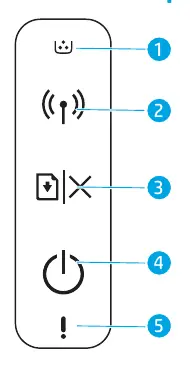
- Toner light: Indicates the status of the toner cartridge.
- Wireless button/light: Used for wireless connectivity (on wireless models).
- Resume/Cancel button: Used to resume printing or cancel a job.
- Power button/Ready light: Indicates the power status and readiness of the printer.
- Attention light: Alerts you to errors or required actions.
Control panel light patterns
Understanding the light patterns helps in troubleshooting common printer issues:
- Ready: The printer is ready to print.
- Processing: The printer is currently processing a job.
- Initializing or canceling: The printer is starting up or canceling a task.
- Cartridge not installed or wrong cartridge: Check the toner cartridge installation.
- Cartridge very low: The toner level is low; prepare for replacement.
- Paper jam or out of paper: Clear the paper path or refill the paper tray.
Printer operating environment guidelines
To ensure the longevity and performance of your printer, follow these environmental recommendations:
- Keep the printer out of direct sunlight.
- Maintain a temperature range between 17.5°C and 25°C (63.5°F – 77°F).
- Keep the humidity range between 30% and 70%.
- Ensure the printer is placed in a well-ventilated area.
- Do not exceed voltage limits.
Manufacturer information
HP Inc.
Practical help
Common problems
Cartridge not installed or wrong cartridge
Check if the toner cartridge is installed correctly or replace with a compatible one.
Paper jam or out of paper
Clear any paper jams from the paper path and ensure the paper tray is loaded.
Cartridge very low
The toner level is low; prepare to replace the toner cartridge soon.
Before use
- Ensure the printer is kept out of direct sunlight.
- Maintain room temperature between 17.5°C and 25°C.
- Keep humidity levels between 30% and 70%.
- Ensure the printer is placed in a well-ventilated area.
- Verify that the power supply does not exceed voltage limits.
Specs in practice
- Operating Temperature
- 17.5°C – 25°C (63.5°F – 77°F)
- Operating Humidity
- 30% – 70%
Images and diagrams
- The control panel features a Toner light, Wireless button/light, Resume/Cancel button, Power button/Ready light, and Attention light.
Model compatibility
- Wireless button/light is applicable to wireless models only.

Manual page author
Emily Carter
User documentation editor
Prepares concise manual descriptions and highlights the most useful setup, operation, and maintenance information for readers.